
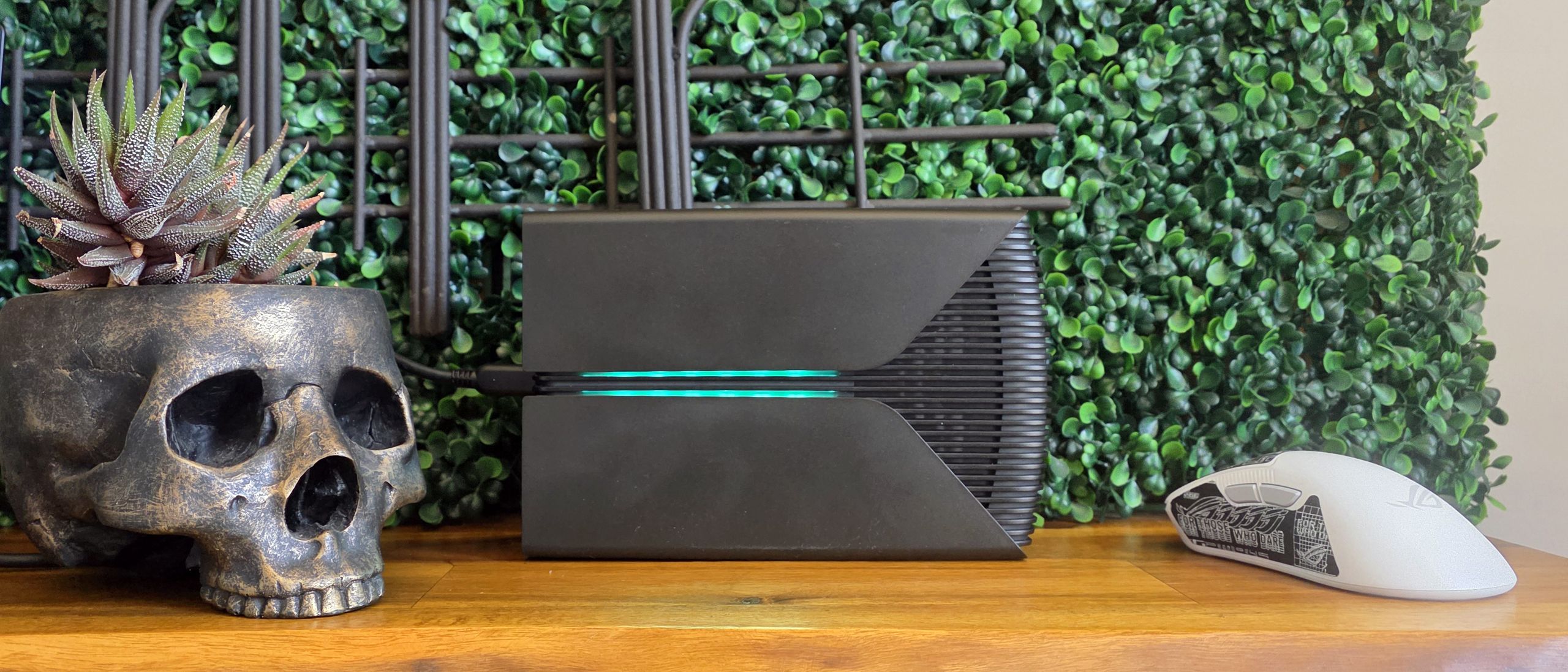
You can also grab Seagate’s Toolkit software , which provides simple but straightforward controls for backing up, mirroring folders, and granular controls of the RGB lighting on the top of the drive. I also appreciate that the drive was recognized by Windows Dynamic Lighting, which let me customize the RGB well before I downloaded Seagate’s Toolkit.
We haven’t tested many external spinning-platter hard drives in recent years, save for WD ’s 6TB portable hard drive (based around a much smaller 2.5-inch hard drive), which is also bus-powered but still uses the archaic USB 3 Micro-B port. But Seagate also sent along its also-new One Touch HDD (available in 8TB, 20TB, and 24TB models, for $10 less than the FireCuda X Vault and competing capacities) drive, which is a bit slimmer (and seen above, left) and also gets power and data over USB-C.
To round out our charts and see what you can get in other form factors, we’ve included Sandisk’s 8TB Desk Drive (which is almost 3x the price, but much faster). We also tossed in Samsung’s slow (for an SSD) T5 Evo drive, as well as a fast flash drive, Kingston’s 1TB DataTraveler Max.
The solid-state options are, for the most part, much faster, as well as generally a lot smaller. But thanks to AI-driven price hikes in the past several months, you’ll pay a whole lot more for 8TB of SSD storage – even though hard drives are also more expensive than they used to be. Generally, unless price really is no option these days, if you need 8TB of storage or more (especially from a single drive), you’re going to opt for a hard drive.
PCMark 10 is a trace-based benchmark that uses a wide-ranging set of real-world traces from popular applications and everyday tasks to measure the performance of storage devices.
Of course, the SanDisk desktop SSD and the Kingston flash drive beat the hard drives here (and in most tests). Seagate’s FireCuda drive manages to beat out the less-than-speedy Samsung T5 portable SSD, and WD’s smaller portable hard drive. But interestingly, it’s the Seagate One Touch that tops all the hard drives on this chart.
We use the DiskBench storage benchmarking tool to test real-world file transfer performance with a custom 50 GB dataset. We copy 4,617 files (images, videos, and software ISO files) to a folder on the test drive (write). Then, after leaving the system idle for five minutes, we run the same test in reverse, moving the test folder to a different location on our PCIe 4.0 testing drive.
In this real-world transfer test, Seagate’s FireCuda drive takes its expected spot atop the other hard drives in our test pool. But Samsung’s T5 is faster, as are the other solid-state drives here. Still, it’s good to see the FireCuda landing around the 200 MB/s read and write range, which is about what we would expect for a performance-focused consumer hard drive here in 2026.
CrystalDiskMark (CDM) is a free and easy-to-run storage benchmarking tool that SSD companies commonly use to assign product performance specifications. It gives us insight into how each device handles different file sizes. We run this test at its default settings.
This sequential synthetic test is a sort of best-case test for SSDs, so you can see that those pricier-per-capacity drives are much faster here. But interestingly, we again see the Seagate FireCuda drive landing below its One Touch hard drive sibling on this test. Given the reverse was true (and there was a wider margin) in DiskBench above, it’s safe to say the FireCuda drive will be slightly faster in real-world file transfers, despite the numbers here.
Again, this synthetic small-file test sees the Seagate One Touch doing a little better than the FireCuda drive, but the two are effectively tied, especially when it comes to writes. One thing that’s clear from all these tests is that, while a smaller portable drive might be more convenient, the WD My Passport (with an internal 2.5-inch drive) is significantly slower than the newer, larger, Seagate drives (based around internal 3.5-inch drives).
Seagate’s FireCuda X Vault is a bus-powered 3.5-inch drive, available in 8TB and 20TB options, aimed at gamers with some RGB lighting (which thankfully doesn’t require additional control software in Windows 11 ). It performs noticeably better than smaller portable hard drives we’ve tested, and is slightly faster than some other 3.5-inch alternatives.
Apart from the lighting and a trial of Xbox Game Pass Ultimate, there isn’t much particularly gaming-specific about it. But if you’re looking for a place to store your streaming footage or a massive game library, it does the job while costing a lot less than a comparative spacious SSD. Its primary downside is also its primary convenience. One USB-C cable can power the drive while providing data access. That’s great for anyone who has dealt with external drive power bricks in the past. But how many USB-C ports do you have that are capable of delivering this drive’s 15W power requirements? If you plan to keep this drive plugged in, you might also need to invest in a capable dock or USB hub with power delivery and multiple USB-C ports.
After a rough start with the Mattel Aquarius as a child, Matt built his first PC in the late 1990s and ventured into mild PC modding in the early 2000s. He\u2019s spent the last 15 years covering emerging technology for Smithsonian, Popular Science, and Consumer Reports, while testing components and PCs for Computer Shopper, PCMag and Digital Trends. ","collapsible":{"enabled":true,"maxHeight":250,"readMoreText":"Read more","readLessText":"Read less"}}), "https://slice.vanilla.futurecdn.net/13-4-20/js/authorBio.js"); } else { console.error('%c FTE ','background: #9306F9; color: #ffffff','no lazy slice hydration function available'); } Matt Safford After a rough start with the Mattel Aquarius as a child, Matt built his first PC in the late 1990s and ventured into mild PC modding in the early 2000s. He’s spent the last 15 years covering emerging technology for Smithsonian, Popular Science, and Consumer Reports, while testing components and PCs for Computer Shopper, PCMag and Digital Trends.
Aurn A plastic shell with no vents ? The temperature must get really bad after a while 🙁 I have a few external drives for my backups, and the temperatures usually aren’t a problem even with plastic shells because they only stay on for short periods of times, but if you use them for maybe just a couple of hours at a time, they can overheat (I have seen 55 °C on a Seagate Backup Plus Hub HDD, for example), and my room isn’t even hot most of the year. I also have an external 7200 RPM HDD that I use most of the time when my PC is on, and I put it in an aluminum case with a notebook cooler (fan) under it, and without the cooler, I think the temperature of the disk would reach 40-43 °C in the summer Are you able to see the temperature with Crystal Disk Info or similar utilities ? It would be nice to include in such reviews Reply
Key considerations
- Investor positioning can change fast
- Volatility remains possible near catalysts
- Macro rates and liquidity can dominate flows
Reference reading
- https://www.tomshardware.com/pc-components/external-ssds/SPONSORED_LINK_URL
- https://www.tomshardware.com/pc-components/external-ssds/seagate-firecuda-x-vault-8tb-review#main
- https://www.tomshardware.com
- Save a massive $520 on a gaming PC upgrade with this mega Newegg DDR5 RAM combo worth $1,159 separately — free 1TB SSD thrown in ramps up the value of this $639
- Premium Build: Greyscale — building a custom-looped ITX PC that pushes the form factor to its limits
- Google Cloud customer wakes up to $18,000+ bill despite $7 budget, thanks to forgotten API key in published project — attacker put in 60,000+ requests and blast
- SpaceX says it is going to begin manufacturing GPUs — $1.75 trillion IPO listing reportedly includes in-house GPU production
- Amazon Eero and Leo routers gain FCC Conditional Approval for US sales — Eero products can skirt router ban for the next 18 months, firm joins Netgear on approv
Informational only. No financial advice. Do your own research.