
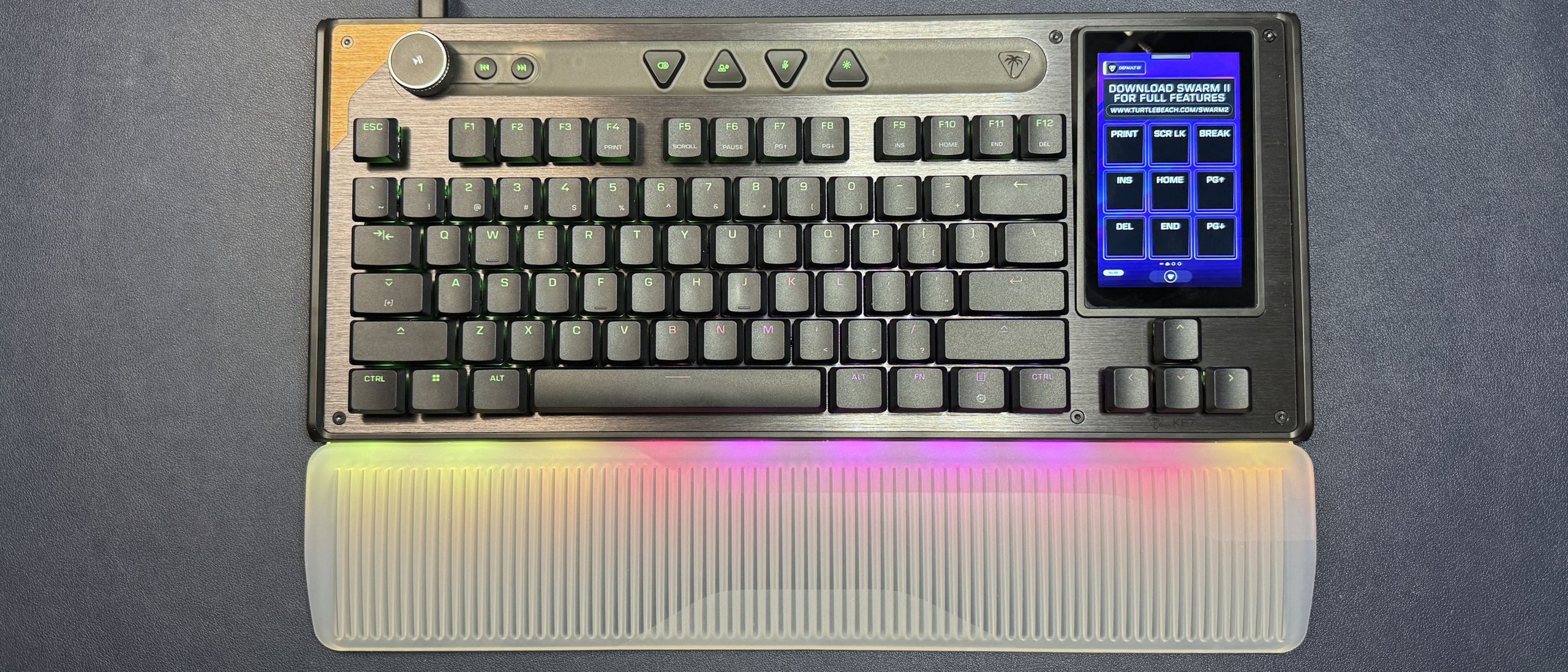
The KB7 is a TKL (-ish) keyboard with Turtle Beach's in-house Titan low-profile linear magnetic Hall Effect switches. They have an adjustable actuation point (0.1 – 3.2mm) and a lifecycle rating of 100 million keystrokes. They're not hot-swappable. Like other magnetic Hall Effect switches, they support all the trendy gaming features that will probably get you banned, including Rapid Trigger, multi-input,controller mode, and ReacTap (SOCD).
I'll admit that I didn't love the way typing felt on the KB7 initially — the linear magnetic low-profile switches combined with the relatively flat, lightweight double-shot PBT keycaps makes for a much flightier typing experience than I'm used to. It took less than an hour for me to get used to it, however, and all in all it's a pretty solid typing experience considering I don't love linear, low-profile, or magnetic switches. The flat, shine-through keycaps make it easy to move your fingers across the board quickly, and the relatively spacious layout means you won't make too many mistakes once you've gotten used to the feel. The board sounds decent — it's not incredible, or anything, but it gives pretty solid thunky feedback for a mainstream gaming keyboard.
I did have some issues that definitely weren't related to my "just getting used to the feel of the board," however — issues that could probably be remedied with a firmware update and software that worked, but, well… I'm not going to hold my breath. I had several issues while I was typing this review, including ghost inputs, missed inputs, and repeat glitches. All of these issues were quickly resolved, but having to stop the review six times because the keyboard was acting up does not give me great confidence in the board's ability to perform under pressure. I didn't have any serious issues while I was gaming, but I also don't generally play a lot of fast-paced first-person shooters where latency and input accuracy is wildly important (I play a handful for testing, but that's it). The KB7 does boast a speedy 8,000 Hz polling rate, but that means nothing if you can't get the right keys to actuate.
The touchscreen performance was decent, though I don't know if I'd trust it in a high-pressure situation. While it registered my inputs quickly and accurately, it's still a touchscreen — hardly the kind of input you want to rely on when you're in the middle of a high-stakes battle for your (digital) life. So, while it's useful for general macro-pad type things, it's not something I'd recommend as part of your ultra-competitive gamer arsenal.
The KB7 is customizable via Turtle Beach's Swarm II software, which you can download by pressing the link on the touchscreen. You can use Swarm II to program the keyboard (remapping keys, adjusting actuation, recording macros, etc), the touchscreen, and the keyboard's bright, per-key RGB backlighting.
The keyboard settings are pretty standard for a magnetic switch gaming keyboard — you can turn on and adjust Rapid Trigger, multi-input, and ReacTap, and you can fine-tune the actuation point of every single key individually (a thing that nobody does). You can also remap every single key, except the Windows key and the Fn key, to do what you want — on the primary layer you can only swap around the existing alphanumeric punctuation keys (e.g. if you want to set up an unusual keyboard layout), but on the secondary (Fn) and tertiary (Easy Shift) layers you can set keys to do everything from outputting macros to changing system settings and, of course… launching AI? (Apparently this is such a core functionality that it comes standard in the Swarm II software, now — and it's not just CoPilot. There are options for ChatGPT, Gemini, Deep Seek, and Grok, too.)
(Image credit: Tom's Hardware) (Image credit: Tom's Hardware) (Image credit: Tom's Hardware) (Image credit: Tom's Hardware) (Image credit: Tom's Hardware) (Image credit: Tom's Hardware) (Image credit: Tom's Hardware) (Image credit: Tom's Hardware) But the real customization is, or should be, in the touchscreen. It is, however, unfortunately — but not unexpectedly — limited. There are several native widgets you can swap in, but they're not particularly life-changing: PC performance monitoring (CPU / GPU / RAM), multimedia controls (which there already exist dedicated keys for), opening apps / websites / files / folders, controlling your Turtle Beach devices (by which I mean mouse DPI), executing macros, and a count down timer. There's also a tab for third-party apps, which currently consist of Discord (though you'll need to set it up via the Discord developer portal as an integration), Counter Strike, Steam (which just opens Steam), OBS, and Streamlabs. You can also assign the standard keyboard functions, Windows functions, and shortcuts such as copy / paste, forward / back, launch calculator, etc.
It's a start, but it's definitely nowhere near as robust as the functionality you'll find on Elgato's Stream Decks. Still, this limited functionality is probably workable for most people (after all, you can set up a lot of the functionality you get through third-party apps and plugins by just spending some time creating macros) — if it worked. But the software is, well, let's just say finicky… at best. Setting up the touchscreen seemed to be pretty straightforward, but getting it to stay set up was more of a chore. The software frequently failed in my testing — it would reset, restart, shut down, prompt another six-cycle firmware update (this, at least, I was prepared for — it's pretty standard for Turtle Beach devices to require 14 firmware updates out of the box), etc. When the software was working, the touchscreen worked as expected and could probably replace my Stream Deck. But this was only about 85% of the time, which would probably be decent if my Stream Deck didn't work 100% of the time. And so the touchscreen has ultimately been relegated to a fun gimmick, at least for now.
After my surprising love affair with the Corsair Galleon 100 SD, I really wanted to love the KB7 — after all, it's basically the Corsair Galleon 100 SD, but with the option of an actual 10-key numberpad, which was my only real gripe with the latter. But Corsair owns Elgato, which has been making Stream Decks for almost a decade — and has the software and the third-party plugins to back them up. And at the end of the day, a highly customizable macro pad is actually only as customizable as its software allows for. While Turtle Beach currently lacks the integrations to fully compete with Elgato, I do think it has a fighting chance… if it can get the Swarm II software to work, like, at all. I can certainly work without built-in Creative Suite integration, but only if there's something to work with.
I still love the idea of the KB7 and I'm fully ready to hop on the Command Center bandwagon, as soon as Swarm II lets me. But given that this is hardly the first time Swarm II has shot itself in the foot, I'll probably keep this Galleon 100 SD around for a little while longer.
Sarah Jacobsson Purewal is a senior editor at Tom's Hardware covering peripherals, software, and custom builds. You can find more of her work in PCWorld, Macworld, TechHive, CNET, Gizmodo, Tom's Guide, PC Gamer, Men's Health, Men's Fitness, SHAPE, Cosmopolitan, and just about everywhere else. ","collapsible":{"enabled":true,"maxHeight":250,"readMoreText":"Read more","readLessText":"Read less"}}), "https://slice.vanilla.futurecdn.net/13-4-25/js/authorBio.js"); } else { console.error('%c FTE ','background: #9306F9; color: #ffffff','no lazy slice hydration function available'); } Sarah Jacobsson Purewal Social Links Navigation Senior Editor, Peripherals Sarah Jacobsson Purewal is a senior editor at Tom's Hardware covering peripherals, software, and custom builds. You can find more of her work in PCWorld, Macworld, TechHive, CNET, Gizmodo, Tom's Guide, PC Gamer, Men's Health, Men's Fitness, SHAPE, Cosmopolitan, and just about everywhere else.
Key considerations
- Investor positioning can change fast
- Volatility remains possible near catalysts
- Macro rates and liquidity can dominate flows
Reference reading
- https://www.tomshardware.com/peripherals/gaming-keyboards/SPONSORED_LINK_URL
- https://www.tomshardware.com/peripherals/gaming-keyboards/turtle-beach-command-series-kb7-review#main
- https://www.tomshardware.com
- Grab this RTX 5070 Ti OLED gaming laptop at $300 off — Acer Predator Helios Neo 16S AI drops to $1,899.99
- The Ultimate Summer Sale Pairing: Steam Sale Meets GeForce NOW Discounts
- SK hynix, Samsung, Micron among semiconductor industry group lobbying against government intervention on domestic memory chip supply — says move would worsen si
- NVIDIA and AWS Collaborate to Bring AI to Production at Scale
- HP OmniBook Ultra 14 review: Potent Snapdragon performance, great endurance, premium pricing
Informational only. No financial advice. Do your own research.