
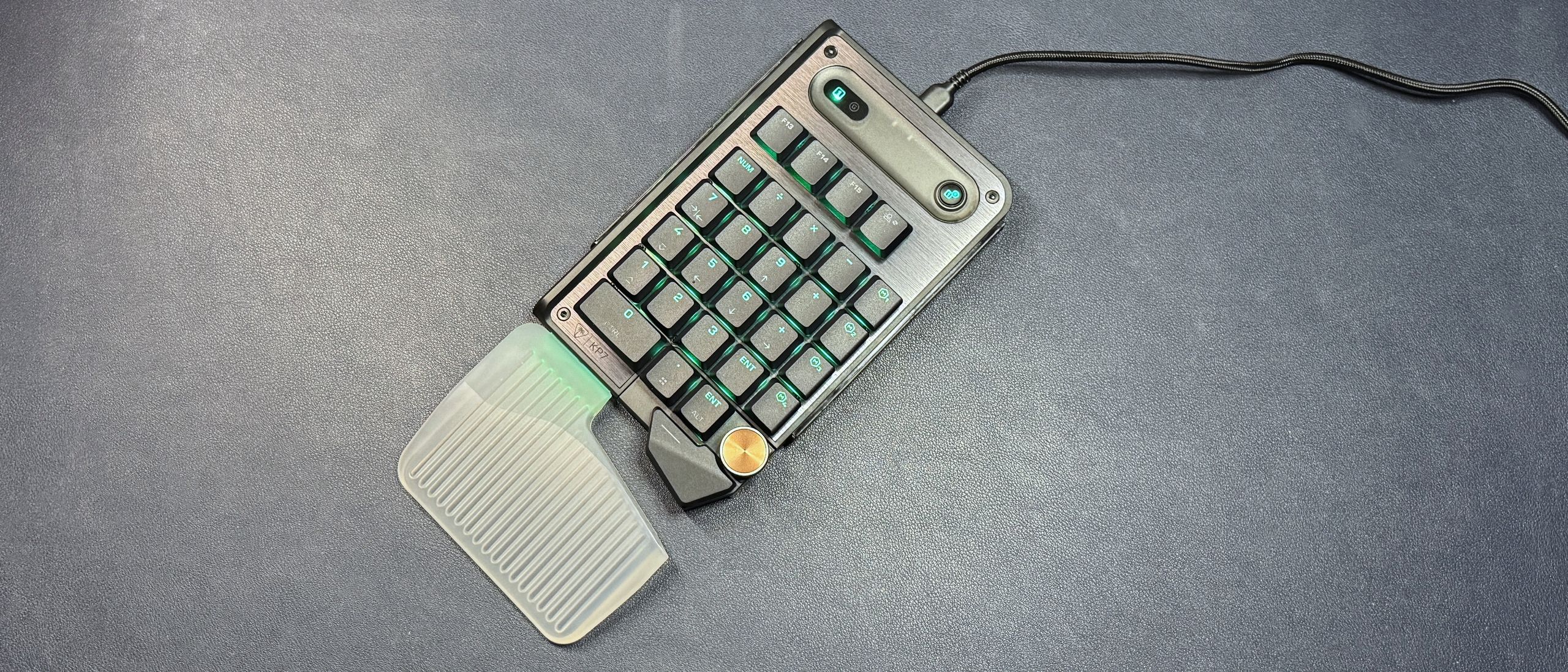
It's hard to judge a keypad's performance on its own, but the KP7 has enough keys that it can function as a single-handed "controller." It features the same linear magnetic Hall Effect switches as we saw in the KB7, with the same functionality — individually adjustable actuation point (between 0.1 and 3.2mm), Rapid Trigger, multi-input, and ReacTap (SOCD). It also sports an 8,000 Hz polling rate, so I guess if you're playing a game that only requires the left half of your keyboard, this might be one way to get the ultra-low latency and speed of an 8,000 Hz magnetic switch keyboard without having to buy the whole keyboard (though it does cost exactly half of what the KB7 costs, and I don't think it's quite half the size).
(Image credit: Tom's Hardware) (Image credit: Tom's Hardware) The low-profile switches and flat keycaps make for pretty speedy input, and while the layout is slightly different from standard numberpad layouts, it's not too bad — in numberpad mode, the first column to the right of the numbers has five keys, but the bottom two keys are both Enter and the two keys above that are both + (normally, the Enter and + keys are vertical 2U keys). It's not quite the same, but it worked well enough for me for data input and other numberpad tasks.
The switches themselves are pre-lubed linear switches with a smooth, consistent keypress and no tactile or audible bump. Typing on the KP7 (well, for as much typing as you can do) is a surprisingly pleasant experience — it's not going to wow any hardcore keyboard enthusiasts, but the linear switches, slim, flat keycaps, and speedy, lightweight Hall Effect actuation is a great combo for extra gaming keys. And, as the KP7 is entirely tactile, it's much easier to integrate into your work (or game) flow. The extendable thumb bar (which just pulls away from the keyboard in a diagonal / downward direction) is also comfortable when you're using the KP7 as a gamepad. The keys on the thumb bar are well-placed, but I did find the knob difficult to turn without hitting other keys, as it's flush with the keys around it.
The KP7 is programmable via Turtle Beach's Swarm II software, which originally belonged to Roccat. It's designed to work in tandem with the KB7 keyboard, but you can still program it fully without having to depend on the keyboard at all. You can use Swarm II to change the keypad's actuation, toggle on and adjust Rapid Trigger and ReacTap, and set up multi-input. You can also use it to remap keys up to four layers deep (Fn, Game Mode, and Easy Shift).
(Image credit: Tom's Hardware) (Image credit: Tom's Hardware) (Image credit: Tom's Hardware) (Image credit: Tom's Hardware) You can customize the KP7's bright, per-key RGB lighting in the software. This works pretty well when you're just customizing the KP7 alone, but I had issues getting the keypad to light up seamlessly alongside the KB7 (they were often out of sync, and/or the KP7 seemed to go into hibernation immediately and often when it was connected to the KB7 — even if it was being powered separately via its own USB-C port.
The KP7 is an interesting product — it's designed to work with the KB7, but I actually like it better as a standalone keypad. Partly because it works better as a standalone keypad — it was very finicky in my tests when it was connected to the KB7, regardless of whether it was powered separately or through the keyboard. This is probably because of the software, which, while fairly straightforward for the KP7, still wasn't great. For example, I was prompted to update the KP7's firmware everytime I connected it to the KB7 — but not when I used it as a standalone keypad.
The KP7 isn't the only standalone numberpad-slash-gaming-keypad out there, but it's the only one I've seen that manages to switch between the two modes pretty seamlessly. We tested Nordic Game Supply's The Shrimp mini-keyboard a few years ago, but that was definitely designed as a gaming keypad first and a numberpad… not at all. At $99.99, the KP7 isn't cheap, but it's versatile enough that you can definitely make it worth it.
Sarah Jacobsson Purewal is a senior editor at Tom's Hardware covering peripherals, software, and custom builds. You can find more of her work in PCWorld, Macworld, TechHive, CNET, Gizmodo, Tom's Guide, PC Gamer, Men's Health, Men's Fitness, SHAPE, Cosmopolitan, and just about everywhere else. ","collapsible":{"enabled":true,"maxHeight":250,"readMoreText":"Read more","readLessText":"Read less"}}), "https://slice.vanilla.futurecdn.net/13-4-25/js/authorBio.js"); } else { console.error('%c FTE ','background: #9306F9; color: #ffffff','no lazy slice hydration function available'); } Sarah Jacobsson Purewal Social Links Navigation Senior Editor, Peripherals Sarah Jacobsson Purewal is a senior editor at Tom's Hardware covering peripherals, software, and custom builds. You can find more of her work in PCWorld, Macworld, TechHive, CNET, Gizmodo, Tom's Guide, PC Gamer, Men's Health, Men's Fitness, SHAPE, Cosmopolitan, and just about everywhere else.
Key considerations
- Investor positioning can change fast
- Volatility remains possible near catalysts
- Macro rates and liquidity can dominate flows
Reference reading
- https://www.tomshardware.com/peripherals/gaming-keyboards/SPONSORED_LINK_URL
- https://www.tomshardware.com/peripherals/gaming-keyboards/turtle-beach-kp7-review#main
- https://www.tomshardware.com
- Save up to 71% on HP gaming desktops and laptops this July 4 — weekend sale could land you a gaming PC for less
- Fill your Steam library without spending a single dime — scratch your shopping itch with the Steam Summer Sale Simulator
- F1 25: 2026 Season Edition GPU benchmarks – From Pole Position to the Back of the Grid
- Claude Meets Blackwell Ultra: Anthropic’s Models Now Run on NVIDIA GB300 in Azure
- Save up to 39% on a new 3D printer this weekend, thanks to these July 4th deals — discounted printers, filament, and resin from Bambu Lab, Creality, Elegoo, and
Informational only. No financial advice. Do your own research.