
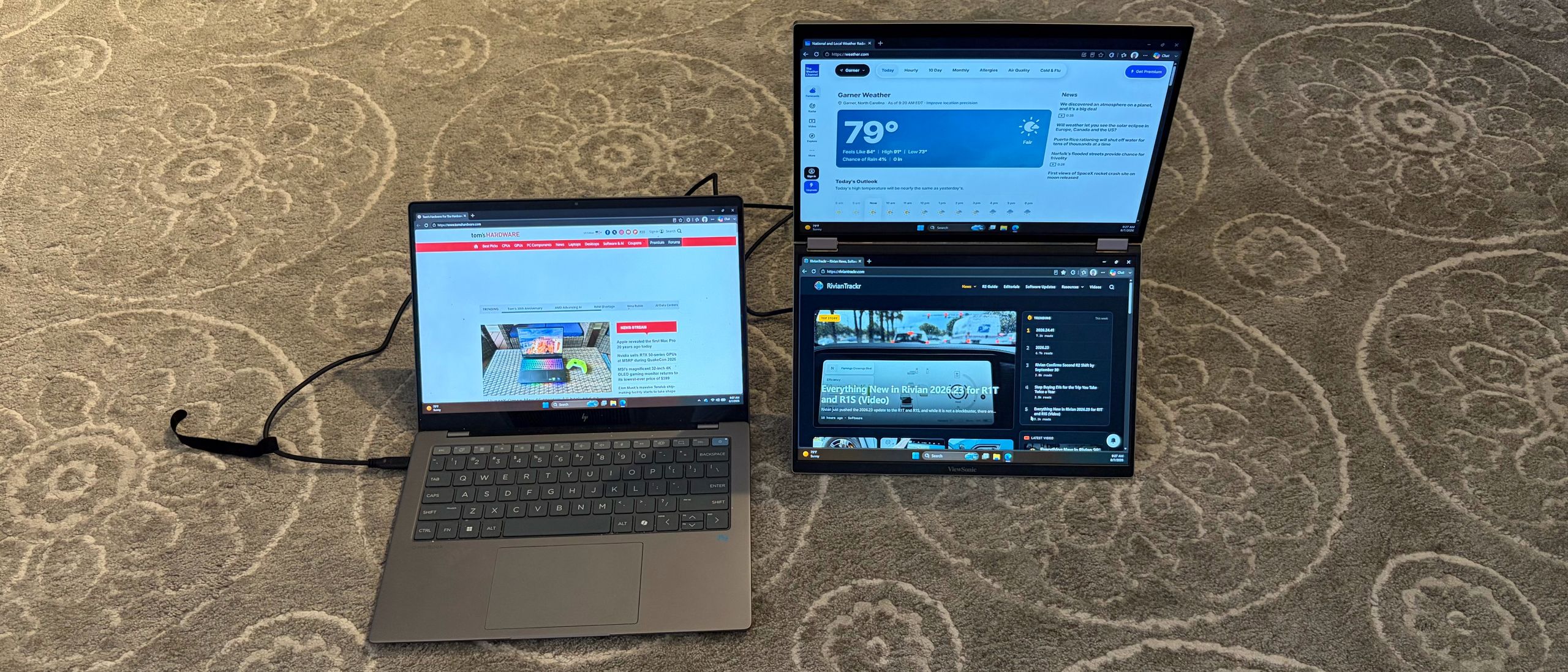
The 360-degree hinge design allows the VG1457 to be used in various orientations. The most popular will likely be landscape mode, with the panels stacked. Portrait mode has the two panels side by side, which would be beneficial for editing two Word documents simultaneously, for example.
There’s also a “tent” mode, which would allow you to have one display facing you, and the second facing away from you (i.e., for someone sitting on the opposite side of the table from you). The VG1457 can automatically rotate the screens to the correct visual orientation using the Auto Pivot feature.
In addition to these orientations, there are also several operating modes. Mirror Mode will simply duplicate what’s on your laptop’s screen to both of the VG1457’s displays. Extend will allow you to have a separate image across each display (laptop and both VG1457 displays). Full Screen mode will display one source/image across both of the VG1457’s displays. Finally, dual source mode allows each of the VG1457’s panels to take input from a separate source. For example, one panel could use a laptop as a source, while the second panel could use a tablet as a source.
The VG1457 uses twin 14-inch 1200p IPS panels with a standard 60 Hz refresh rate. Both panels are covered with an anti-glare finish to reduce distracting reflections.
ViewSonic says that the panels are rated for up to 300 nits maximum brightness, but that wasn't the case with our review unit. Instead, we saw just 201 nits, ranking it in fourth place of five dual-screen portable monitors that we've recently tested. Only the KYY X90D was dimmer at 181.4 nits at full power.
Color performance was also not up to par compared to its peers; we measured just 44.8 percent coverage of DCI-P3 and 63.2 percent of sRGB . Both figures put it at the back of the pack, and by a large margin.
It's one thing to be able to boast (or not boast) about color performance with instrumented tests, but how does the VG1457 look in real-world applications? For my needs, I spend a lot of time in Word, Excel, Microsoft Edge, and Pixelmator Pro. And for those use cases, it was "fine." Colors weren't particularly vibrant, and I wished that the brightness of the VG1457's panels at least matched the brightness of the native 14-inch display on the OmniBook X that I was using as a test system.
Watching movies was also just an "OK" experience, with muted colors and lots of grey undertones when watching dark scenes.
The VG1457 also includes a pair of 2-watt speakers, which sounded OK. They're serviceable for handling your Google Meet or Zoom calls, or listening to some music in the background while you work. However, they are by no means high-quality speakers that will blow your socks off.
The ViewSonic VG1457 has a lot of positive qualities that I appreciated. Its relatively compact and lightweight frame (for a dual-screen monitor) is a boon for travel. Many dual-screen monitors are “portable” in name only, and would be a chore to carry around; however, I was able to slip the VG1457 into my laptop backpack with ease. I also like that there are three USB-C ports supporting 65-watt power passthrough to your computer or other peripherals.
On the other hand, color performance and brightness were lackluster compared to the competition. You won’t be happy if you’re looking to use the VG1457 for watching videos or photo editing. Still, for more basic productivity tasks or presenting (which is its primary mission anyway), it’s more than adequate.
Brandon Hill is a senior editor at Tom's Hardware. He has written about PC and Mac tech since the late 1990s with bylines at AnandTech, DailyTech, and Hot Hardware. When he is not consuming copious amounts of tech news, he can be found enjoying the NC mountains or the beach with his wife and two sons. ","collapsible":{"enabled":true,"maxHeight":250,"readMoreText":"Read more","readLessText":"Read less"}}), "https://slice.vanilla.futurecdn.net/13-4-25/js/authorBio.js"); } else { console.error('%c FTE ','background: #9306F9; color: #ffffff','no lazy slice hydration function available'); } Brandon Hill Social Links Navigation Senior Editor Brandon Hill is a senior editor at Tom's Hardware. He has written about PC and Mac tech since the late 1990s with bylines at AnandTech, DailyTech, and Hot Hardware. When he is not consuming copious amounts of tech news, he can be found enjoying the NC mountains or the beach with his wife and two sons.
Key considerations
- Investor positioning can change fast
- Volatility remains possible near catalysts
- Macro rates and liquidity can dominate flows
Reference reading
- https://www.tomshardware.com/monitors/portable-monitors/SPONSORED_LINK_URL
- https://www.tomshardware.com/monitors/portable-monitors/viewsonic-vg1457-dual-screen-portable-monitor-review#main
- https://www.tomshardware.com/membership
- Cherokee Nation bans hyperscale data centers on its lands, won't support projects without consultation — energy and water consumption, air quality, noise, and c
- Japanese repair shop sells GPU VRAM upgrades for $25 per GB during memory crisis — RTX 2080 Ti modded to 22GB of GDDR6 for just $282, double the VRAM creates a
- Peer-reviewed study of 443,000 Backblaze hard drives ranks HGST most reliable and Toshiba the least — Analysis of 1.66 million drive-years finds Seagate and Tos
- Critical macOS Screen Sharing flaw gives attackers remote root access — CISA bumps bug to 9.8 severity following active Monero cryptojacking attacks
- As AI Increases Demands on Memory, Storage Steps Up
Informational only. No financial advice. Do your own research.