
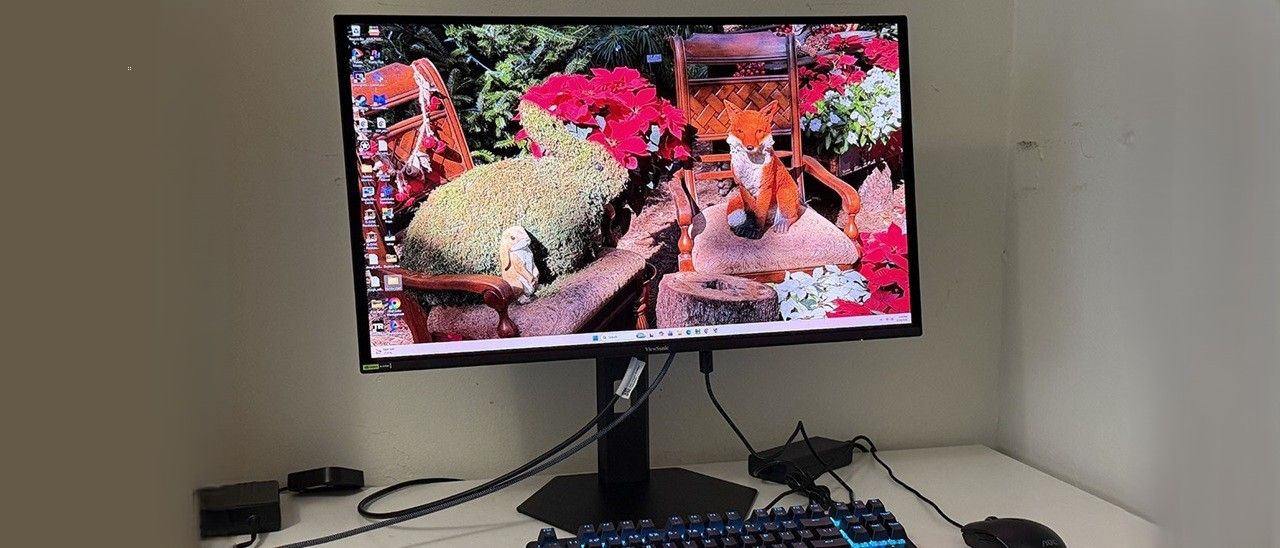
(Image credit: View Sonic) (Image credit: View Sonic) (Image credit: View Sonic) (Image credit: View Sonic) The VX2738-2K features angular styling with simple shapes and slightly rounded corners. The front is all screen with a narrow flush bezel that ranges in width from eight to 23 millimeters. A badge graces the lower left corner, indicating Nvidia G-Sync certification. It also meets FreeSync Premium standards. Other bits include a small ViewSonic logo and a tiny power status LED.
In the back are more triangles and a central box containing the internals. A joystick operates the OSD along with a separate power toggle button. The stand snaps into place over a 100mm VESA mount. If you want to use an arm, ViewSonic provides four large fasteners that you can tighten by hand if you like.
The stand has full ergonomics with 5/20 degrees tilt, 45 degrees swivel, and a 90-degree portrait mode. The OSD can be rotated manually as well. The height range is 5.1 inches (130mm). Movements are smooth and firm, better than what you’ll find with most budget screens. The package with stand weighs 12 pounds and sits on a thick metal plate base.
Underneath are four video inputs, two HDMI 2.1 and two DisplayPort 1.4 that support Display Stream Compression (DSC), which keeps frame rates at their maximum potential. There are a pair of two-watt internal speakers, and you get a 3.5mm headphone jack.
(Image credit: Tom's Hardware) (Image credit: Tom's Hardware) (Image credit: Tom's Hardware) (Image credit: Tom's Hardware) (Image credit: Tom's Hardware) (Image credit: Tom's Hardware) (Image credit: Tom's Hardware) The fun starts with seven picture modes. The Game mode includes four additional presets, one of which includes a black stabilization slider. This can be increased to brighten shadow areas for better visibility. While it makes the picture less dramatic, it helps you find hidden enemies more easily. Standard is the default mode, and it includes everything needed for a precise calibration. And that’s a good thing because the VX2738-2K isn’t quite on spec out of the box, more on that later.
There are five fixed color temps and a user color with RGB sliders. Don’t be fooled by the one labeled sRGB. It does not change the color gamut from the native space, which covers almost 109% of DCI-P3. You’ll see the VX2738-2K’s full color for all content, be it SDR or HDR. You also get three gamma presets. HDR has no options, but you can turn off the effect if you like. Leaving it on Auto means the VX2738-2K switches without user intervention.
Manual Image Adjust is where you’ll find OLED care options like pixel orbiting, screen refresh and static detection. The one labeled OLED APL is a variable brightness setting. Turning it on raises the peak white level for small areas of the screen.
In the VX2738-2K’s Standard mode, I observed a slight purple tint in grayscale patterns and very dark gamma, which gave the image a murky appearance. Fixing the RGB sliders took care of the color, but gamma could only be corrected by turning the OLED APL option on. That means you’ll see variable brightness all the time. While this isn’t my favorite approach, ViewSonic’s VB isn’t super aggressive so there is no obvious image pumping or rapid changes in brightness. It is the way to the best image, so I recommend using it. It’s locked on by default for HDR content. Below are my recommended SDR settings. HDR has no provision for adjustment; just set the HDR option to Auto for an automatic switch.
There is no activity that cannot be enhanced by an OLED monitor and the VX2738-2K proved that to me yet again. The broad contrast and saturated color offered by this technology cannot be completely duplicated by LCD, and that includes Mini LED panels.
The VX2738-2K isn’t the brightest OLED I’ve reviewed, but it is more than bright enough to be satisfying. I found that the variable brightness option was required for the best picture. Usually, I use constant brightness for work tasks and variable for entertainment. With OLED APL turned off, the picture was dull in comparison to other OLEDs. This turned out to be due to dark gamma, which you can learn more about on page four. Turning it on addressed my concerns. And it wasn’t aggressive in operation, there were no artifacts like pumping or changes in brightness that lagged behind the moving image. I left it engaged for all content. And it’s locked to on for HDR.
HDR looked spectacular as all OLEDs do. Color was rich and vibrant thanks to the Quantum Dot layer. It’s awesome to get this tech in a $450 monitor. Accuracy was excellent once I had calibrated. A few tweaks to the RGB slider took color, grayscale and gamma to reference-level. That showed in all areas, gaming, video and productivity.
Video processing was exemplary and with frame rates staying at or near the 240 Hz maximum, moving objects were rendered with perfect clarity and full detail. There was no smearing or blur of any kind. The VX2738-2K was extremely responsive to my inputs as well. You’ll see how good it is on the next page as it’s one of the fastest 240 Hz screens I’ve tested to date. To get visibly better performance, you’ll need to go to at least 360 Hz. And only the most skilled gamers would be able to tell a difference. My abilities are not at that level. I would happily frag all day and twice on Sunday. The VX2738-2K has that addictive quality.
For daily use, the VX2738-2K serves extremely well. 27 inches is ideal for QHD resolution; it’s a reasonably pixel-dense 109ppi but not so much that frame rates suffer. My GeForce RTX 4090 was more than stout enough to keep speeds at 240fps with games set to their highest detail levels. And the dot structure is invisible from more than two feet away. You can sit close when working in Photoshop or Premiere Pro. Or relax and sit back when watching videos on YouTube.
My only complaint is a small one. I was glad to see the inclusion of internal speakers but the VX2738-2K’s are quite tinny. At 50% volume, they were reasonably loud but somewhat distorted in the highest frequencies, which made them harsh. They’re fine for system sounds but for music or game audio , they don’t offer much impact or detail. I suggest plugging in your favorite headphones to the provided 3.5mm jack. Speaking of plugs, I noted the inclusion of four video inputs instead of the usual three with an extra DisplayPort in the mix, nice.
Takeaway: The VX2738-2K is an extremely versatile monitor with excellent gaming performance and enough brightness, color saturation and clarity to suit it for photo editing, web browsing or any computing task. It delivers fast and smooth video processing along with accurate and vivid color once calibrated. The internal speakers aren’t the greatest but plug in a pair of headphones and you’ll be fine. Above all, it’s a superlative value at just $450 and that’s the best part.
Current page: Features and Specifications
Key considerations
- Investor positioning can change fast
- Volatility remains possible near catalysts
- Macro rates and liquidity can dominate flows
Reference reading
- https://www.tomshardware.com/monitors/gaming-monitors/SPONSORED_LINK_URL
- https://www.tomshardware.com/monitors/gaming-monitors/viewsonic-vx2738-2k-27-inch-oled-review#main
- https://www.tomshardware.com
- These are the four keyboards I'm still using after reviewing keyboards for years — How a 500 Hz TKL and a Stream Deck layout dominated my desk
- NVIDIA Blackwell Leads on First Agentic AI Infrastructure Benchmark
- NVIDIA and Doosan Group Collaborate to Advance Physical AI and AI Factory Infrastructure
- How the UK Is Turning Sovereign AI Ambition Into Action With NVIDIA Technologies
- NVIDIA Confidential Computing to Help Expand Apple’s Private Cloud Compute
Informational only. No financial advice. Do your own research.