
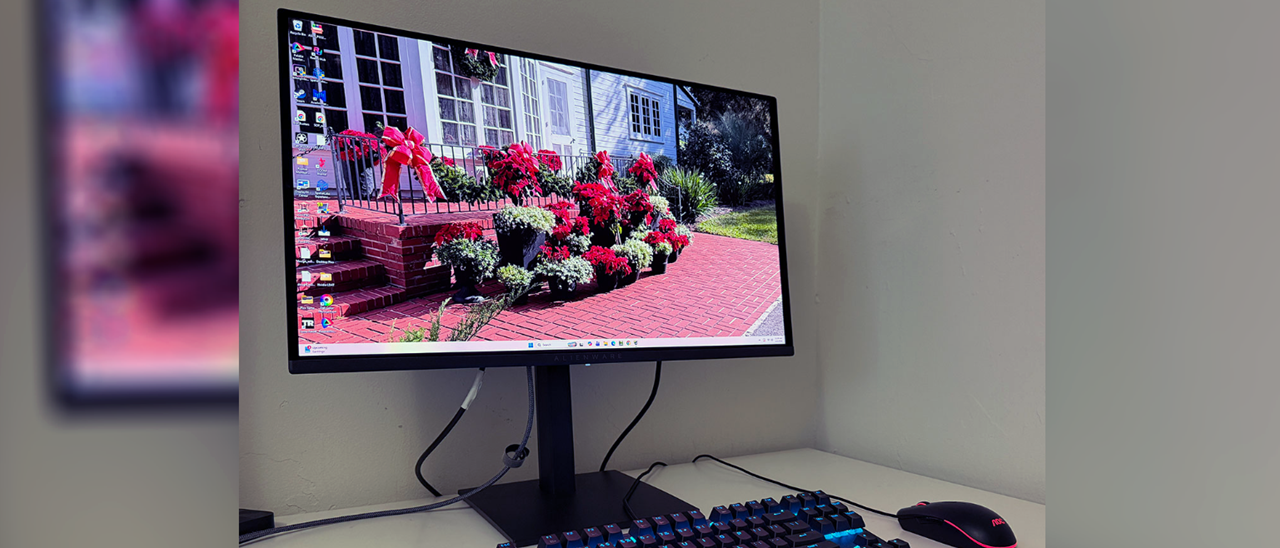
The AW2726DM’s carton is unassuming, and aside from a small line of text announcing the model number, 240 Hz and QD-OLED; you’ll have to open it up to experience the incredible bang-for-the-buck that it offers. The base and upright mate with a captive bolt and you’ll need to find the four screws and included tool to attach the panel. There is no snap on fitting here. The mount is 100mm VESA compatible, so aftermarket arms are easy to employ. The power supply is internal, so there’s an IEC cord plus cables for HDMI and DisplayPort.
(Image credit: Alienware) (Image credit: Alienware) (Image credit: Alienware) (Image credit: Alienware) Styling is minimalistic thanks to the all-screen look Alienware is going for. The front bezel is flush and narrow, with a strip at the bottom just wide enough for an Alienware logo. Moving around the side, you can see the two-part design that many OLEDs feature. The panel is among the thinnest I’ve seen at just three millimeters deep. The component housing takes the total thickness to just 1.65 inches. And if you don’t use the included stand, the back is completely smooth. The AW2726DM is one of the slimmest displays you’ll find in any size.
The back features just a small Alienware head and the OSD joystick. A Kensington lock is provided too. There’s plenty of ventilation on top of the bulge, and the screen is further shielded from heat by a graphite layer. There are no internal fans.
The stand is reasonably solid, with full ergonomics that include 5.2 inches of height range, a 90-degree portrait mode, and 5/21 degrees tilt. Swivel is a full 360 degrees, thanks to a bearing ring in the base that allows the entire package to turn smoothly.
The input panel is up and under and is made up of a DisplayPort 1.4 with Display Stream Compression (DSC) and two HDMI 2.1 ports. They support consoles with VRR up to 120 Hz. For the full 240 Hz, you’ll need to use DisplayPort. You also get a 3.5mm headphone jack.
HDR10 signals get three of their own modes. Display is the default and best choice there. I observed very obvious edge enhancement in the Movie and Game presets, but Display was free of artifacts.
The AW2726DM’s only panel maintenance feature is a pixel refresher. I have never seen burn-in on any OLED display, and that includes the monitor I’m currently writing this review on and my nearly six-year-old LG television. Both have gotten by on pixel refresh alone with no need for orbiters or logo protection. And Alienware includes a three-year burn-in warranty if you’re still concerned.
My AW2726DM review unit wasn’t quite perfect out of the box in the Standard picture mode. It looked slightly green in tone when viewing grayscale test patterns, so I went for the Custom Color mode and its two-point RGB controls. That got me to reference level. There are no gamma options, but the monitor sticks close to the 2.2 power spec for SDR. Color is very saturated thanks to the Quantum Dot layer. It covers over 111% of DCI-P3. There is no sRGB option, so you’ll be seeing that extra color for all SDR and HDR content. I doubt anyone will consider that a bad thing. When I ran the initial measurements, brightness peaked at around 204 nits, but after calibration, it dropped to 185 nits. There is no variable brightness for SDR. To dial in your AW2726DM, try the settings shown below.
HDR signals get three of their own modes, with no options for adjustment. I found color and luminance to be nearly spot-on, which is a good thing. You can read more about that on page five.
Gain – Red 96, Green 95, Blue 100 Bias – Red 50, Green 50, Blue 50
Key considerations
- Investor positioning can change fast
- Volatility remains possible near catalysts
- Macro rates and liquidity can dominate flows
Reference reading
- https://www.tomshardware.com/monitors/gaming-monitors/SPONSORED_LINK_URL
- https://www.tomshardware.com/monitors/gaming-monitors/alienware-aw2726dm-27-inch-qhd-240-hz-qd-oled-gaming-monitor-review#main
- https://www.tomshardware.com
- Small Missouri town ousts half its city council after $6 billion AI data center approval — petition calls for mayor's removal as frustration (and violence) over
- China has spent 3.6 times more than the US on chipmaking subsidies over the past decade — $142 billion and counting, easily outweighs CHIPS Act
- Linux lays down the law on AI-generated code, says yes to Copilot, no to AI slop, and humans take the fall for mistakes — after months of fierce debate, Torvald
- Intel's promising upcoming Nova Lake-S lineup reportedly includes an iGPU-focused SKU with 12 Xe3P cores — new leak claims a midrange 16-core CPU with powerful
- Small Missouri town ousts half its city council after $6 billion AI data center approval — petition calls for mayor's removal as frustration (and violence) over
Informational only. No financial advice. Do your own research.