
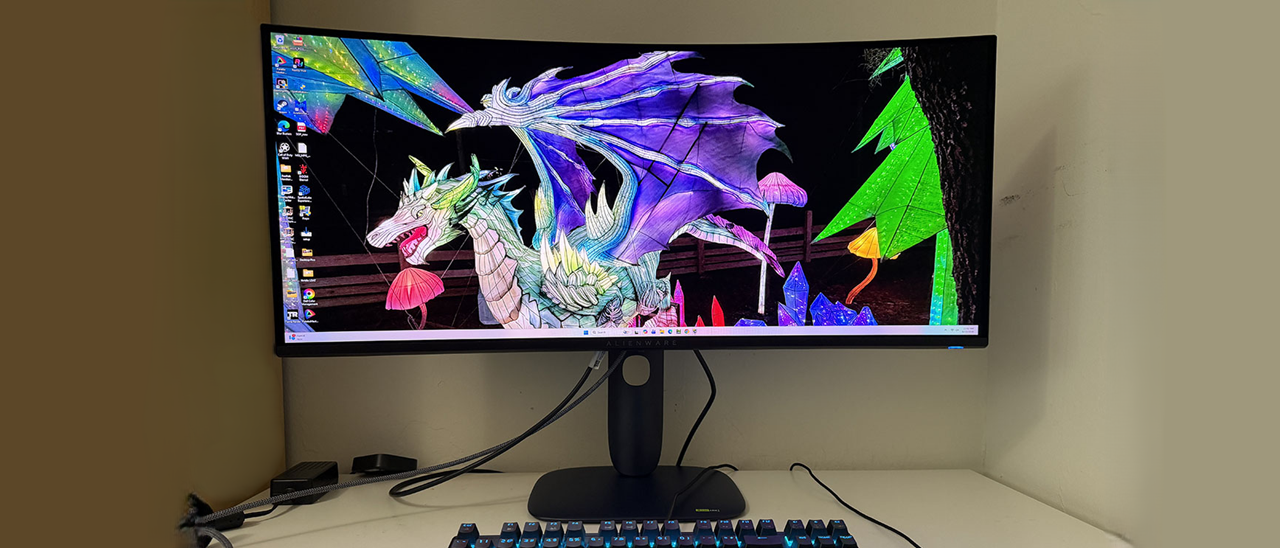
The AW3426DW arrived in secure molded pulp packaging that is completely recyclable. The base, upright, and panel assemble easily with no tools needed. The power supply is internal, so you get IEC power plus HDMI, DisplayPort, and USB cables. A small microfiber cloth is provided to keep that beautiful screen free of dust and fingerprints.
(Image credit: Dell) (Image credit: Dell) (Image credit: Dell) (Image credit: Dell) The AW3426DW maintains the aesthetic Alienware introduced last year with softly rounded corners and smooth tapers. My favorite bit is where the upright and base meet; the joint appears to float with a slender swivel point that’s barely visible. In the back is a backlit Alienware head and a polished symbol; “Alienware 30” is the official term. The head can light up with different colors and effects. A subtle vent rings the fulcrum with small perforations that keep the internals cool. A graphite layer behind the OLEDs further cools the screen.
The side photo affords a good view of the rounded aesthetic. The stand has no angles or corners at all, just a small cable hole to keep wiring tidy. Ergonomics include a 5/21-degree tilt and a 20-degree swivel. The height range is 4.4 inches, and there is no portrait mode. Movements are firm and free of play. Build quality is premium in every respect. If you’d rather not use the stand, there is a 100mm VESA mount with fasteners included.
Underneath, you’ll find a small I/O panel with two HDMI 2.1 ports and a DisplayPort 1.4 with Display Stream Compression (DSC). A USB upstream port supports the two downstream jacks on the panel’s edge. You get a USB Type-A and Type-C. The Type-C port supports charging and peripherals, but not video. In the center, you can see the OSD joystick that controls all monitor functions.
Game Enhance Mode contains a timer, frame counter, and alignment marks, but where are the aiming points? That’s one of the coolest features of the AW3426DW, it’s called AlienVision, and it is a completely customizable set of reticles and sniper modes, eight parameters in all, that can be edited and combined in hundreds of ways to create a custom view of the game environment. Once configured, there are three memories so you can have setups for different games.
Calibrating the AW3426DW is completely unnecessary. Just leave it in the default Standard mode and set brightness to taste. There is no variable brightness for SDR, so only one value is needed. If you want to calibrate, choose Custom Color. It has RGB gain and bias, plus hue and saturation sliders for each color. To change the gamut, use Creator mode. It lets you specify sRGB or P3 and includes five gamma presets. In the three Game modes, you can also adjust color and specify a custom value for the dark stabilizer. My SDR settings are included below.
For HDR content, there are seven more modes. Desktop is the default and is similar to HDR Peak 1300 Bright in its color and luminance tracking. The latter delivers the brightest highlights and the most vivid color.
I suspect that some readers here will be wondering if the AW3426DW is a worthwhile upgrade over the AW3425DW. After several days of gaming and working, I will say that it is. HDR is brighter, and the new panel with its V-Strip RGB pixel structure is clearer than before. It’s hard to quantify this since OLEDs are sharp by nature, but the AW3426DW does make an incremental improvement. Brighter HDR certainly makes an impact with highlights that pop and a dimensional quality that no premium Mini LED can match.
Color accuracy is superb both out of the box and after calibration, where I changed just two settings, one click each. The AW3426DW is truly factory-calibrated. It equals any professional monitor in terms of measured performance and image fidelity.
Gaming was an addictive experience, as it is with any fast OLED. The smooth motion that comes with panel response, measured in fractions of a millisecond, is something you can’t get from an LCD. An OLED draws the screen about 10 times faster than an LCD with an equal refresh rate. The AW3426DW’s bump to 280 Hz is also a reason to upgrade. It reduces my input lag by 4ms in my test. Could I spot that difference in gameplay? No, but I’m not a competition gamer either. Those looking for every advantage will want to give this monitor an audition.
The 34-inch curved panel proved useful for both work and entertainment. It’s just large enough for me to display two documents side by side. It requires a bit more scrolling than my 16:9 32-inch screen, but the 1800R curve isn’t too severe. There was no image distortion, but I got a nice wraparound effect when navigating first-person shooters and graphical adventures.
I appreciated the inclusion of USB ports, especially the two located on the bottom edge of the panel. It’s easy to plug in peripherals or charge a phone from the USB-C port. But I missed the 3.5mm headphone jack. And there are no internal speakers, so to get audio , you’ll need USB-capable headphones or a desktop amplifier if you want to drive cabinet speakers. And I enjoyed the AlienFX feature with its glowing Alien head. It played colors off the wall behind my desk.
Takeaway: The AW3426DW is a worthy upgrade from the AW3425DW. It’s quicker and brighter, and the image is a tad sharper than before. Input lag is lower as well, which will appeal to skilled gamers looking for every possible advantage. Color is saturated and vivid with accuracy good enough to use right out of the box. The screen’s curve strikes an ideal balance between immersion and a square image.
Current page: Features and Specifications
Key considerations
- Investor positioning can change fast
- Volatility remains possible near catalysts
- Macro rates and liquidity can dominate flows
Reference reading
- https://www.tomshardware.com/monitors/gaming-monitors/SPONSORED_LINK_URL
- https://www.tomshardware.com/monitors/gaming-monitors/alienware-aw3426dw-34-inch-qd-oled-gaming-monitor-review#main
- https://futureplc.com/privacy-policy/
- The Ultimate Summer Sale Pairing: Steam Sale Meets GeForce NOW Discounts
- Cracked version of Assassin’s Creed Black Flag Resynced leaked days prior to official release despite Denuvo DRM protection — Denuvo unable to stop crackers, wi
- Sega’s $5M investment saved Nvidia in 1996, now Jensen Huang is heading to Tokyo to mark 30 years of partnership — Akihabara event will include a GeForce RTX 50
- Nvidia touts Vera CPU's single-threaded performance as its agentic AI advantage, reveals next-gen 'Rigel' Arm CPU cores — frames chip as a 'max single-threaded
- Nvidia shows off GeForce Trading Cards Series 1 — collectible cards show off games, GPUs, and tech demos, and will be available for free at upcoming events
Informational only. No financial advice. Do your own research.