
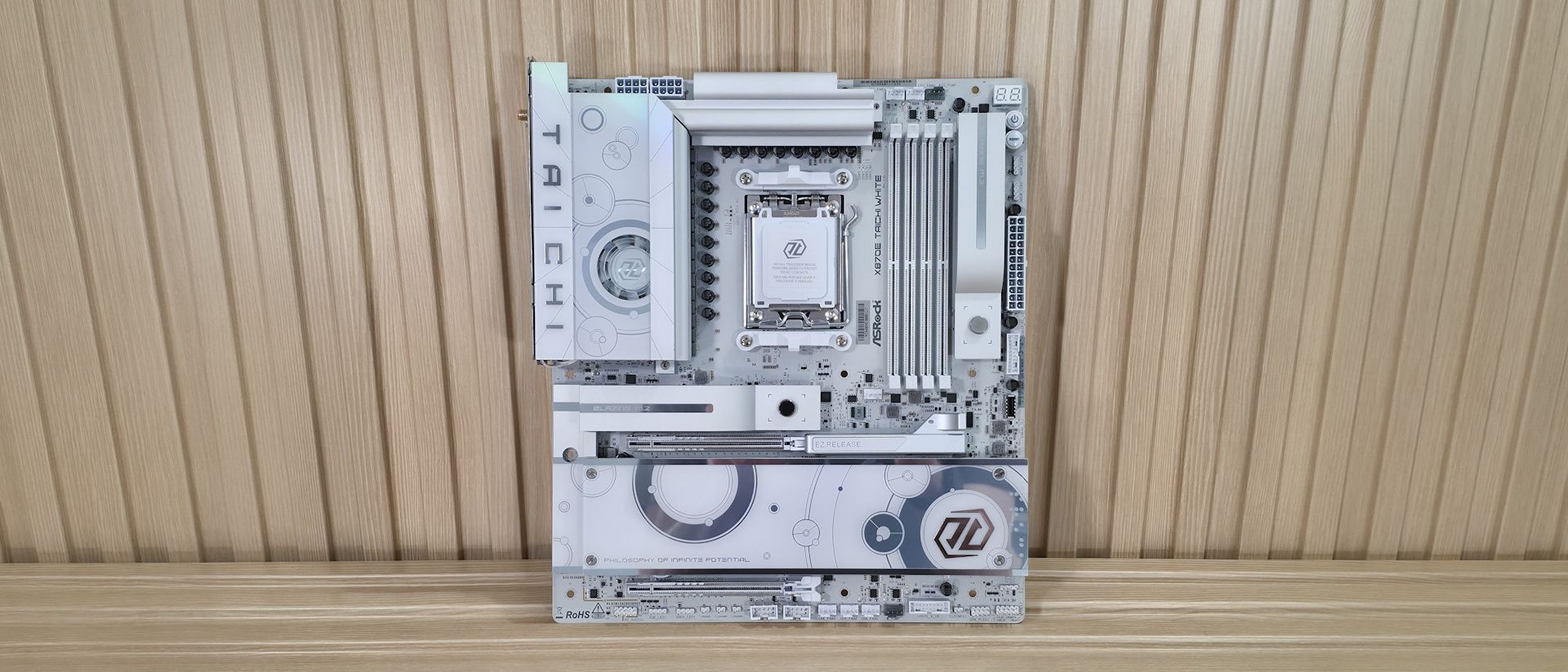
Above the DRAM slots are the first three (of eight) 4-pin fan/pump headers. Each header supports PWM and DC-controlled devices through the BIOS. The lion's share of these headers (CPU_FAN2, CHA_FAN1-4, and both AIO_PUMP headers support a whopping 3W/36A each and also auto-detect 3-pin/4-pin, while the CPU_FAN1 supports up to 1A/12W. There’s plenty of output available.
To the right of the DRAM slots is a vertically oriented M.2 socket that uses ASRock’s M.2 Key Latch to hold the device down and the M.2 heatsink quick release to attach and detach quickly—this socket, M.2_2, is a PCIe 4.0 (64 Gbps) M.2 socket. Don’t let the heatsink fool you. It’s labeled as “Blazing” M.2 (typically reserved for PCIe 5.0-capable sockets), but it’s PCIe 4.0 (what ASRock calls “Hyper”). Along the right edge, starting in the top-right corner, we spy the two-character Dr. Debug diagnostic panel that displays POST codes in bright white, and below that are LED-backlit Power and Reset buttons. Below those are the first two 3-pin ARGB headers, followed by the 24-pin ATX power lead for the board, a 19-pin USB 3.2 Gen 1 (5 Gbps), and finally a front panel USB 3.2 Gen 2×2 (20 Gbps) Type-C connector.
Power delivery on the X870E Taichi White uses the same robust configuration as the original. There are 25 phases total, with an incredible 22 dedicated to Vcore. Power flows from the 8-pin EPS connectors to the Renesas RA229628 controller (there’s a second controller for the SOC, etc.). From there, power goes to the Renesas R2209004 110A SPS MOSFETs. The 2,420A available will handle any processor you throw at it with aplomb. Be it stock, overclocked, or even extreme overclocking, the power bits and active VRM cooler won’t have any issues, even with a Ryzen 9 9950X or the Ryzen 9 9950X3D2 .
On the bottom half of the board, starting on the left and hidden under a shroud, is the audio section. ASRock uses the flagship Realtek ALC4082 codec (along with several dedicated audio capacitors) and the ESS SABRE9219 DAC for real panel audio. It also supports direct-drive technology on the front headphone port, supporting up to 600 Ohm headsets. This combination of codec and DAC is one of the best native audio solutions on motherboards.
In the middle of the board are two full-length slots, both of which connect through the CPU and split up x16 PCIe 5.0 lanes. The top slot supports up to x16 while the bottom is up to x8. When both are in use, it’s x8/x8.
Mixed in and around the PCIe slots are three M.2 sockets. Above the PCIe slot is the one and only PCIe 5.0 x4 (128 Gbps)-capable M.2 socket hidden under a significant heatsink. Recently, we tested motherboard heatsink contact on the primary M.2 heatsink (also with a quick release) and found that a majority do NOT make good contact with the devices they’re supposed to cool. The good news is the Taichi White was one (of six) that made adequate contact on both sides. The other two M.2 sockets in this area, both PCIe 4.0 x4 (64 Gbps), reside under the plate heatsink. Note: The Taichi White doesn’t share bandwidth with PCIe slots, USB ports, or anything. So feel free to stuff this board like a Thanksgiving turkey and get everything possible out of your USB, M.2, and PCIe slots. Moving right, past the chipset to the edge are your three SATA ports. This is one place where ASRock cut back (from six), but these days, most people can get by with three SATA ports and four M.2 sockets. If you’re into RAID configurations, the SATA ports support RAID 0/1 modes while NVMe supports RAID 0/1/10. Finally, we've included a few images of the board's active ICs. ASRock uses a mix of Realtek (PWM controller, audio, MOSFETs) and Marvell ICs.
(Image credit: Future) (Image credit: Future) (Image credit: Future) Image 1 of 3 View Original
At the bottom are several headers, including front-panel audio and USB ports. A complete list of connectivity is listed below (from L to R):
Flipping the board around to the rear IO, you can see it’s chock-full of colorful USB and other ports. On the left are Clear CMOS and BIOS Flashback buttons. Next to those are the Wi-Fi 7 (remember, it’s ‘only’ 160 Hz) antenna connections and the HDMI (v2.1) port. Next to that are stacks of colored USB ports. In total, there are 12: two USB 4 (40 Gbps) Type-C ports that double as video outputs; five USB 3.2 Gen 2 (10 Gbps), two of which are the Lightning USB ports (yellow – designed to reduce latency by using different controllers). Three USB 3.2 Gen 1 (5 Gbps) ports (purple) support USB PD 3.0 charging up to 5V@3A (15W). Lastly, there are two USB 2.0 ports in black. Above one of the Type-C ports is the Marvell (Aquantia) 10 GbE, and finally, on the right end, is the audio stack with two 3.5mm and SPDIF outputs.
If you’re an esports gamer where every millisecond counts, the lighting gaming ports could come in handy. Otherwise, it’s not really something that adds value to the average user.
MORE: Best Motherboards MORE: How To Choose A Motherboard MORE: Best Motherboard Deals MORE: Best Motherboard Combo Deals MORE: All Motherboard Content
Current page: ASRock X870E Taichi White Features and Specifications
Key considerations
- Investor positioning can change fast
- Volatility remains possible near catalysts
- Macro rates and liquidity can dominate flows
Reference reading
- https://www.tomshardware.com/pc-components/motherboards/SPONSORED_LINK_URL
- https://www.tomshardware.com/pc-components/motherboards/asrock-x870e-taichi-white-motherboard-review#main
- https://www.tomshardware.com/membership
- Dev uses Claude AI to create native macOS driver for 'obscure' Windows-only printer — Linux container hack enables system-wide Cmd-P printing, driver now availa
- Intel's Arc Pro B70 workstation GPU is now up to 48% more expensive than it was just a month ago — 32GB Battlemage workstation card climbs toward $2,000
- Securing the Infrastructure of Intelligence
- Firebird Launches CIS Region’s Largest AI Factory in Armenia
- Nvidia crypto mining GPUs hacked to restore locked-away VRAM — software mod unlocks 64GB of VRAM on $250 CMP 170HX
Informational only. No financial advice. Do your own research.