
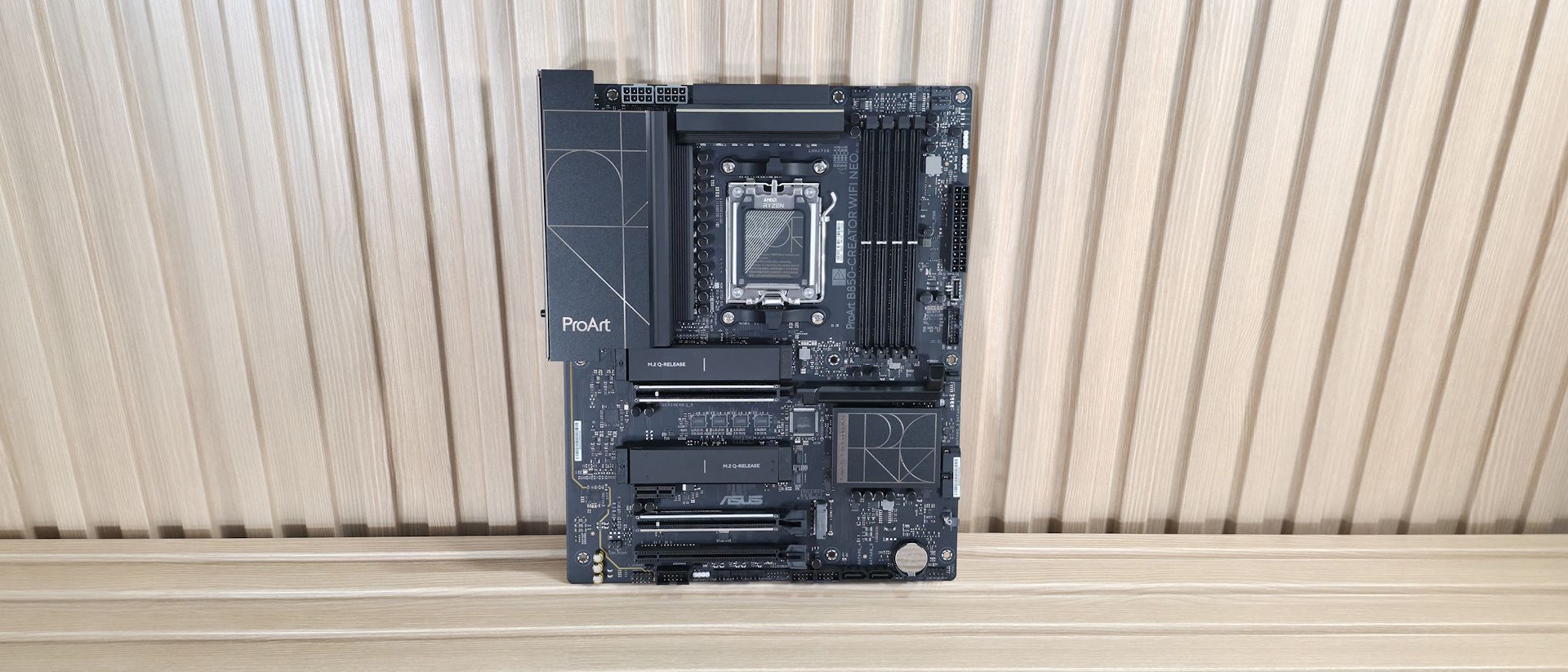
Overall, I like the professional appearance. And what you see, a lot of motherboard showing, is typical for the price point. I just wish at least one of the PCIe 5.0 x4 sockets included a heavier heatsink.
Starting with the top-left corner, we get a better look at the two 8-pin ProCool EPS connectors (one required) to feed the processor. Next, we get a better look at the gold-accented ProArt design on the matte-finish VRM heatsinks. Moving past the socket area, the next feature we encounter is the four DRAM slots, with the locking mechanism located only on the top. Asus lists support for DDR5-8400 with 9000-series processors and higher, and DDR5-8600 for 8000-series APUs. We didn’t have any issues running our DDR5-6000 and DDR5-7200 kits with the 9900X. But, as is typical with our test hardware, we needed to break out the APU for our DDR5-8000 kit to work. If you want to get the most out of your RAM, you can use Asus’ AEMP (Asus Enhanced Memory Profile) functionality, which detects the memory ICs in the kit and provides optimized frequency, timing, and voltage profiles that you can easily apply to increase performance.
Above the DRAM slots are the first three (of seven) 4-pin fan headers. Each header supports PWM and DC-controlled devices. Each header outputs up to 3A/36W, which is plenty of output for any pump-and-fan configuration. You can even run a custom loop off the headers without worrying about power. Control of any attached devices is handled via the BIOS or Fan Expert 4 in the Armory Crate software suite. Or you can use ProArt Creator Hub to monitor PC status, switch fan profiles, and adjust performance modes.
Continuing right and moving down the long edge, the first thing we run into is the 4-LED debug header, which lights up during the POST process. If something goes wrong during this critical time, one of the LEDs corresponding to the problem (CPU, DRAM, VGA, Boot) remains lit, indicating where the hiccup is. Moving down the same edge, we then see the first two (of three) 4-pin ARGB connectors. The ProArt Creator hub or Armory Crate controls each. Next, we see the 24-pin ATX connector for board power, a front-panel USB 3.2 Gen 2×2 (20 Gbps) connector that also supports 30W PD/QC4+ charging, and a 19-pin front-panel USB 3.2 Gen 1 (5 Gbps) header.
Power delivery on the B850-Creator Wifi Neo is plenty capable, sporting 17 phases, with 14 dedicated to Vcore. Power heads from the 8-pin EPS connectors and onto the Digi+ EPU (ASP2205) voltage regulator. From there, it moves to the 80A DrMOS MOSFETs. The 1,120 Amps available isn’t a ton, but it will handle any CPU you throw at it, including the Ryzen 9 9950X or the Ryzen 9 9950X3D2 .
At the bottom of the board, on the left, are the last-gen flagship Realtek ALC1220P codec and a couple of dedicated audio capacitors. This audio solution is typical for the price point, and most users won’t have any issues with it.
Next are four PCIe slots in the middle of the board. The top full-length slot uses reinforcement, connects to the CPU, supports PCIe 5.0 x16 speeds, and uses the PCIe Slot Q-Release to simplify removing a PCIe card from the motherboard. The other reinforced full-length slot also connects via the CPU and supports PCIe 5.0 x8 speeds. If both slots are in use, they run at x8/x8. The bottom full-length slot (not reinforced) connects via the chipset and supports PCIe 4.0 x4 (but it shares lanes with M.2_3). The tiny x1 slot also connects through the chipset and runs up to PCIe 4.0 x1 speeds.
There are three M.2 sockets, with the top two (under heatsinks) connecting to the processor and supporting PCIe 5.0 x4 (128 Gbps) speeds. The last M.2 socket, M.2_3 on the right, connects through the chipset and runs up to PCIe 4.0 x4 (64 Gbps) speeds. This socket shares bandwidth with the PCIe_3 slot. If either one is populated, the other gets disabled. So keep that in mind if you need to use that slot, as it will take away an M.2 socket.
Along the right edge, we find another 4-pin fan header and two (of four) SATA ports. If you need to run RAID, the SATA ports and M.2 sockets support RAID0/1/5/10 modes. We also included images of several chips used on the board. Asus uses mainly Realtek (audio, networking), and it's own PWM ICs.
(Image credit: Future) (Image credit: Future) (Image credit: Future) (Image credit: Future) (Image credit: Future) At the bottom are several headers, including front-panel audio and USB ports. A complete list of connectivity is listed below (from L to R):
The rear I/O on the B850-Creator Neo has all the basics, but lacks native 40 Gbps USB ports, which could be a concern for creators whose files are on an external drive. Outside of that, it does come with two USB-C ports, both running at 10 Gbps (USB 3.2 Gen 1), and one supporting DP Alt Mode (for video). You get two 10 Gbps and four 480 Mbps Type-A ports for a total of six, which can be limiting for some users (including me). Additionally, there are DisplayPort and HDMI for video output, a BIOS Flashback button, dual 5 GbE ports, quick-connect Wi-Fi 7, and three 3.5mm audio jacks (no SPDIF). Note: this board uses a ‘slower’ Wi-Fi 7 that’s limited to 2.9 Gbps. It’s still plenty fast, and faster than Wi-Fi 6, but it's worth mentioning in case you’re one of the few who actually need the fastest Wi-Fi around and have the hardware to use it.
MORE: Best Motherboards MORE: Best Motherboard Deals MORE: Best RAM Combo Deals MORE: How To Choose A Motherboard
Current page: Asus B850-Creator Wifi Neo Features and Specifications
Key considerations
- Investor positioning can change fast
- Volatility remains possible near catalysts
- Macro rates and liquidity can dominate flows
Reference reading
- https://www.tomshardware.com/pc-components/motherboards/SPONSORED_LINK_URL
- https://www.tomshardware.com/pc-components/motherboards/asus-b850-creator-wifi-neo-motherboard-review#main
- https://www.tomshardware.com
- Grab a massive $464 saving on a two-year NordVPN subscription with three extra months free — 69% saving unlocks this privacy-first VPN service with scam protect
- Get 16GB DDR5 for less than $260 in this B&H RAM bundle deal for an AMD AM5 build — save $119 on this PC parts kit that includes a Ryzen 5 CPU and an Asus B650E
- Asus B850-Creator Wifi Neo motherboard review: AM5 Creator mobo looks the part, but is missing useful features
- Singapore cops seize $42 million mansion, freeze $772k bank account of suspected Nvidia AI GPU smugglers — individuals alleged to have illegally exported data c
- Microsoft's flagship Windows PC lineup will drop reportedly drop budget options — firm prunes Surface Go and Surface Laptop Go
Informational only. No financial advice. Do your own research.