
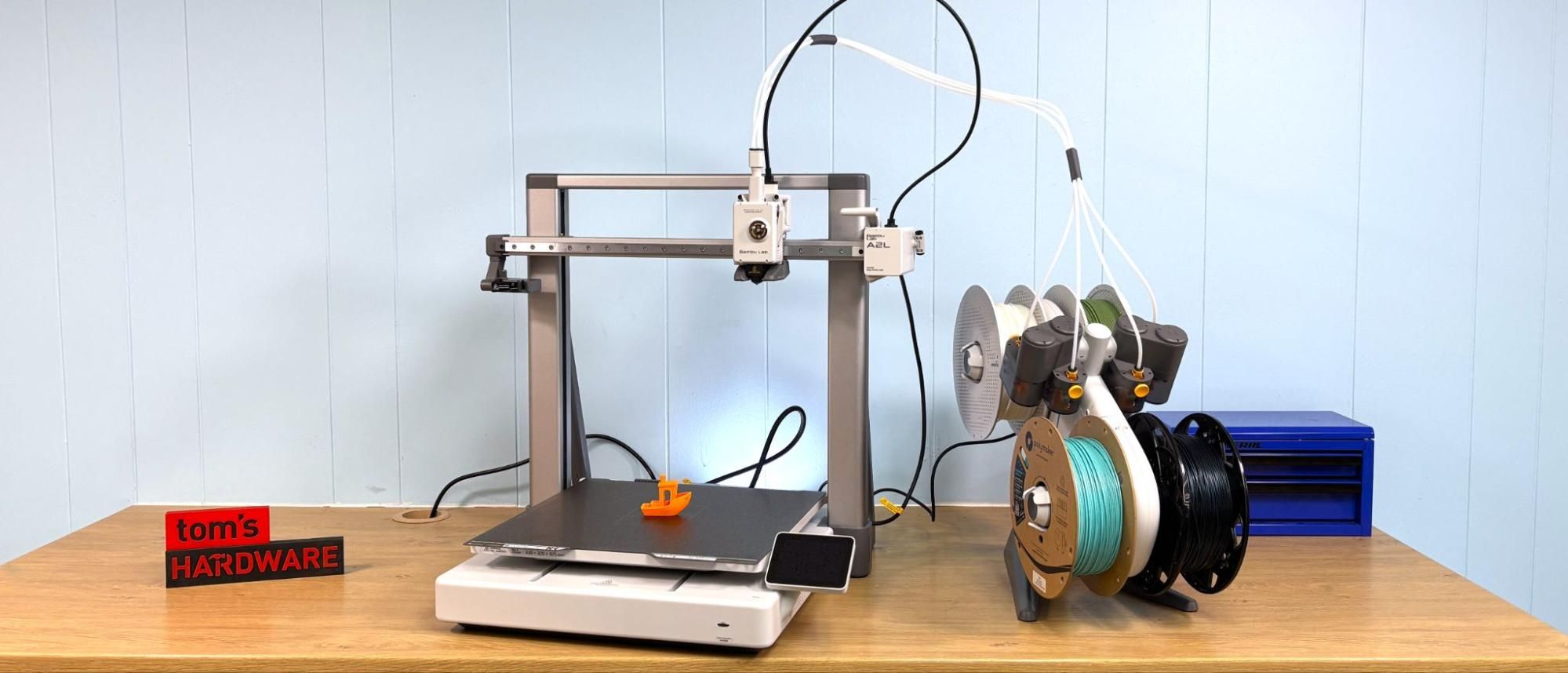
The Bambu Lab A2L completely auto-levels itself during initial calibration, then can recheck the level before each print. It uses the nozzle as the probe, so it can also set the z height for you. I had no problems with the settings and no need to make adjustments.
Though calibration errors are rare, Bambu Lab has a section in its Wiki to guide you through troubleshooting advice.
Like the Bambu Lab A1, the A2L can work from a single spool holder mounted to the gantry, or from four spools on the Lite AMS unit. In addition, the A2L is also out of the box compatible with the box style AMS and AMS 2 Pro.
For the AMS Lite, simply push spools onto the motorized spindles and poke the filament into the intake. The machine will detect the filament and draw it in.
The AMS has an RFID reader, which allows it to read tags on Bambu Lab branded filament. These tags will tell the machine what type and color of filament is on each spindle. If you’re using untagged filament, or the single spool holder, you’ll need to enter this information manually.
The Bambu Lab A2L is a plus sized Cartesian, or as we call them, bed slinger. The A-Series sleek white and brushed aluminum style has been copied by most of the competition, so Bambu Lab seems to be onto something.
The printer is extremely easy to use with a touch screen interface that contains guides to show you how to run the machine. It has the same build size as the H2 Series, but does not come with an option for an enclosure.
It has metal rails, linear bearings, and dual Z rods, all tucked inside a smooth frame and base that makes it look much more polished than other printers. To make up for its large size, it has a pair of hidden “granular dampers” designed to absorb vibration and stabilize the frame. You can’t see them, but you can hear them if you give the printer a bit of a shake.
The A2L has a new feature called “adaptive vibration compensation,” which uses a real-time algorithm to retune calibration as your print gets taller. This is to eliminate vibrations that can affect printers the taller – or heavier – they get.
When equipped with an AMS unit, the A2L takes up noticeably more space. Bambu Lab offered a clip that I could print myself that would attach the AMS to the X gantry, but I’m still not convinced that is the best place for it.
The extruder motor has been upgraded to a PMSM closed-loop servo to actively detect filament grinding in the gears, clogs and air printing. Combined with the new nozzle clumping detector on the purge sweep, the A2L should be able stop a lot of annoying small problems before they become huge spaghetti monsters.
One odd thing is the A2L uses the same quick swap steel nozzles as the A1 and A1 Mini. These are not the upgraded nozzles used on the H2 Series, but H-style nozzles are backward compatible with the A-Series. These nozzles have made a huge impact on the industry, with the competition scrambling to copy them as well. There’s no screws, wiring or messy thermal paste involved here.
The A2L is compatible with a cutting and plotting attachment, which is available as a separate purchase. The add-on is easy to install: simply remove the front cover and the spinner, then snap on the cutting attachment and plug a cable into the toolhead. It is advised to remove the bowden tubes for the filament, but there’s little need to do so. The hotend remains in place and is kept off by the machine.
The attachment can hold either a Bambu Lab made drag knife or any standard size pen or marker. I was able to use a normal ball point pen in mine by adding a few wraps of tape to thicken the pen body.
This is the same attachment you can get on the H2 Series and uses Bambu Suite, a companion app, to “slice” files. There is no laser add-on, since the A2L is open frame. The A2L also lacks a top down camera for positioning, so you will need to use the cutting function with the help of a phone camera equipped with Bambu Handy. This system is a bit janky, but it works, especially if you take care lining up the photos.
(Image credit: Tom's Hardware) (Image credit: Tom's Hardware) Bambu Lab Automatic Material System (AMS) Lite
We received the A2L Combo, which includes an AMS Lite module. The AMS Lite is made specifically for the A-Series and is not compatible with the Core XY machines. It’s not as clean looking as the boxy AMS, with four Bowden tubes stretching from each spool to the tool head. However, this simplified version is much easier to unjam should brittle filament break in the tube.
Each spool is mounted on a spring-loaded spindle, which provides the necessary retraction. Since each color has its own Bowden tube, the A2L only needs to pull the filament a few inches until it's clear of the tool head, not all the way back to the AMS Unit, which makes it a bit faster during color swaps than the original system. Each spool also gets a motor to push filament to the tool head. This new system solves the problem of cardboard spools with crushed edges, spools that are too wide or too tall, and spools that are too light.
There are notable drawbacks to using either of Bambu Lab’s AMS systems. The printer wastes an amazing amount of material when it cleans out the nozzle between colors. The waste can be reduced with tuning , but takes time and patience. The slicer will tell you exactly how much it will use before you start a print.
The second drawback is loss of speed. The printer needs to pause between layers to purge filament, then do a nozzle wipe on the purge tower. The Flexi Factory Panda takes 2 hours and 40 minutes to print in one color using default settings, and 6 hours and 46 minutes to print in three colors.
Bambu Lab has its own custom slicer, Bambu Studio, which is a fork of PrusaSlicer. The slicer is also the primary means of transferring files via Cloud service or local LAN to the printer. You can also control and monitor your printer remotely with Bambu Handy, a mobile app.
Bambu Studio is also the “paint” program you need to assign color to your prints. The device tab allows you to talk directly to the printer to define the filaments in the AMS, heat up the printer and control the speed.
It has a wide range of presets for filament from both Bambu Lab and other manufacturers. I’ve found these presets to be incredibly helpful and accurate.
You also use Bambu Studio to access MakerWorld, a one stop shop for the Bambu Ecosystem. Here you’ll find free files for your printer, MakerLab with AI powered design tools and Maker’s Supply, a store front will model kits, hardware, tools, LED lights and CyberBricks so you can level up your 3D printing hobby.
To show what the Bambu Lab A1 can do under normal conditions, I printed three Ice Cream Narwhales using default settings of 200-300mm/s and a .2mm layer height, taking 10 hours and 44 minutes to print. The models came pre-painted by the designer.
It turned out beautifully smooth with no visible layer lines or ringing. There was a little color bleed from the gold cone to the top of the narwhale’s head. This was printed in a sparkle blue from an unmarked PLA spool I picked up from SMRRF a couple years ago, and now deeply regret not labeling it better, plus a basic PLA Pink and Black from Bambu Lab and gold from Polymaker’s Panchroma Dual Silk Sunset .
For a PETG test, I attempted to print a wind spinner for the garden, which I created in Tinkercad. The print ultimately failed due to the skinny base, but it got about 95% there, which is still impressive. When it fell over, it looped the rest of the layers around the print like a coil. If you look closely at the coil, you can see little bubbles caused by moisture. The print still looks fantastic and I’ll give it another shot later after I make the base wider. This is printed in Bambu Lab PETG Translucent 6 hours and 31 minutes using a .2 layer height and default settings. This print is smooth, without stringing or noticeable layer lines. The two flat bases printed separately – without supports– then snapped together.
Reminder – the AMS can print special “TPU for AMS” which is a stiffer formula available from Bambu Lab.
TinkerCad (Image credit: Tom's Hardware) TinkerCad (Image credit: Tom's Hardware) I tested out the A2L’s cutting module by making a few branded price tags for items I sell at a local boutique. For this I used a simple shape I whipped up in Canva and my jpg logo. I dropped both into Bambu Suite, the “slicer” software that runs Bambu’s 2D cutter attachment and also the laser module for a H2 Series machine. (No, there’s not a laser for the A2L.)
I swapped the normal build plate for a purpose built sticky plate and very easily snapped the cutter module onto the tool head, then plugged it in. Because the A2L doesn’t have an overhead “birdeye” camera like an H2 Series, I had to take an overhead photo of the build plate with the Bambu Handy app. It’s surprisingly difficult to get the entire A2L bed into an overhead shot when you’re only 5’2” without getting a ladder. This might be why the registration is a little bit off and the inked logos are a little bit lower than they should be.
This required two passes. First the ink layer, which used a normal ball point pen that I wrapped tape around to fit in the pen holder. Then I swapped the pen for the cutting blade and finished it.
The cutter can also handle vinyl , and with the A2L bed size, you could really get a nice sized shirt made. Bambu didn’t send any vinyl to try out, but they do sell it on their website. Because this is a manual cutter and not a laser melting material, you are free to use any material that is under .5mm thick.
The Bambu Lab A2L is the supersized evolution of the A1 bedslinger that does double duty as a family craft hub. It’s budget-friendly with an easy-to-use interface that lets beginners have a little extra room to play without having to move up to a price H2 Series.
Like the first A1, this is much easier to use and maintain than Bambu’s larger machines, as the AMS Lite isn’t prone to jamming, and the new nozzle clumping detector sweeps printer purge safely away.
At $569 for the combo and $469 for a single color machine, the A2L is a great choice for makers who want Bambu quality and access to the ecosystem without the price of a Core XY machine.
If you’re interested in a larger color bedslinger, the Anycubic Kobra 3 Max has a 420x420x500mm build volume and is currently on sale for $601.60. The Bambu Lab H2S has the same build size in a Core XY enclosed unit for $1349.
Denise Bertacchi is a Contributing Writer for Tom\u2019s Hardware US, covering 3D printing. Denise has been crafting with PCs since she discovered Print Shop had clip art on her Apple IIe. She loves reviewing 3D printers because she can mix all her passions: printing, photography, and writing. ","collapsible":{"enabled":true,"maxHeight":250,"readMoreText":"Read more","readLessText":"Read less"}}), "https://slice.vanilla.futurecdn.net/13-4-24/js/authorBio.js"); } else { console.error('%c FTE ','background: #9306F9; color: #ffffff','no lazy slice hydration function available'); } Denise Bertacchi Social Links Navigation Freelance Reviewer Denise Bertacchi is a Contributing Writer for Tom’s Hardware US, covering 3D printing. Denise has been crafting with PCs since she discovered Print Shop had clip art on her Apple IIe. She loves reviewing 3D printers because she can mix all her passions: printing, photography, and writing.
Key considerations
- Investor positioning can change fast
- Volatility remains possible near catalysts
- Macro rates and liquidity can dominate flows
Reference reading
- https://www.tomshardware.com/3d-printing/SPONSORED_LINK_URL
- https://www.tomshardware.com/3d-printing/bambu-lab-a2l-3d-printer-review#main
- https://www.tomshardware.com
- Sony WH-1000XM5 active noise-canceling headphones for an all-time low $198 at Amazon — audiophile-grade audio and ANC for an affordable price
- From Materials Simulation to Experimental Astronomy, New NVIDIA AI Software Unlocks Scientific Discoveries
- Get an RTX 5060 gaming laptop loaded with Ryzen 7 CPU and 32GB RAM for $1,099 — mobile gaming upgrade just got $300 cheaper
- TP-Link's 8-port 2.5G unmanaged Ethernet switch is a smokin' bargain at $50 — upgrade your home network for half price
- Steam Machine scalping hits $3,000 on eBay as sellers list preorder reservations — scalpers already flipping queues for 2X the MSRP of the 2TB model
Informational only. No financial advice. Do your own research.