
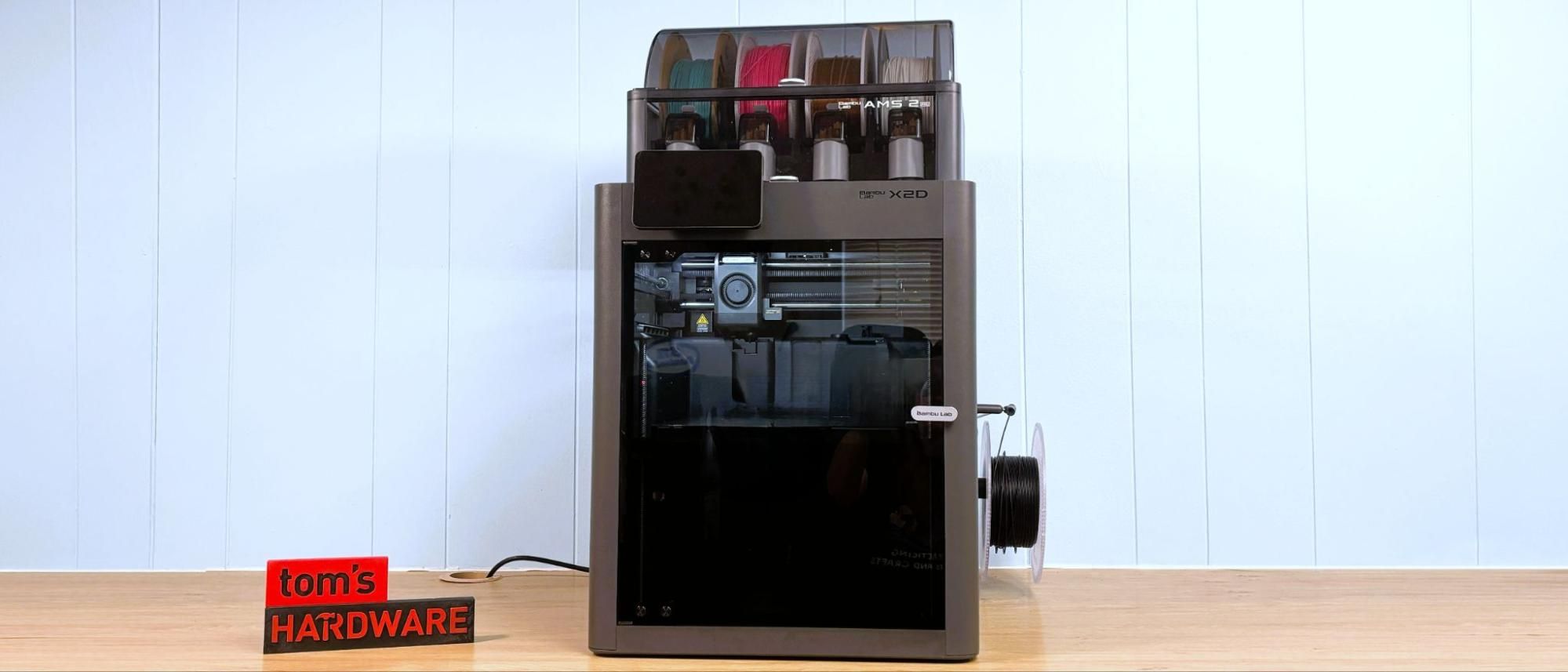
The printer comes with test models loaded in its memory, such as a scraper you can print and assemble with parts included in the toolbox. It does NOT come with a USB stick, which you will need to take time-lapse videos. There’s a getting-started guide and instructions on how to access the slicer and phone app. The box has a QR code printed on the inside flap that directs you to an unpacking video.
The most obvious improvement to the X2D is the dual nozzle, which is similar, but not the same as, the H2D . The X2D uses the same quick swap nozzles, originally inspired by the A1 but improved for faster flow. This means that all manually changed Bambu Lab nozzles are now compatible across the entire X2, H2, and P2 lineup.
Unlike the H2D and H2C, the right side nozzle is the "auxiliary," and it's got a weird little secret: it's not direct drive. Bambu Lab has gone old school and given the Aux nozzle a true Bowden extruder, which I expect to confuse the crud out of makers who started with any “modern” direct drive printer from the last 4 or 5 years. I’ll admit that even I puzzled over the mysterious gray box after opening the package. As an early reviewer, I was coming in completely blind and naturally didn’t stop to dig out the manual first.
The extruder is slapped onto the back of the printer and screwed into place, which leads me to suspect the X2 and P2 share a good bit of chassis. The new H2 style filter is also screwed into the back. Fortunately, this mess can face the wall and never be seen again.
Bambu Lab says the extruder is placed on the back of the machine to remove weight from the toolhead and remove vibrations. But that’s not all that has changed. First, the toolhead glides on steel rods, instead of the X1 Carbon’s dubious carbon fiber rods. Steel rods, which started showing up with the H2 series, should be more robust and easier to maintain.
The dual nozzles have mechanical switching, which removes yet another motor from the tool head. And, as previously stated, Bambu Lab is tripling down on the new style of A1 adjacent nozzle, which can be installed without tools. This means Bambu only needs to manufacture one kind of nozzle for multiple printers, and customers can avoid confusion when ordering replacement parts.
The X2D has a “smart thermal control system” which, like the H2 before it, can keep the chamber cool or warm to suit your needs. This solves one of my personal pet peeves: leaving the door open while printing PLA. Many new users think the door is there to keep children/cats/dust out of the printer, rather than provide a controlled environment for high temperature printing. The airflow system feeds cooler air from the room to the auxiliary part cooling fan on both sidewalls. During testing, the chamber temperature hovered around 32 °C, and I had no issue with nozzle clogs or overhangs.
When you print high-temperature filaments, the heat mode is activated automatically. The vents close and the heater kicks on, allowing warm air to circulate in the chamber.
Speaking of circulating air, the X2D has a triple-stage air filtration system with a HEPA filter and coconut shell activated carbon. The print chamber is vented through this system to trap odors and particulates.
The X2D also gets a USB port, which is one of those simple features that we appreciate. Having a USB port allows you to easily transfer files without the need for an internet connection. It's also where the X2D stores timelapse footage.
The live view camera has also been improved to a full HD 1920 x 1080 high frame rate camera, and combined with upgraded chamber lighting, gives much better results. The camera is also part of a new AI computer monitoring system that makes sure you have the same plate installed as the slicer settings and watches for nozzle blobs and spaghetti printing.
Nozzle pressure is measured with an eddy current sensor, and the machine automatically adjusts the flow rates for you. The main (left side) nozzle has the new direct drive system we’ve seen on the H2 and P2, with a PMSM servo delivering 8.5kg max extrusion force. That’s about 70% more than the old X1C. The printer also monitors the system to detect filament grinding or clogs on the main nozzle. The auxiliary (right side) nozzle uses a standard stepper motor.
Another huge improvement over the X1C is the removal of the dead zone in the forward left corner. The older machine reserved this space for a permanently mounted prong to push the cutter. Now the filament cutter levers are pointed backward, with a small metal prong mounted in the center back of the chamber to depress a button that pushes the cutter. It’s still a manual system, but now it’s much smaller and doesn’t eat up any build volume space.
The rest of the printer is largely the same: a 256mm cubed build volume and a speedy, highly accurate motion system. In case this is your first Core XY, the motion system uses a combination of belts to move the X and Y axes in tandem for smoother, faster printing. The print head stays at the top of the machine while the build plate slowly lowers. When combined with vibration-damping input shaping, the results are exceptionally smooth, high-quality prints.
The X2D Combo comes standard with the new AMS 2 Pro, a four-color Automatic Material System. This new AMS can double as a filament dryer with active venting to maintain low humidity when the lid is kept closed. It still needs desiccant packs to keep moisture at bay because the dryer doesn’t run while it prints.
The AMS 2 Pro is now easier to maintain, with the tubes exposed. This makes it a lot easier to fish out scraps of filament that might snap inside the unit.
Like all the other Bambu Lab machines, X2D needs a collection bucket for its inevitable pile of filament poops. There are various community-designed solutions to the problem, or you can just put an empty filament box back there. I do wish Bambu would address this issue.
Bambu Lab says the X2D can obtain a top speed of 1,000mm/s and 20,000 mm/s acceleration, which is twice the default speed of the slicer and likely only used for travel moves. We still have the “sport” and “ludicrous” speeds, which is 124% and 164% faster than normal, with somewhat sketchy quality results. It’s fine for a quick draft, but I’d still stick with standard speed.
When the X2D has an error, the touchscreen can show us the same helpful assistant as the higher-end machines. It will offer up a QR code you can scan with your phone and get troubleshooting advice from the Bambu Wiki, a knowledge base for operating any Bambu printer. The Wiki will help you identify and fix the problem, often with short video tutorials.
The X2D Combo comes standard with Bambu Lab’s new AMS2 Pro system: a four-spool feeder that unlocks the ability to print in four, eight, twelve, and even sixteen colors. The units cost $299 each and can be placed on top or next to the printer. You can also attach an older AMS if you have an extra or just want to save a couple of bucks.
The auxiliary nozzle comes with a basic rack, but can use another AMS 2 Pro or the single spool AMS HT.
You can program the filament colors using the touchscreen, and also change the colors or spool placement on sliced files.
The AMS unit is able to read RFID ID tags that the company installs on each roll of its own filament for easy identification. These tags tell the printer what type and color of material you have installed, and then match it with presets in Bambu Studio. If you use 3rd party filament, you’ll have to fill that information in by hand.
The AMS has pockets for descant and seals tightly, allowing you to use the AMS as a drybox for temperamental filament like Nylon. The AMS 2 Pro does double duty as a filament dryer, though only while it is not printing.
There’s also a “backup” option for the AMS, which will allow it to automatically switch from one slot to the next instead of tripping a run-out sensor. This could be handy for using up partial spools or prints that will need more than one spool. To use this setting, you’ll need to have identical spools loaded.
The Bambu Lab X2D comes mostly assembled and only needs a few things mounted onto the back, and the screen plugged into the front. You’ll probably spend more time removing all the packing screens and zip ties. The printed guide walks you through each step.
The Bambu Lab X2D has an excellent auto-leveling system combined with vibration compensation, pressure advance, and automatic belt tensioning. A thorough self-test is run after unpacking the machine to make sure everything is in working order.
Once you’re up and running, the machine will automatically run a bed leveling check before each print. This takes a few minutes, but you’re free to uncheck the option if you don’t want to take the time.
There is no need to set the Z height or Z offset. In fact, there’s no option or button to do so, because the X2D handles this setting on its own.
The X2D comes with two single spool racks if you didn’t opt for an AMS. If you order the combo, you’ll get an AMS 2 Pro and one spool rack for the auxiliary nozzle. If you’re upgrading from an X1 Carbon or a P1, the side-mounted rack is so much easier to deal with than the old rear-mounted spool.
TPU is problematic. Bambu Lab recommends their harder “TPU for AMS” for the main nozzle and none at all for the auxiliary nozzle. If you want to run “regular” soft TPU, you’ll have to gerry rig a top-mounted spool and bypass all the tubing, but this is not supplied.
The X2D automatically unloads filament when it’s done printing.
Key considerations
- Investor positioning can change fast
- Volatility remains possible near catalysts
- Macro rates and liquidity can dominate flows
Reference reading
- https://www.tomshardware.com/3d-printing/SPONSORED_LINK_URL
- https://www.tomshardware.com/3d-printing/bambu-lab-x2d-review#main
- https://www.tomshardware.com
- News outlets are blocking Wayback Machine from archiving their pages — 23 outlets concerned AI companies might abuse fair use and use it to train their models
- Espresso Lite 15 Review: An entry-level portable monitor with a splash of color
- Veteran Microsoft engineer says original Task Manager was only 80KB so it could run smoothly on 90s computers — original utility used a smart technique to deter
- Grab MSI’s RTX 5080 gaming laptop for just over $2,000 — offers fast 240 Hz QHD+ display, dual storage slots, and expandable DDR5 memory
- NVIDIA, Telecom Leaders Build AI Grids to Optimize Inference on Distributed Networks
Informational only. No financial advice. Do your own research.