
Gigabyte X870E Aorus Xtreme AI Top Motherboard Review: Solid flagship, but the X3D version is what you want today
Of course, the question is whether the Audigy FX Pro's signal was so much cleaner and clearer than my PC's onboard audio that it warrants the upgrade, and my answer to that is… probably not. It was noticeable, but it was only noticeable by comparison — I didn't have any real issues with the onboard audio prior to testing the sound card, and I still don't have any real issues. And while the Audigy FX Pro's audio signal is very clean, it's not perfect — I went ahead and plugged in a USB DAC/amp (the AudioQuest DragonFly Cobalt), and that signal was cleaner and clearer than the Audigy FX Pro's. So it's hard to say where the Audigy FX Pro ends up falling — it's definitely in between onboard audio and audiophile-grade equipment, but I suspect onboard audio is still fine for most users.
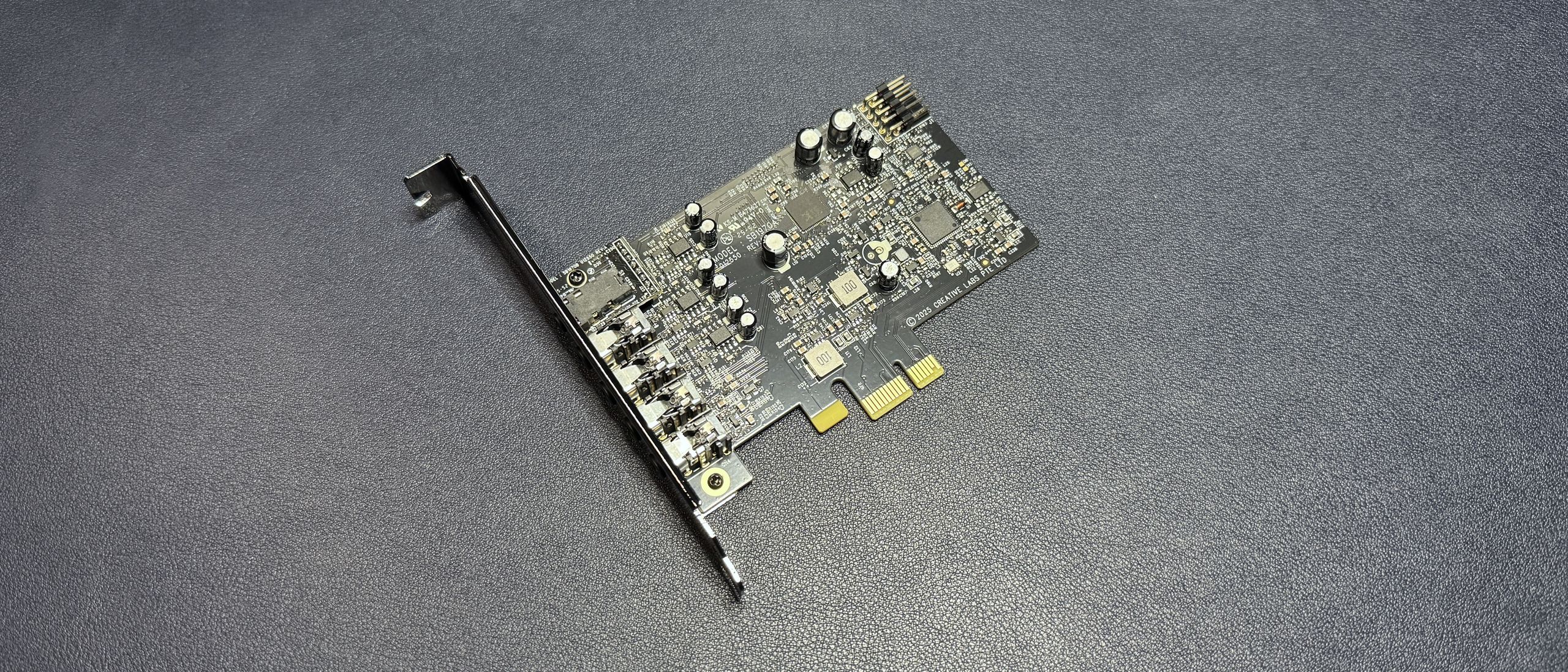
The Sound Blaster Audigy FX Pro is the first product to work with the company's new Creative Nexus app, which is an audio controller featuring a 10-band EQ with a searchable database of game-specific presets, as well as Creative's Acoustic Engine software enhancements. These include surround (virtual surround and upmixing), crystalizer (enhanced dynamic range of compressed audio), bass (bass boost for those with and without subwoofers), smart volume (consistent volume across media, with loud and night modes), and dialog plus (amplifies and cleans up vocal frequencies).
The Audigy FX Pro does not have Creative's Super X-Fi (SXFI) technology, which is the company's gamer-oriented spatial audio tech that uses head/ear-mapping to create more realistic virtual surround sound (it also received an AI-enhanced update a couple of years ago ). However, the virtual surround from Creative's Acoustic Engine did an excellent job of widening and repositioning the soundstage in the headsets and headphones I tested (through both the front and back ports). The other Acoustic Engine features also offered well-tuned enhancements that didn't sound too over-processed. The crystalizer did a nice job of separating out details and layers of environmental sound in games such as Uncharted 4 and God of War: Ragnarok, while the dialog plus feature was able to boost voices in games and movies without making them sound shrill or out of place.
The app also lets you update the card's firmware and drivers (it did require a firmware update right out of the box, which wasn't too painful aside from needing a restart).
The real question is whether you need a dedicated, discrete sound card in 2026. And I'm talking about the literal you — would your setup actually benefit from a sound card? If you're looking for a way to bring your 7.1 discrete surround gaming dreams to life, then yes, you almost certainly need a sound card. But I don't think that's a huge chunk of the market, given that it's pretty difficult to find 7.1 speaker systems (especially if you're looking for the best PC speakers ).
If you're just looking for a way to improve your system's overall audio output, the good news is that the Creative Audigy FX Pro will probably give you a cleaner, clearer signal than your onboard audio chip — even if you have a very high-end, gamer-oriented motherboard with isolated audio. But whether it will sound that much better is where it gets debatable. If you're already rocking a high-end motherboard and you want to put your money toward a big audio improvement, you might be better off picking up one of the best gaming headsets (or best wireless gaming headsets ), as these bypass your PC's audio altogether unless they're connected via analog (i.e. plugged into the 3.5mm headset jack).
Likewise, the gaming-oriented speakers on our list of best PC speakers have their own built-in audio interfaces and won't use your PC's onboard audio (or a discrete sound card, if you have one). But if you have a more budget-friendly motherboard and/or you're looking for 7.1 (or 5.1) surround support, the Audigy FX Pro is a quick, easy, and relatively affordable installation that will let you connect your speakers to your PC and offer a noticeable bump in audio performance.
Sarah Jacobsson Purewal is a senior editor at Tom's Hardware covering peripherals, software, and custom builds. You can find more of her work in PCWorld, Macworld, TechHive, CNET, Gizmodo, Tom's Guide, PC Gamer, Men's Health, Men's Fitness, SHAPE, Cosmopolitan, and just about everywhere else. ","collapsible":{"enabled":true,"maxHeight":250,"readMoreText":"Read more","readLessText":"Read less"}}), "https://slice.vanilla.futurecdn.net/13-4-23/js/authorBio.js"); } else { console.error('%c FTE ','background: #9306F9; color: #ffffff','no lazy slice hydration function available'); } Sarah Jacobsson Purewal Social Links Navigation Senior Editor, Peripherals Sarah Jacobsson Purewal is a senior editor at Tom's Hardware covering peripherals, software, and custom builds. You can find more of her work in PCWorld, Macworld, TechHive, CNET, Gizmodo, Tom's Guide, PC Gamer, Men's Health, Men's Fitness, SHAPE, Cosmopolitan, and just about everywhere else.
JeffreyP55 Admin said: Creative's new Audigy FX Pro sound card is an $80 discrete internal sound card with 7.1 surround sound, high-res playback, 120dB SNR, and the support of Creative's new Nexus app. Creative Sound Blaster Audigy FX Pro: A decent upgrade for analog audio : Read more I wouldn't bother with a PCIE1 anything. The slots have been disappearing from motherboards for a couple of years now. Reply
Rand0m_Guy Nothing more than a money grab, the on-motherboard audio just as good these card now a days. What you are paying for is the software suite which very few people use. The next class of people just buy the USB headphones or speakers, no needs for any kind of card or on-board hardware for this. Myself, I use a Topping E70 Velvet, L70 amp stack with Sennheiser HD560S headphones. I tried to "borrow" the HD800s from my rep, but he probably figured I can run faster than him, so I wasnt allowed to touch them 🙂 Reply
wakuwaku JeffreyP55 said: I wouldn't bother with a PCIE1 anything. The slots have been disappearing from motherboards for a couple of years now. Even budget MATX boards have an extra PCIE slot besides the x16 for the GPU. They have not been disappearing, just reducing in amount. Reply
EzzyB Rand0m_Guy said: Nothing more than a money grab, the on-motherboard audio just as good these card now a days. What you are paying for is the software suite which very few people use. The next class of people just buy the USB headphones or speakers, no needs for any kind of card or on-board hardware for this. Myself, I use a Topping E70 Velvet, L70 amp stack with Sennheiser HD560S headphones. I tried to "borrow" the HD800s from my rep, but he probably figured I can run faster than him, so I wasnt allowed to touch them 🙂 There are still some of us though. I have quite a bit of hearing loss, mainly on the high end. I don't have a high-end motherboard (literally bought the wrong one without higher end audio and didn't realize it.) For me this is probably a good idea. While the most of the features of the software described are not new and are present on the current Creative software, things like dialogue enhancement are critical to me. You can't use hearing aids with headphones (they feed back dreadfully) so I have to use things like that and the equalizer to recreate the various boost levels already programmed into the hearing aids. I imagine this will be a decent upgrade over the Audigy card I'm still using, bought about 15 years ago, so I appreciate the review! Reply
Roland Of Gilead I went with a Sound B:aster Z SE. It has Optical out (SPDIF), along with analogue outputs. More expensive though, but I did want it for the optical out. In terms of the audio and the quality, I'm no audiophile at all, but even with my untrained ears the sound is far better than onboard (ALC 887 codec). The optical out is handy because the card can send compressed audio (Dolby Digital Live, DTS: X) to a standard 5.1 surround sound system, which gives more options for speaker setups. Reply
enb141 EzzyB said: There are still some of us though. I have quite a bit of hearing loss, mainly on the high end. I don't have a high-end motherboard (literally bought the wrong one without higher end audio and didn't realize it.) For me this is probably a good idea. While the most of the features of the software described are not new and are present on the current Creative software, things like dialogue enhancement are critical to me. You can't use hearing aids with headphones (they feed back dreadfully) so I have to use things like that and the equalizer to recreate the various boost levels already programmed into the hearing aids. I imagine this will be a decent upgrade over the Audigy card I'm still using, bought about 15 years ago, so I appreciate the review! I also have hearing loss, I got a soundblaster AE-9 because I need as much clarity as possible otherwise is hard to understand people. So unfortunately I can't use sound blaster on every computer I have so I also use Equalizer APO for equalizing on cheap soundcards (Laptops, Headphones) by the way, I hope this time equalizer doesn't limits audio to 24/96 as SoundBlaster AE-9 does. Reply
enb141 Roland Of Gilead said: I went with a Sound B:aster Z SE. It has Optical out (SPDIF), along with analogue outputs. More expensive though, but I did want it for the optical out. In terms of the audio and the quality, I'm no audiophile at all, but even with my untrained ears the sound is far better than onboard (ALC 887 codec). The optical out is handy because the card can send compressed audio (Dolby Digital Live, DTS: X) to a standard 5.1 surround sound system, which gives more options for speaker setups. S/PDIF for Dolby Digital and DTS is now limited, HDMI is the only way to get real multi channel audio, because normal DTS and Dolby Digital are compressed (about mp3 320), but with HDMI you can get lossless DTS-HD Master Audio and Dolby True HD. Reply
UnforcedERROR Roland Of Gilead said: I went with a Sound B:aster Z SE. It has Optical out (SPDIF), along with analogue outputs. More expensive though, but I did want it for the optical out. In terms of the audio and the quality, I'm no audiophile at all, but even with my untrained ears the sound is far better than onboard (ALC 887 codec). The optical out is handy because the card can send compressed audio (Dolby Digital Live, DTS: X) to a standard 5.1 surround sound system, which gives more options for speaker setups. Did you motherboard not have optical/coax? Most do these days, even lower end ones. That aside, HDMI is a better option as it'll interface with dedicated receivers so long as they aren't 20 years old, and it'll run both compressed and uncompressed surround options. In 2026 I am not sure how I feel about soundcards, there are too many better options depending on need, in my opinion. Reply
Dr3ams The first Sound Blaster card I bought was in 1995, a Sound Blaster 32 PnP with an ISA interface. Over the years I've owned a few of them, but when motherboards started offering premium audio chips and media player apps came out with really good sound management options, I didn't see the point in buying Creative's cards any more. Reply
drjohnnyfever It's important to check your MOBO sound specs. Some of them have really good DAC's, like Sabre 32, built in. I bought the Sound Blaster AE-5 Pro Plus Pure a few years ago because my MOBO's dac was poor. Excellent sound with the above. So good, I got a couple more for other PC's. Reply
Key considerations
- Investor positioning can change fast
- Volatility remains possible near catalysts
- Macro rates and liquidity can dominate flows
Reference reading
- https://www.tomshardware.com/pc-components/sound-cards/SPONSORED_LINK_URL
- https://www.tomshardware.com/pc-components/sound-cards/creative-sound-blaster-audigy-fx-pro-a-decent-upgrade-for-analog-audio#main
- https://www.tomshardware.com/subscription
- NVIDIA Spectrum-X — the Open, AI-Native Ethernet Fabric — Sets the Standard for Gigascale AI, Now With MRC
- NVIDIA and SAP Bring Trust to Specialized Agents
- NVIDIA Spectrum-X — the Open, AI-Native Ethernet Fabric — Sets the Standard for Gigascale AI, Now With MRC
- Intel's Project Firefly creates sub-$600 laptops to compete with Apple's MacBook Neo — leverages China's smartphone manufacturing blueprint to produce affordabl
- US FTC reportedly launches antitrust probe into Arm following its launch of its own AGI CPU — regulators investigate if chip designer is restricting architectur
Informational only. No financial advice. Do your own research.