
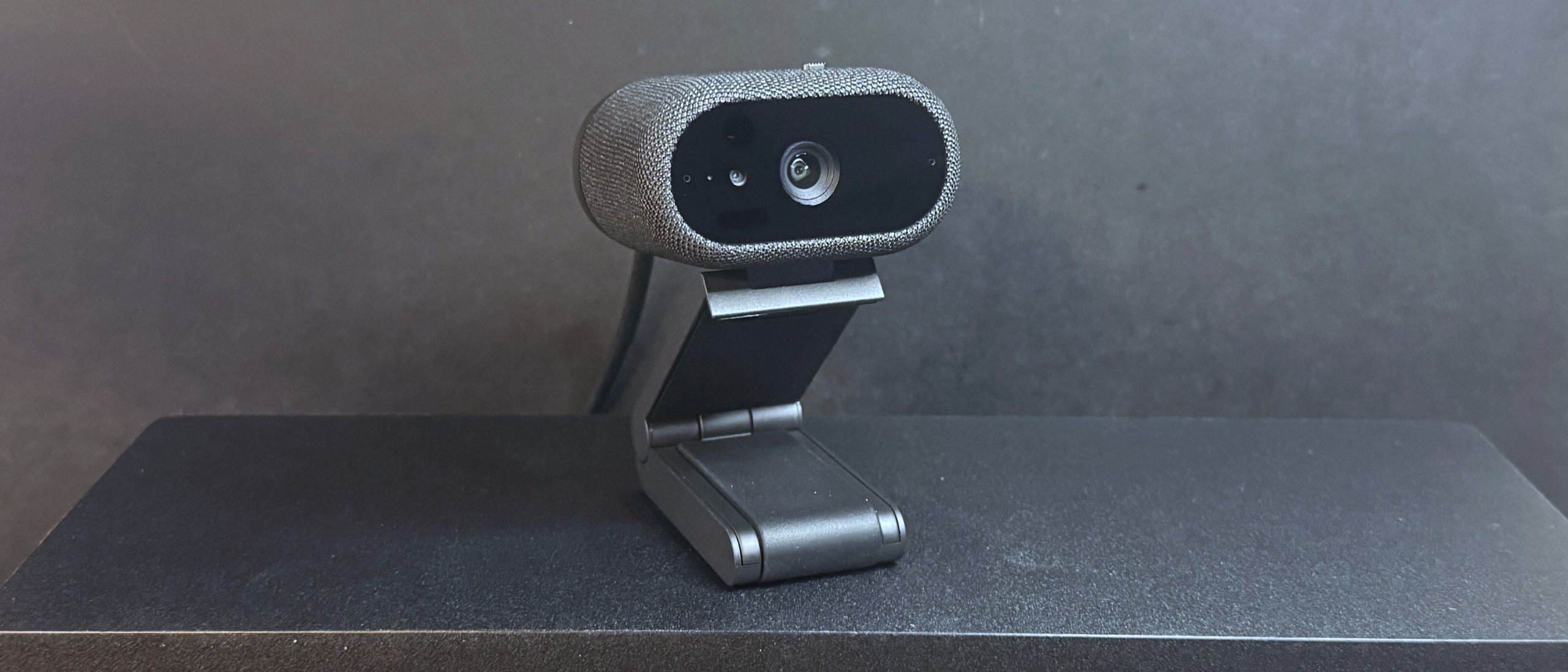
The Dell Pro 7 is a 4K webcam that records video in 4K, 1080p, and 720p resolution at both 60 and 30fps — which makes it somewhat rare, as most 4K webcams record a maximum of 4K / 30fps. Not that this matters for most users, as streaming and video chat platforms still generally limit outgoing streams to 1080p at most. Still, I guess it's worth noting if you're looking for a webcam that you can use to record action sequences on.
We started out by testing the Dell Pro 7's performance in what is basically an "ideal" (and very unrealistic) webcam lighting scenario. In this scenario there are two professional lights in front of me (behind my monitor set up): a ring light and a key light. I also have four monitors — three 27-inch monitors and one ultra-wide 34-inch monitor, plus some negligible ambient lighting from various peripherals (including my desk). There are two desk lamps behind me, as well as an arching floor lamp above me. All in all, this is an aggressively well-lit scenario (and a very unlikely one, unless you happen to be a professional content creator).
Dell Pro 7 (Image credit: Tom's Hardware) Elgato Facecam Pro (Image credit: Tom's Hardware) Logitech MX Brio (Image credit: Tom's Hardware) Razer Kiyo Pro Ultra (Image credit: Tom's Hardware) Image 1 of 4 View Original
The Dell Pro 7 looked very good in our well-lit scenario. It did a great job of reigning in its auto-exposure in response to the lighting, which is something even the best webcams usually have more trouble with. It managed to keep the scene pretty evenly lit, even as I moved around the room, while also keeping it from looking too evenly lit, i.e., flat and featureless. Its auto white balancing was okay, though it trended toward the cool end of the spectrum. Actually, the colors on this webcam always seemed to be just a little too cool, even with some tweaking in the software. Not the worst thing in the world, but it was frustrating that I couldn't get the color to where I wanted it with adjustments.
That said, while the Dell Pro 7 produced an objectively very good image overall, it didn't really stand out in any way aside from that. I suppose that's not a bad thing, especially for a webcam that's (maybe) slightly more aimed at the workplace, but it mostly made me think of all the other $200 4K webcams you can pick up instead of the Dell Pro 7. Also, while the webcam did a pretty solid job of capturing still photos, the auto-focus was a little slow — which sort of negates the benefit of a 4K / 60 fps capture rate.
Dell Pro 7 (Image credit: Tom's Hardware) Elgato Facecam Pro (Image credit: Tom's Hardware) Logitech MX Brio (Image credit: Tom's Hardware) Razer Kiyo Pro Ultra (Image credit: Tom's Hardware) Image 1 of 4 View Original
The Dell Pro 7 performed moderately well in our low-light scenario. It did an okay job of lighting the scene — the picture looked better than most older webcams, but that's about it (and that's not saying much). There was a lot of noise / graininess and artifacting, however, especially when I moved. And the autofocus had (unsurprisingly) even more trouble tracking me in the dark, and an evenly-lit blurry mess is still a blurry mess.
No webcam performs particularly well in low light, because sensor size is a major factor in low-light performance and webcams are… just not that big. But compared to other 4K webcams such as the Elgato Facecam Pro and the Logitech MX Brio, the Dell Pro 7 definitely comes in a little below average.
To test the Dell Pro 7's performance in overexposed lighting scenarios, I turned off all of the lights in front of me and three of my monitors. That left me with my overhead and background lights, as well as one 27-inch monitor. This isn't the most extreme overexposed lighting scenario, but it's a fairly common one as most offices tend to have a lot of overhead lighting (and only professional streamers put bright, studio-grade lighting directly behind a monitor).
Dell Pro 7 (Image credit: Tom's Hardware) Elgato Facecam Pro (Image credit: Tom's Hardware) Logitech MX Brio (Image credit: Tom's Hardware) Razer Kiyo Pro Ultra (Image credit: Tom's Hardware) Image 1 of 4 View Original
The Dell Pro 7 performed fairly well in this lighting scenario, though it struggled to find a natural-looking color balance (and it kept veering cooler). This is another scenario in which no webcam does particularly well — for the most part, it's enough to just not get blown out by the lighting behind you. But the Logitech MX Brio, which is probably one of the Dell Pro 7's closest competitors, did a much better job here.
The Dell Pro 7 is configurable via the Dell Display and Peripheral Manager, which lets you adjust camera and picture settings and set up the webcam's various features, such as Windows Hello, presence detection, and the "smart" image enhancements.
While the Dell Display and Peripheral Manager has all the settings and adjustments you might expect in a webcam app, I didn't feel like the various manual adjustments for exposure, saturation, contrast, sharpness, and vibrance were very powerful, which was a bit surprising as usually these settings are too powerful. But this wasn't too much of an issue for me, as the picture is already pretty good — just not perfect — out of the box.
In addition to image enhancements and color adjustments, you can also set up several features in Dell Display and Peripheral Manager — such as face-tracking and auto-framing; "smart" HDR, exposure, and auto white balance; and Windows Hello compatibility. Like the Dell Pro 5, the Dell Pro 7 also has a "document view" feature designed to better focus on and display documents, as well as an "object focus" mode that can be activated using gesture controls (or manually).
The Dell Pro 7 has built-in dual beam-forming microphones, and while a built-in microphone is not really something most people are looking for in a webcam (especially as they generally tend to be terrible), the Dell Pro 7's built-in mics were surprisingly good — and not just for a webcam, but… in general. In fact, this might be the first webcam with a mic I can actually recommend.
The Dell Pro 7's mics picked up my voice very well — it came through loud, clear, and surprisingly vibrant and full, even when I was sitting at a normal distance from the webcam and speaking casually (i.e., not trying to speak "into" the mic). There was a little fuzziness and distortion around the edges of my words, and it picked up the clacking on my keyboard and the clicking on my mouse almost as well as it picked up my voice (and the software-based noise reduction in the app almost immediately started swallowing my words), but as long as you're not trying to type and talk at the same time the Dell Pro 7's mic sounds good . Not as good as a standalone USB gaming mic, of course, but on par with the average gaming headset mic.
The Dell Pro 7 is actually a pretty solid 4K webcam, if not a particularly thrilling one. While I don't think most people looking at the Dell Pro 7 are going to be fiending for 60fps, I'm sure there are probably at least two people who will appreciate it. For everyone else, the Dell Pro 7 has a nice suite of office-friendly features, including presence detection to lock your PC when you're not sitting in front of it, Windows Hello compatibility for extra security , and things like document view and gesture control and an extra-wide field of view for when you need to run a remote 4K, 60fps meeting with lots of people (and documents).
But if you don't see yourself running speedy, highly-detailed multi-person webcam meetings, the similarly-priced Logitech MX Brio does a better job at making you look good… which is a big part of what webcams are for, right? The Dell Pro 7 outputs a decent picture (in relatively "ideal" lighting), but this webcam is not really about the picture — it's about everything else.
Sarah Jacobsson Purewal Social Links Navigation Senior Editor, Peripherals Sarah Jacobsson Purewal is a senior editor at Tom's Hardware covering peripherals, software, and custom builds. You can find more of her work in PCWorld, Macworld, TechHive, CNET, Gizmodo, Tom's Guide, PC Gamer, Men's Health, Men's Fitness, SHAPE, Cosmopolitan, and just about everywhere else.
Key considerations
- Investor positioning can change fast
- Volatility remains possible near catalysts
- Macro rates and liquidity can dominate flows
Reference reading
- https://www.tomshardware.com/peripherals/webcams/SPONSORED_LINK_URL
- https://www.tomshardware.com/peripherals/webcams/dell-pro-7-webcam-4k-review#main
- https://www.tomshardware.com/membership
- Intel suspends bug bounty program that paid up to $100,000 per flaw — new Intigriti disclosure program offers no rewards
- Acer Nitro XV273U F5 gaming monitor review: One of the fastest LCDs on the planet
- Save up to 40% on Elegoo 3D printers during its September sale, from just $159 — Elegoo Day deals mean you can save on a new FDM or resin printer, with big bulk
- Acer Predator QD-OLED monitor now 36% off — 500 Hz refresh rate and True Black 500 certification slashed to $509.99
- Details about Intel's next-gen Nova Lake CPUs keep leaking — an attempt to establish a timeline based on what we know so far
Informational only. No financial advice. Do your own research.