
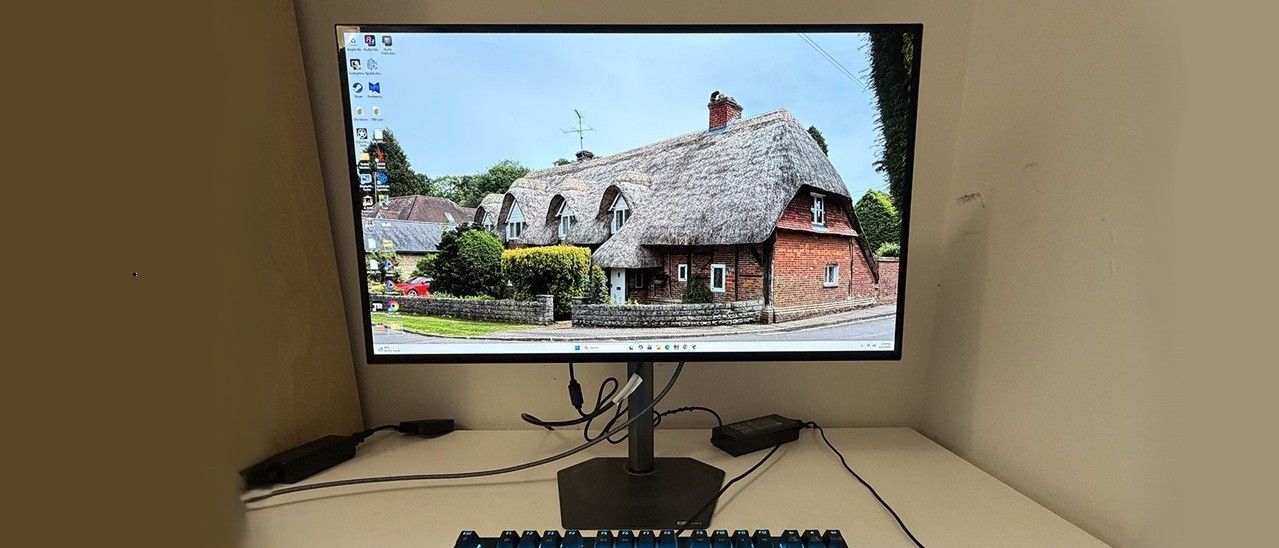
If you’ve been fancying an OLED but didn’t want to spend $600 or more on a 27-inch monitor, the GO27Q24G is a compelling option.
The GO27Q24G comes packed in crumbly foam in three parts. I was impressed by the stand, which is all-metal and super solid. Everything assembles tool-free. The accessory bundle includes an external power supply and a DisplayPort cable. If you want to use an arm, there’s a 100mm VESA mount, but you’ll need to source your own fasteners.\
(Image credit: Gigabyte) (Image credit: Gigabyte) (Image credit: Gigabyte) Image 1 of 3 View Original
The GO27Q24G’s styling and build is minimalist in all the right ways. From the front, you only see the image surrounded by a very narrow flush bezel of 8-11 millimeters. There is no plastic trim anywhere in sight and no logos either. Even the power LED is tucked well underneath where you won’t be distracted.
The base is a stamped steel plate with a gray satin finish. Its footprint is small, but with rubber feet and an ideal shape, it’s very stable. The upright is all-metal with very smooth movements and the same gray satin finish. The GO27Q24G includes full ergonomics with 5/21 degrees of tilt, 15 degrees swivel, a 90-degree portrait mode, and a 5.1-inch height range. A small cable clip is included to keep your wires tidy.
The only plastic used is in the back, where a small component bulge is trimmed with generous ventilation and a small Gigabyte logo. There’s a joystick flanked by two buttons and the input panel. It features two HDMI 2.1 ports , one DisplayPort 1.4 with DSC, and a USB-C input which has 15 watts of power. There are no additional USB ports or internal speakers, but you do get a 3.5mm headphone jack.
A single joystick controls the GO27Q24G’s OSD. Two flanking buttons toggle power and switch between aspect ratio modes.
(Image credit: Tom's Hardware) (Image credit: Tom's Hardware) (Image credit: Tom's Hardware) (Image credit: Tom's Hardware) (Image credit: Tom's Hardware) (Image credit: Tom's Hardware) (Image credit: Tom's Hardware) (Image credit: Tom's Hardware) Image 1 of 8 View Original
The OSD screen is well appointed with information. Resolution and refresh numbers are at the top while other parameters are at the bottom. You can quickly check the active input, SDR/HDR status, picture mode, brightness level, gamma setting, and color temp mode.
The GO27Q24G includes PIP and PBP options with full control of the PIP window’s size and location. You can also program the four joystick directions for quick access to commonly used settings.
In Standard mode, the GO27Q24G measures OK out of the box but leaves room for improvement. Grayscale is a tad warm, and gamma is too dark, which makes the picture less lively. With a few tweaks to the RGB sliders and a change of gamma preset from 2.2 to 2.0, the picture is greatly improved. Color gamut coverage is nearly 100% of DCI-P3, so you can see a vivid picture in SDR or HDR mode. If you want sRGB , choose that mode from the 10 presets. It has only a brightness control available. My recommended settings are below.
For HDR signals, there are five specific modes. To get the brightest possible picture, choose Peak 1300. It has a lot of impact, but for the most accurate luminance tracking, HDR is the way to go. You can read more about this on page five.
You’ll see in the upcoming tests that the GO27Q24G delivers more brightness than any other OLED in its class. But does that translate to gaming goodness? I’m going to say yes. Because it’s one of the most precise monitors I’ve ever played on. Qualifier: you’ll need to keep the frame rate above 200fps. But that’s true of any OLED, regardless of resolution. I had no problem with that thanks to a GeForce RTX 4090 . And when I say precision, I mean that I could pretty much not miss. The firing accuracy I enjoyed made me a bit overconfident, to the point where I was wading into hordes of enemies rather than taking my time picking them off one by one. I can’t promise that the GO27Q24G will make you a better player, but it is an absolute weapon. Pro competitors will surely want to give it an audition.
Picture quality was superb thanks to its high brightness. I tried both HDR and Peak 1300 modes for Doom Eternal and picked the latter as my favorite. You can see the technical differences between them in my test on page five. Quick spoiler: Peak 1300 is much brighter, almost double, in fact. And it has tremendous impact. The GO27Q24G has a bit less color volume than Quantum Dot or Tandem OLED monitors, but its extra light output makes up for that.
I noted from the get-go that the GO27Q24G has premium build quality. Though many OLEDs share this trait, I was particularly impressed with the all-metal stand. It’s sleek and slender, but supremely solid. The panel’s fulcrum is equally tight, which creates a monolithic package. And with nothing facing the viewer besides the screen, there are no distracting elements; no lights, no logos, no plastic trim, no nothing. I was amazed when I learned that the price is only $350.
Takeaway: The GO27Q24G is one of the best values I’ve seen in the OLED category. It offers all the performance of more expensive monitors while outpacing them in brightness. It also has the smoothness and response of the best gaming panels I’ve experienced. There are a few peripheral bits missing, like USB ports, LEDs, and internal speakers. But for the money, there isn’t a better 27-inch QHD OLED.
Current page: Features and Specifications
Key considerations
- Investor positioning can change fast
- Volatility remains possible near catalysts
- Macro rates and liquidity can dominate flows
Reference reading
- https://www.tomshardware.com/monitors/gaming-monitors/SPONSORED_LINK_URL
- https://www.tomshardware.com/monitors/gaming-monitors/gigabyte-go27q24g-27-inch-oled-240-hz-qhd-gaming-monitor-review#main
- https://futureplc.com/privacy-policy/
- Why Telecom Operators Are Building Their AI Strategy on Open Models
- AMD debuts Helion reference design for agentic AI servers with up to 32,768 Zen 6 ‘Venice’ cores
- Redditor unknowingly buys stolen rental PC, and it gets remotely blocked by rental firm
- Developer uses Claude to enable Xbox Cloud Gaming on jailbroken PS5s
- Epic Games reportedly delays Disney shooter title so it can pivot to AI coding
Informational only. No financial advice. Do your own research.