
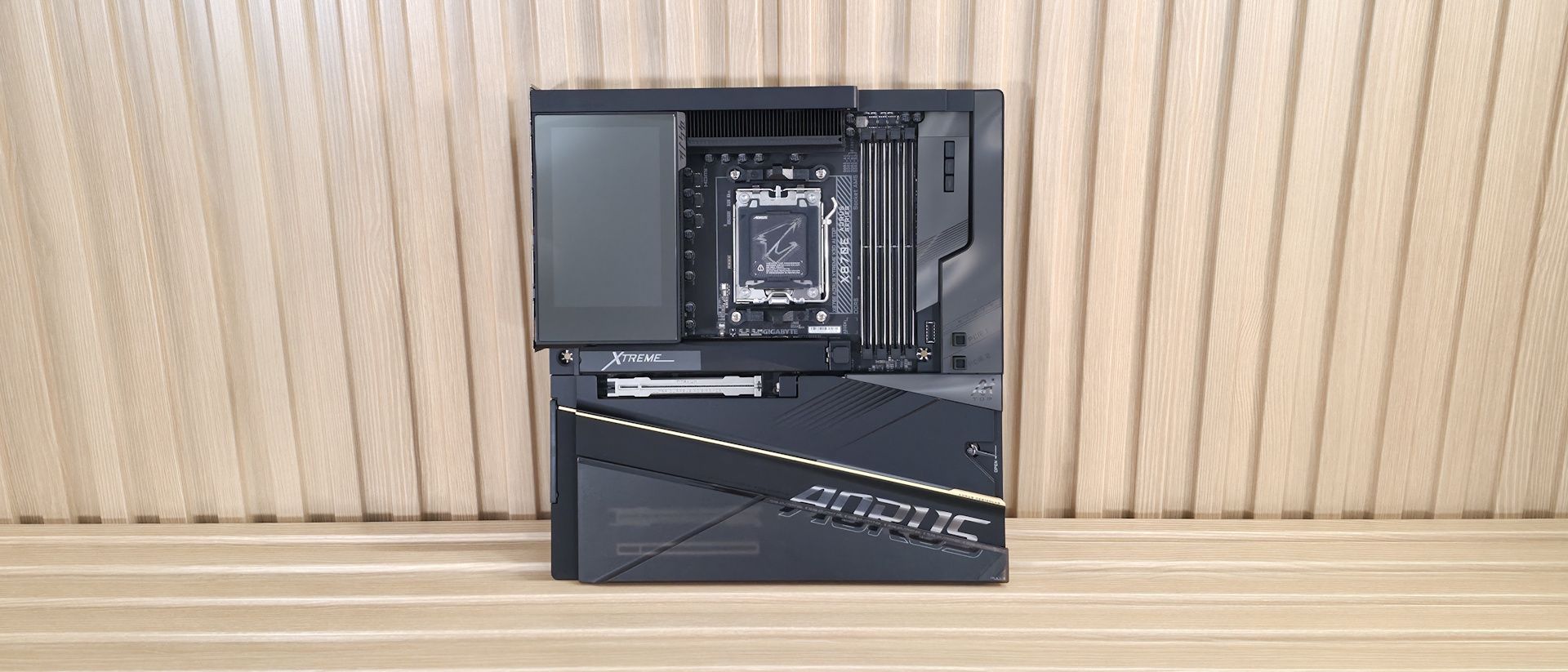
Focusing on the top half, starting on the left, we get a better look at the 5-inch LCD Edge View screen, which displays system parameters for instant insights, including temperatures, voltages, and clock speeds. You can also customize the display to show your own GIFs or still images for your own special touch. The VRM heatsink below uses fins (with a ‘nano carbon coating’), a lot of mass, and a heatpipe connecting to both, helping to dissipate heat from the MOSFETs below. Between this and the high-quality VRMs underneath, you can run and overclock any compatible chip to its limit (which will be your cooling method). Above the socket area, Gigabyte includes another magnetic shroud, this one designed to cover the dual 8-pin EPS connectors and some unsightly bits along the top edge, maintaining the clean appearance.
Just past the socket area, to the right, are the DRAM slots. Here, all four slots use Gigabyte Memory UD Slot D5 reinforcement (only two are reinforced on the non-X3D), and all four have locking mechanisms on both sides to secure the sticks in place. Gigabyte lists support of up to DDR5-9000, which is plenty fast for the platform and is a slight increase over the original Xtreme AI Top. We didn’t have any issues running any of our three kits, up to DDR5-8000 with an APU, as expected. The X3D also includes a RAM fan with a shroud that slides over your RAM (secured via a magnet) to help cool the warmer-running DDR5 sticks. We didn’t crank the voltage to see any differences, but we did observe a ~4°C drop during our 30-minute stress test using our DDR5-7200 kit, which runs at a higher 1.4V.
Above the DRAM slots and below that shroud are the first two (of three – 10 total fans through internal headers) 4-pin fan headers. Each header supports both PWM- and DC-controlled devices and delivers 2A/24W, which is plenty for fans and pumps. Control over the headers is handled by the BIOS, Smart Fan 6, or Gigabyte’s Control Center (GCC) software. Just to the right, left, and above the VRM heatsink are two 2-pin temperature sensor headers for additional monitoring capabilities.
Rounding the corner and working our way down the right edge, we first see the 2-character debug display. Below that are power, reset, and Clear CMOS buttons. Next, in the upper-right corner, we see another 4-pin system-fan header and two more fan headers (those that split into three each – cables included). Below that is a front USB Type-C connector with DisplayPort capability (for installing an extra monitor on your chassis). Continuing down the edge, we then run into the 24-pin ATX to power the board, along with supplemental PCIe power (6+2) for additional board power (think RTX 5090 or a pair of graphics cards).
Next is another 3-pin fan header, a 2-pin temperature header (use the included thermistors), and the front HDMI output for easy installation of additional monitors (think an internal display for sensors or the like). Last but not least is the front-panel USB 3.2 Gen 2×2 (20 Gbps) connector.
Power delivery on the X870E Aorus Extreme X3D AI Top consists of 24 phases, with 22 dedicated to Vcore, again, more than the non-X3D version. Power heads from the 8-pin EPS connector(s) in the top-left corner, onto an Infineon XDPE192C3D 12-channel controller. From there, it moves to the 22 Infineon PMC41430 110A SPS MOSFETs. It’s a robust solution that will handle anything you throw at it, including the Ryzen 9 9950X , the recently released Ryzen 7 9850X3D (fastest gaming processor around), or the Ryzen 9 9950X3D2 , even if you want to use extreme (sub-ambient) cooling methods.
On the bottom half of the board, starting on the front-left side and under the plate heatsink, is the audio section. Gigabyte equips the Xtreme X3D AI Top with unique ESS ES9080 chips (versus the Realtek ALC4000-series we’re used to) and an ESS ES9280AC DAC chip. On paper, the specs are similar: Both offer 7.1 channels and around 110 dB SNR. You’d be hard-pressed to hear a difference between them, and we have no issue with the audio selection as it is excellent. Gigabyte also includes a USB DAC that connects your 3.5mm headphones to the DAC and system.
In the middle of the board, under the heatsinks, are the five M.2 sockets. The top socket (M2A_CPU), with its own larger heatsink (another massive heatsink is included in case you have a hot-running 5.0 x4 M.2 drive and plan to beat on with extended transfers), supports up to 110mm devices and runs at PCIe 5.0 x4 (128 Gbps), as does M2B-CPU, but it’s under the plate heatsink. Also below the large plate heatsink are three other sockets, each supporting up to 110mm modules. The top-most, M2C/D_SB and M2E_SB, run at PCIe 4.0 x4 (64 Gbps) again, supporting up to 110mm devices, and connect through the chipset. Compared to the non-X3D AI Top, this board has one more total socket and a second PCIe 5.0 x4 slot, which we expect from a flagship.
Visible around the plate heatsink are three full-length PCIe slots. The top two connect through the CPU and are reinforced with their Titanium PCIe UD Slot X, which connects to the CPU. The top slot supports PCIe 5.0 x16 (also x8), while the second supports PCIe 5.0 x8. The top slot is your PCIe 5.0 x16 slot for your video card, and both use the PCIe EZ-Latch Plus to secure your expensive graphics card. Simply install the card, then press the button to lock it and remove it. Easy. The bottom full-length slot connects to the chipset, supports PCIe 4.0 x4, and is used for expansion cards.
Moving right, past the chipset, the first item we run into is next to the PCIe release buttons. Along the edge is a front USB 3.2 Gen 2×2 (20 Gbps) port, followed by two SAT ports below it. Next are the LED header, USB fan header, two USB 3.2 Gen 1 (5 Gbps) headers, and, finally, the front panel port. We've also captured several images of the IC's used to make this motherboard work consisting of a mix of Infineon bits for power and Realtek brand networking and USB support. Typical fare.
(Image credit: Future) (Image credit: Future) (Image credit: Future) (Image credit: Future) (Image credit: Future) (Image credit: Future) Normally, we’d list all the headers across the bottom, but unlike most motherboards, all the headers you typically see are on the right edge and covered above.
The rear IO on the Aorus Xtreme X3D AI Top offers enough connectivity, including 10 USB ports. Starting on the left, we see the convenient Q-Flash Plus buttons (for CPU-less BIOS flashing) and the OC Ignition button for one-touch overclocking. Next to that is the rear HDMI (v2.1) port for using the integrated graphics on (most) CPUs. Above that is the audio stack (2x 3.5mm plus SPDI/F). There are two USB4 (40 Gbps) Type-C ports, one 20 Gbps Type-C port, and a 10 Gbps Type-C port, for a total of four. You get eight Type-A ports, all running at USB 3.2 Gen 2 (10 Gbps). Above the USB ports are the two Marvell AQTion 10 GbE ports, and finally, the Mediatek-based Wi-Fi 7 (5.8 Gbps) quick connect. I would have liked to see more USB Type-A ports here, like the competition, but most users won’t need or miss them.
MORE: Best Motherboards MORE: How To Choose A Motherboard MORE: Best Motherboard Deals MORE: Best Motherboard Combo Deals MORE: All Motherboard Content
Current page: Gigabyte X870E Aorus Xtreme X3D AI Top Features and Specifications
Joe Shields is a staff writer at Tom\u2019s Hardware. He reviews motherboards and PC components. ","collapsible":{"enabled":true,"maxHeight":250,"readMoreText":"Read more","readLessText":"Read less"}}), "https://slice.vanilla.futurecdn.net/13-4-22/js/authorBio.js"); } else { console.error('%c FTE ','background: #9306F9; color: #ffffff','no lazy slice hydration function available'); } Joe Shields Staff Writer, Components Joe Shields is a staff writer at Tom’s Hardware. He reviews motherboards and PC components.
Roland Of Gilead Oh, please please please, can someone stop OEMs from using their naming conventions for this tripe! Plus, Pro, Top, Extreme, XL, Ultra, Pro Max, but to name a few. Ugghh! It's getting really annoying. Reply
Anton_Godlike_Gaming Gigabyte Control Center (GCC) is utter garbage. With prices like this, why in the heck cannot Gigabyte build a utility, software team to actually build "tools" that match the hardware engineering prowess – that goes into boards like this? Reply
Key considerations
- Investor positioning can change fast
- Volatility remains possible near catalysts
- Macro rates and liquidity can dominate flows
Reference reading
- https://www.tomshardware.com/pc-components/motherboards/SPONSORED_LINK_URL
- https://www.tomshardware.com/pc-components/motherboards/gigabyte-x870e-aorus-xtreme-x3d-ai-top-motherboard-review#main
- https://www.tomshardware.com
- News site linked to OpenAI super PAC sent bots posing as journalists to interview real people — site has published nearly 100 articles with real quotes gathered
- Intel reportedly says it boosted yields by selling what would normally be 'scrap' or 'low-expectation' CPUs — customers more willing to accept lesser chips due
- New Adobe Premiere Color Grading Mode Accelerated on NVIDIA GPUs
- Intel's upcoming Xeon 7 'Diamond Rapids' server CPUs reportedly delayed to 2027 — Next-gen Coral Rapids lineup lands 2028 but can be accelerated, according to n
- Vendor slaps extra 'memory fee' on each tech purchase amid global chip crunch — the more you buy, the more you pay
Informational only. No financial advice. Do your own research.