
Connectivity-wise, the FlipGo’s primary ports are on the left side of the bottom panel. Here you’ll find two USB-C ports and two mini-HDMI ports. On the right side of the bottom panel, you’ll find ports provided by the internal USB hub: two USB-A and one USB-C. Adjacent to the USB hub hookups is a three-way jog wheel for the OSD and the power button.
JSAUX offers a stand that allows you to prop the FlipGo up in landscape (one monitor stacked on top of the other) or portrait mode (both monitors standing up vertically, book-style). However, our review unit only came with a red faux leather protective cover. Without the stand, I could use the monitor with the bottom panel sitting flat on my desk and the top panel sitting vertically. Alternatively, I could use it in portrait mode.
The FlipGo uses a relatively basic on-screen display (OSD), which is controlled using a three-way jog wheel. Despite there being two displays, you don’t have independent control over picture settings. Adjustments made on one display apply to both, for better or worse.
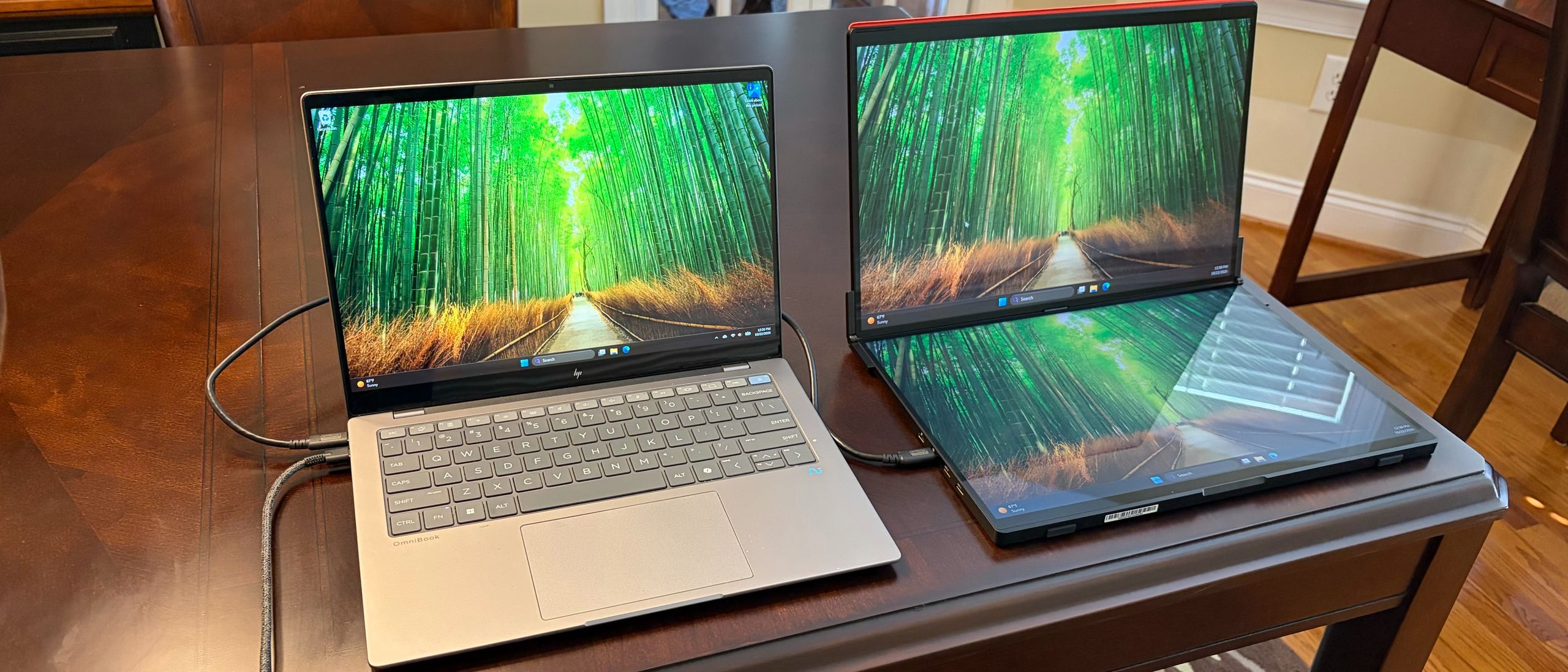
The FlipGo comes with an assortment of cables in the box. You get two USB-C cables, a mini-HDMI to HDMI cable, and a USB-C wall adapter. As I previously mentioned, the FlipGo does not support touch input on macOS. In addition, the FlipGo only supports mirror mode for both screens on macOS and requires you to use both USB-C and mini-HDMI to HDMI cables to connect (Windows 11 supports both mirror and extend modes). Because of these limitations and the fact that you’d be better off buying the cheaper non-touch model for macOS, I performed all of my testing with a Windows 11 laptop (HP OminiBook X).
Setting up the FlipGo couldn’t have been easier. Although JSAUX includes two mini-HDMI ports on the FlipGo for use with older laptops, if you have a USB-C port that supports DisplayPort, you can use that instead. With my OmniBook X test laptop, I was able to use just one USB-C cable to handle both power and video/data for the FlipGo. The FlipGo also supports 60-watt power passthrough to your laptop, which you can leverage by running dedicated power through the second USB-C port.
(Image credit: Tom's Hardware) (Image credit: Tom's Hardware) Image 1 of 2 View Original
Using just a single cable between the FlipGo and the OmniBook X, I primarily used the two displays in portrait mode. In this mode, I could have two separate webpages open, side-by-side next to the OmniBook X’s internal panel. While I could use the FlipGo in landscape mode, the bottom panel had to lie flat on my desk, given that no stand was provided with my review unit to prop it up.
Touch support functioned, as expected, on both panels without needing to install any additional software. In short, the FlipGo operated flawlessly.
The FlipGo uses two 16-inch IPS panels, each with a resolution of 2560 x 1600 and a refresh rate of 60 Hz. JSAUX listed maximum brightness at 500 nits, but as you’ll see with our test numbers below, that figure was quite optimistic.
As I previously stated, due to the lack of a stand provided with my review unit, I primarily used the FlipGo in portrait mode, and it performed wonderfully here. The large panel sizes combined with the extra resolution over 1080p panels made them ideal for putting two webpages side-by-side. More frequently, I found myself pairing a webpage with an instance of Microsoft Word or Microsoft Excel. I especially appreciated the extra vertical resolution to limit scrolling up and down in Excel.
Compared to the FlipGo Horizon Pro that I previously reviewed, the panels on the “regular” FlipGo were far superior. Not only were they much more colorful and vibrant, but they were also vastly superior in brightness (319 nits versus 247.4 nits). However, I must note that the 319 nits that we recorded were a far cry from the 500 nits that JSAUX claims.
For our color tests, the FlipGo covered 97.2 percent of DCI-P3 and 137.2 percent of sRGB color spaces. That put the FlipGo well ahead of its competition, with the Aura Triple Aero 15.6 Pro Max coming the closest (at 85.4 percent and 120.6 percent, respectively). Given the higher-quality panels on the FlipGo compared to the FlipGo Horizon Pro and the glossy finish on my OmniBook X’s display, overall color balance matched pretty well across all three displays, adding to the enjoyment of using the portable monitor. I’ve often found that portable monitors have slightly (and sometimes far) inferior panels than their laptop counterparts, which can lead to a jarring experience when looking from one to the other. That is definitely not the case with the FlipGo.
The JSAUX FlipGo is a remarkable piece of hardware for productivity warriors. At first sight, the FlipGo impresses with its high-quality build, stiff hinges, and plentiful video input options. JSAUX even incorporates a USB hub that gives you a couple of USB-A ports and a USB-C port to expand your peripheral footprint.
The FlipGo also tops the charts when it comes to color performance and brightness, more than justifying its $479 street price. I have two reservations concerning my review unit, but only one is really applicable. My review unit lacked a stand to prop the FlipGo up in landscape or portrait modes; however, shipping units from Amazon now include that part. So, crisis averted on that front. My other complaint is unavoidable: the 4.18-pound weight is considerable and is probably a bit more than most people are willing to deal with when traveling. However, it makes a perfect companion for expanding real estate on your desk without the massive footprint that comes with hooking up a traditional desktop monitor.
Brandon Hill Social Links Navigation Senior Editor Brandon Hill is a senior editor at Tom's Hardware. He has written about PC and Mac tech since the late 1990s with bylines at AnandTech, DailyTech, and Hot Hardware. When he is not consuming copious amounts of tech news, he can be found enjoying the NC mountains or the beach with his wife and two sons.
Key considerations
- Investor positioning can change fast
- Volatility remains possible near catalysts
- Macro rates and liquidity can dominate flows
Reference reading
- https://www.tomshardware.com/monitors/portable-monitors/SPONSORED_LINK_URL
- https://www.tomshardware.com/monitors/portable-monitors/jsaux-flipgo-dual-screen-portable-monitor-review#main
- https://futureplc.com/privacy-policy/
- 3.2 Petabits per second real-time optical fiber transfer speed world record claimed by Chinese team
- Europe’s Industrial Leaders Reinvent Engineering and Manufacturing With NVIDIA
- Valve adds CD-ROM drive support to Steam Frame kernel, took less than ten minutes
- Pioneers Across Europe Deploy NVIDIA Earth-2 Open Models to Power Real-World Weather and Climate Prediction
- Proton hosts Flock map revealing over 300,000 cameras, defying cease-and-desist threats against creator
Informational only. No financial advice. Do your own research.