
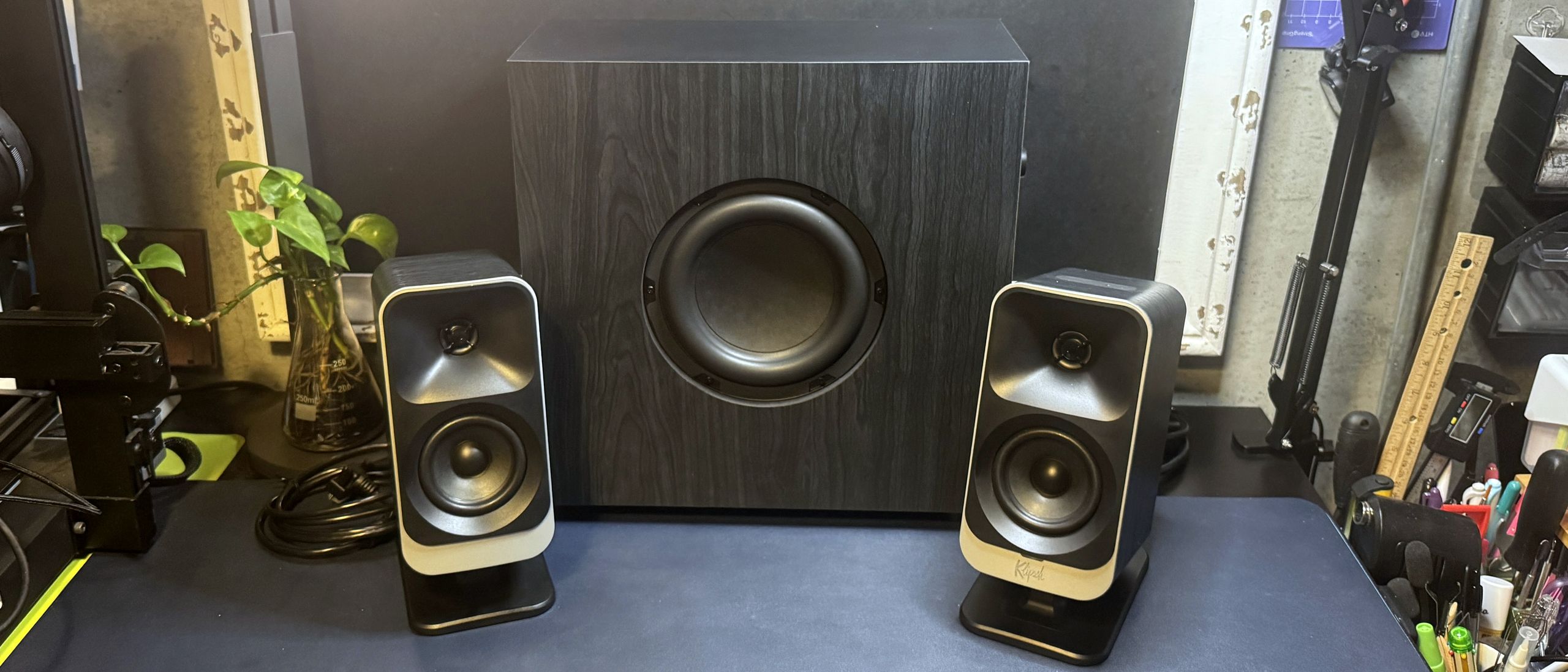
The ProMedia Lumina is a 2.1 system with left and right satellite speakers and a slim subwoofer for that extra 'oomph'. Each satellite speaker has a 1-inch tweeter on top of a 3-inch midrange driver, and the subwoofer has a 6.5-inch side-firing woofer. The speakers have a frequency response of 40 – 20,000 Hz -6dB and a signal-to-noise ratio (SNR) of 98dB.
The speakers sound good — but not great. They're especially strong in the midrange: mids are solid, present, and well-rounded, and songs such as K-391's Lonely World sound vibrant and dynamic. The highs are also fairly strong without being too bright. Songs with easily painful highs, such as Britney Spears' Toxic , were no problem on these speakers. The strong mids and highs also means these speakers were very good for gaming — gunshots and footsteps were definitely a little easier to hear, but they weren't so in my ear that I started feeling jumpy (well, not until the enemy was actually on top of me, anyway).
The disappointing part was the bass — while the subwoofer was definitely pumping out something, it wasn't much. Even turned up all the way, the ProMedia Lumina system definitely lacked the power and oomph I expect from a 2.1 system — especially a 2.1 system aimed at gamers (while these are, I suppose, marketed as PC speakers and not gaming-specific PC speakers, I think the flashy LED lighting definitely makes them more gamer-oriented than not). Even when I cranked the volume and the subwoofer up, the bass still felt lackluster. The speakers' strong lower midrange meant that most media still sounded pretty good, but I definitely felt like we could have gotten rid of the subwoofer and not much would change. And on top of that, since the speakers connect to the subwoofer via proprietary connectors, you can't swap in a third-party subwoofer.
The ProMedia Lumina speakers can be controlled in a few different ways — through the physical controls on the right satellite speaker, using Klipsch's mobile remote app, or with Klipsch Control on your PC (PC only).
(Image credit: Tom's Hardware) (Image credit: Tom's Hardware) (Image credit: Tom's Hardware) (Image credit: Tom's Hardware) (Image credit: Tom's Hardware) You can use Klipsch Control to further customize the built-in lighting presets — it's definitely not the most customizable lighting you'll find in PC speakers, but most of the presets can be tweaked a little. You can also set the lighting to "screen react," which reflects your screen (sort of) for a more immersive experience. If you're looking for something that will perfectly mirror your setup's colors or react in time with gunshots in various games (or whatever), however, you probably want a lighting setup more along the lines of Razer's Nommo V2 Pro .
Klipsch Control also features virtual surround, a 6-band EQ with several built-in presets, and a few settings you can't access with the on-speaker controls, such as "night mode," which turns the bass down by 50%, and lets you toggle and adjust things like auto standby and function sounds.
The Klipsch ProMedia line is a classic in PC speakers, and the ProMedia Lumina is pretty good, but I'm not sure it's worth the nearly $400 price tag. The new speakers look nice, even if I'm not sure how well this woodgrain vinyl wrap will stand the test of time, and the slimmer subwoofer redesign is definitely more convenient. However, while the speakers sounded very good for most media, including gaming, music, and movies, they would have sounded even better had there been a solid bass response. Instead, I wasn't even sure what the subwoofer was doing — perhaps Klipsch should've just gotten rid of the subwoofer altogether.
With a retail price of $380, the ProMedia Lumina 2.1 isn't exactly a budget-friendly system, especially when you might as well just get a cheaper 2.0 system (and maybe pick up a third-party subwoofer, if you feel like it). While systems like Razer's Nommo V2 Pro are even pricier, the Razer Nommo V2 is a closer equivalent to the ProMedia Lumina, and costs $299.99.
Sarah Jacobsson Purewal is a senior editor at Tom's Hardware covering peripherals, software, and custom builds. You can find more of her work in PCWorld, Macworld, TechHive, CNET, Gizmodo, Tom's Guide, PC Gamer, Men's Health, Men's Fitness, SHAPE, Cosmopolitan, and just about everywhere else. ","collapsible":{"enabled":true,"maxHeight":250,"readMoreText":"Read more","readLessText":"Read less"}}), "https://slice.vanilla.futurecdn.net/13-4-23/js/authorBio.js"); } else { console.error('%c FTE ','background: #9306F9; color: #ffffff','no lazy slice hydration function available'); } Sarah Jacobsson Purewal Social Links Navigation Senior Editor, Peripherals Sarah Jacobsson Purewal is a senior editor at Tom's Hardware covering peripherals, software, and custom builds. You can find more of her work in PCWorld, Macworld, TechHive, CNET, Gizmodo, Tom's Guide, PC Gamer, Men's Health, Men's Fitness, SHAPE, Cosmopolitan, and just about everywhere else.
Key considerations
- Investor positioning can change fast
- Volatility remains possible near catalysts
- Macro rates and liquidity can dominate flows
Reference reading
- https://www.tomshardware.com/speakers/SPONSORED_LINK_URL
- https://www.tomshardware.com/speakers/klipsch-pro-media-lumina-review#main
- https://www.tomshardware.com
- Scammers are selling fake DDR5 with empty plastic chips relabeled to pass as legit — fake components mounted to PCBs are yet another sign of the RAMpocalypse
- Microsoft's massive Kenya AI data center would require switching off 'half the country' to meet power requirements, government says — $1 billion project stalls
- Microsoft's massive Kenya AI data center would require switching off 'half the country' to meet power requirements, government says — $1 billion project stalls
- The tech industry is moving faster than ever. Keep up with Tom’s Hardware Premium, available from just $7 per month
- NVIDIA, Ineffable Intelligence Team Up to Build the Future of Reinforcement Learning Infrastructure
Informational only. No financial advice. Do your own research.