
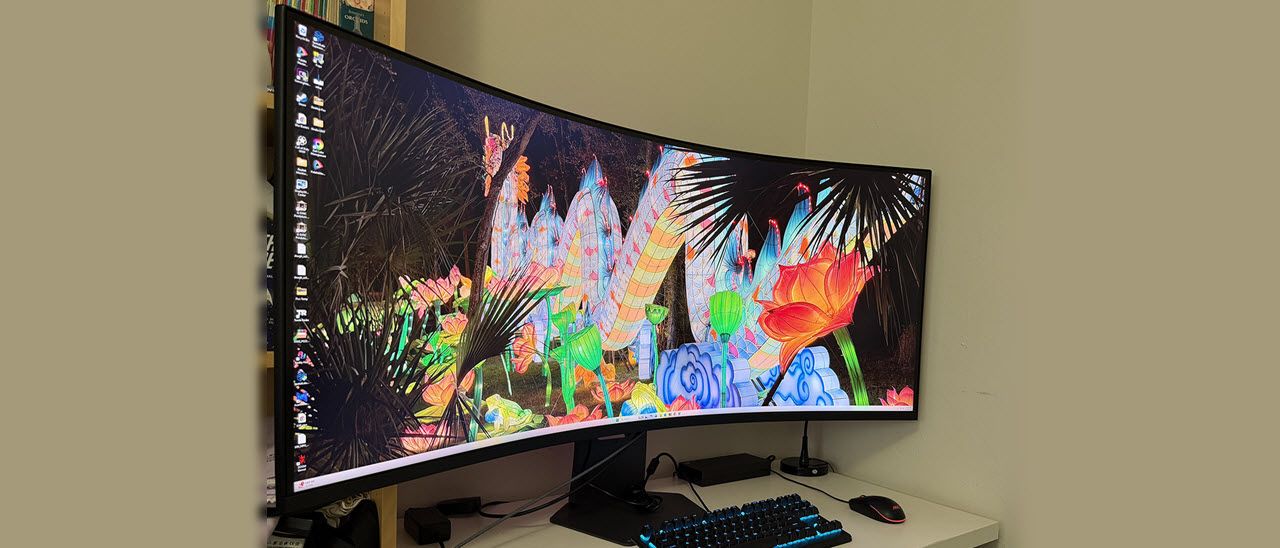
The 52G930B is a luxury item for sure, with a $1,700 asking price at this writing. But it is relatively unique in that it combines the best elements of jumbo and curved screens into a high-performing and immersive package.
The 52G930B’s box is understandably huge but very easy to unpack. Everything is well secured in crumbly foam and lifts out the top like a big TV. The baseplate is quite heavy and attached to the upright with two captive bolts. The panel snaps on, or you can use the 100mm VESA mount for an aftermarket arm or bracket. There’s an enormous external power supply, along with cables for HDMI, DisplayPort, and USB-C.
(Image credit: LG) (Image credit: LG) (Image credit: LG) (Image credit: LG) At nearly four feet wide, you’ll need a bit of extra desktop space for the 52G930B. The stand looks small in the photos, but it is very substantial with a thick metal baseplate and a wide upright secured with two bolts. Ergonomics are firm and free of play and include a 4.7-inch height adjustment and 20 degrees of tilt. There is no forward tilt which is a good thing because the best way to enjoy a screen like this is perfectly vertical with your eyepoint at the center. The stand is tall enough to allow this.
Styling is minimalist, but a few details set the 52G930B apart. An UltraGear logo, which looks a bit like wings, graces the back with LED light bars framing it like parentheses. The word “UltraGear” also appears on the upright above a convenient cable hole. From the front, it’s all screen with a flush bezel, though not a particularly narrow one. It’s 12mm around the top and sides and 19mm at the bottom. In practice, you won’t notice it when the picture is literally wrapping around you.
The OSD joystick is in the center, just behind and below the input panel. There, you get all the latest port versions: DisplayPort 2.1, HDMI 2.1, and USB-C. To run full resolution at 240 Hz, you can use either DP or HDMI. USB-C is DisplayPort-compatible but is limited to 120 Hz.
I was surprised to see there was no remote included with the 52G930B. Granted, you’ll likely be sitting very close to it. But you can download LG Switch and control everything from the Windows desktop. It offers a customizable image mode called Personalized Picture, and you can go further into calibration with LG Calibration Studio. It has two of its own setting memories in the OSD.
(Image credit: Tom's Hardware) (Image credit: Tom's Hardware) (Image credit: Tom's Hardware) (Image credit: Tom's Hardware) (Image credit: Tom's Hardware) (Image credit: Tom's Hardware) (Image credit: Tom's Hardware) (Image credit: Tom's Hardware) First up are the Game Modes and picture modes; there are 13 in total. They include different game types, gamut choices for sRGB and DCI-P3, color weakness, and two memories for use with the LG Calibration Studio app. Gamer 1 is the default, and it measured within a whisker of perfect with no adjustments needed.
In Picture Adjust, the 52G930B has four gamma presets and three fixed color temps. The Manual option lets you adjust grayscale as a unit while Custom unlocks the RGB sliders. You also get a six-color adjustment and Deep Black Pro which is the dimming feature. It has three levels with the highest bumping contrast to around 16,000:1.
If you choose H/P (headphone) as the audio output, the 52G930B engages DTS Headphone:X processing. You’ll need to buy an app from DTS to enjoy it, but it’s worth the investment because the sound is truly immersive. And it works with any headphones, though it’s best to have a model optimized for the technology. It’s like a surround system inside your head and it’s super effective for gaming and movie watching.
The 52G930B is a great candidate for PIP and PBP when you want to view two sources at once. The PIP window can be sized and moved as well. Hexagon Lighting refers to the two LED strips in the back, which can cycle through different colors or show a single hue. User-Defined Key refers to the left and right joystick clicks, which can be programmed for convenient access to often-used commands.
My 52G930B came set to its Gamer 1 mode and initial measurements showed it to be spot on for grayscale, gamma and color gamut tracking. I attempted a calibration but could make no improvement. The native gamut covers just under 95% of DCI-P3 , which is great for both SDR and HDR content. If you want sRGB, it’s one of the picture modes. There is also an HDR Effect mode, which alters gamma to make SDR content look like HDR. It makes some content look better, but doesn’t always improve the image. Below are the brightness values with Deep Black Pro (dimming) turned off.
For HDR content, you can adjust overall brightness and change the color temp, but the RGB sliders are grayed out. Picture modes remain available too, but only Gamer 1 and 2 are accurate to industry standards.
Make no mistake, the 52G930B is a very large monitor. It’s nearly four feet wide, more than a meter, and though it doesn’t require a ton of depth, you will want some space on either side and room to sit back a little. You should sit close to get the immersive effect, but if you get in too tight, you’ll be turning your head a lot more than necessary. I found a good spot about three feet away.
Since the aspect ratio is 21:9 versus 32:9, like most screens this wide, there’s a lot of extra height. Game characters are approximately the size of GI Joe dolls so if you’re used to smaller screens like me, it takes some getting used to. In your face would be the appropriate phrase to use here.
Once acclimated, I could dispatch monsters and aliens with ease. Video processing is excellent and that’s good because my RTX 4090 couldn’t manage much more than 200 fps in Doom Eternal. And it was working hard if the warm breeze coming from my PC’s vents was any indication. The fans were at their max speed. You can tap the 52G930B’s potential with this video card, but an RTX 5090 would be even better. The overdrive worked well for me and kept motion blur below the distraction level. If you have less than a 4090, there is no backlight strobe to prevent smear at low frame rates.
This is one of the few LCDs that can keep up with an OLED when it comes to input lag. I compared it to other jumbo curved screens, and it trounced all of them in testing. Gameplay is quick and precise with no hesitation or stutter. Mouse inputs are instantly translated, and motion resolution is high, making aiming easier. My hit percentage was very high.
The 52G930B’s audio quality is above average as well. The speakers play quite loudly without audible distortion. And the extreme curve directed the sound right into my ears. There was decent bass, too, thanks to the monitor’s large size, which affords room for bigger drivers.
The image in all scenarios was excellent. Color is vivid and bright with deep contrast. It isn’t quite an OLED, but it’s one of the better LCDs I’ve come across. I’ve said that VA is the next best option and the 52G930B supports that statement.
My only ergonomic complaint was that there is no remote. Large screens are tough to adjust with an OSD joystick. I got relief from the LG Switch app that allowed Windows desktop control. But a handheld remote would be better. And given the $1,700 price tag, it seems like an unfair omission.
Takeaway: Remote wishes aside, the 52G930B is a superb gaming and entertainment display. Playing is a completely different experience than smaller monitors with the action literally becoming big as life. Audio quality is among the best I’ve heard from internal speakers with loud clean sound. The inclusion of DTS Headphone:X is a nice value-add. Video processing is on par with the best OLEDs in terms of input lag and a high-quality overdrive. Motion blur is minimal and the panel is extremely quick and responsive. Work tasks require some adaptation, but the picture is sharp and colorful enough for any use.
Current page: Features and Specifications
Key considerations
- Investor positioning can change fast
- Volatility remains possible near catalysts
- Macro rates and liquidity can dominate flows
Reference reading
- https://www.tomshardware.com/monitors/gaming-monitors/SPONSORED_LINK_URL
- https://www.tomshardware.com/monitors/gaming-monitors/lg-ultragear-52g930b-52-inch-5k-gaming-monitor-review-extreme-in-every-respect#main
- https://www.tomshardware.com
- College students drown out AI-praising commencement speeches with boos — 'deal with it' one speaker fires back as students heckle positive pitches for AI's role
- Josef Prusa says Bambu Lab allegedly violates AGPL license with an un-auditable network 'black box' — warns Chinese 3D printing software poses massive security
- Jury throws out Elon Musk's lawsuit against OpenAI after less than two hours of deliberation — Unanimous vote that Musk filed the lawsuit too late
- Jay Forrester filed the first practical computer RAM patent 75 years ago this week — his Magnetic Core Memory patent would be granted five years later
- OpenClaw creator burned through $1.3 million in OpenAI API tokens in a single month — bill covered 603 billion tokens across 7.6 million requests and 100 coding
Informational only. No financial advice. Do your own research.