
You can also add Ethernet connectivity with an optional Netgear USB-C to Ethernet adapter (although, as you'll see in the performance section, I was able to enable this functionality with a cheap, off-the-shelf WAVLINK USB-C to 2.5 GbE adapter).
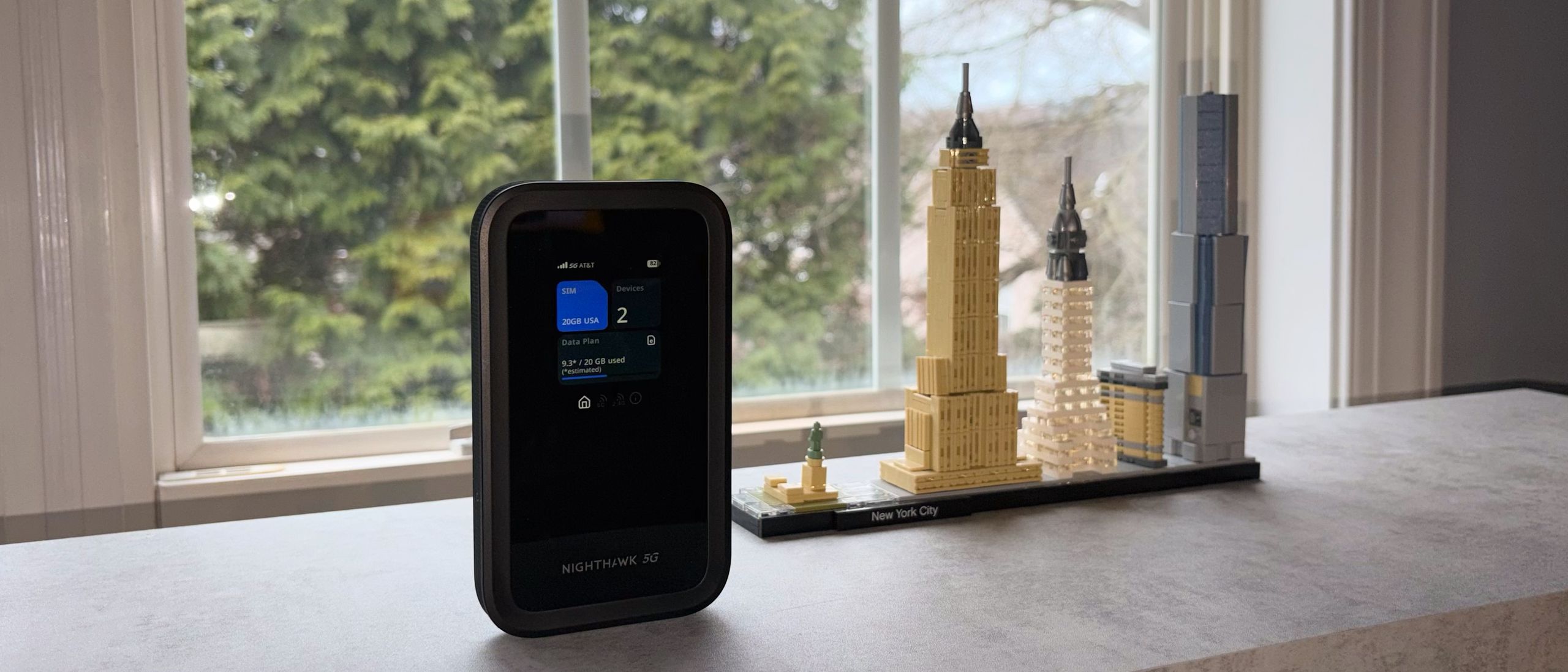
The 2.4-inch color screen at the top is only for displaying key status updates and is not a touchscreen. You'll see the current cellular network, signal strength, battery percentage, which SIM you're currently using, the number of connected devices, how much of your selected data plan you've used so far, and the status of the 5 GHz and 2.4 GHz radios.
The lack of touch capabilities on the screen isn't a detriment for two reasons: 1) it's too small to be truly useful for touch navigation, and 2) you can control every aspect of the Nighthawk M5 using the Netgear app.
Netgear doesn't include a carrying case for the Nighthawk M7, but it does include a USB-C to USB-C cable.
The Nighthawk M7 is controlled entirely via the Netgear app (available on iOS or Android), which I installed on my iPhone Air. After installing the app, I scanned the QR code on the screen to set up the Nighthawk M7. The setup program automatically connected to the mobile hotspot and completed the usual onboarding procedures.
That latter point is what sets the Nighthawk M7 apart from similar devices. Not only can you use a physical SIM, but you can also download eSIMs for use worldwide. Obtaining an eSIM is as simple with the Netgear eSIM Marketplace as it is grabbing one on your smartphone via apps like Airalo .
There were options to purchase 3GB, 5GB, 10GB, or 20GB of data for $10, $14, $23, or $40, respectively. The 3GB option is only valid for 7 days (after installing and activating the eSIM), while the other three options are valid for 30 days. After selecting a data plan, you’re able to check out using Apple Pay (if you’re using an iPhone), or you can manually input your credit card information.
Once you purchase an eSIM, you can install it. The app then downloads the eSIM from the marketplace and saves it to the hotspot. You can either use it immediately or save it for later. If you choose to use it immediately, your 7- or 30-day countdown starts. In my case, the eSIM I installed was for the AT&T 5G/4G cellular network.
The process for setting up an eSIM for Europe (which covers 45 countries) and other regions is the same. I went through the steps of securing a European eSIM and was quoted prices of $11, $18, $33, and $44 for 3GB, 5GB, 10GB, and 20GB, respectively. Those prices are comparable to what’s available on Airalo, which lets you download global eSIMs to your smartphone. However, with Airalo, there may be limits on how many devices you can connect at once, depending on the carrier you select. You’re typically limited to tethering to one or two devices, versus up to 32 with the Nighthawk M7.
The Nighthawk M7 uses a Qualcomm Snapdragon SDX72 chipset supporting sub-6GHz 5G and 4G LTE cellular connectivity. On the hotspot connectivity side, you'll find dual-band Wi-Fi 7 support via the 5 GHz (2,900 Mbps) and 2.4 GHz (700 Mbps) wireless bands.
You can also connect the Nighthawk M7 directly to a device using a USB-C to USB-C cable. Again, using my MacBook Air, I connected the Nighthawk M7 directly via USB-C. Unsurprisingly, I saw even higher speeds using direct connect than Wi-Fi. Average download and upload speeds rose to 242 Mbps and 53.25 Mbps, respectively.
These download and upload speeds were consistent across multiple devices, including an iPhone Air (Wi-Fi 7), Mac Mini (Wi-Fi 6E), an HP OmniBook X (Wi-Fi 7), and multiple Windows desktop PCs with Wi-Fi 7 adapters.
In addition, the Nighthawk M7 supports sharing its cellular internet connection via its USB-C port with a USB-C to Ethernet adapter. Although Netgear would gladly prefer that you purchase one of its branded adapters, I used a WAVLINK USB-C to 2.5 GbE adapter that I always carry in my laptop bag. I plugged the adapter into the Nighthawk M7’s USB-C port and connected a CAT6e cable from the WAVLINK adapter to the WAN port on an Asus ROG Strix BE18000 tri-band Wi-Fi 7 gaming router. Everything worked as expected, and I was even able to use the Nighthawk M7 via the WAVLINK adapter connected to the GbE port on my Mac Mini without issue. I see no reason why a no-name, sub-$10 adapter wouldn’t also work with the mobile hotspot.
The Nighthawk M7 supports up to 32 devices simultaneously, making it a handy travel companion. Just imagine a family of four traveling to Italy for a week or more. Instead of each family member requiring one eSIM per device for data, you could purchase a single eSIM for the Nighthawk M7 and let each mobile device connect to it for internet access.
TheWi-Fi Offload feature can also be used to connect the Nighthawk M7 to a public Wi-Fi hotspot and securely share that connection with multiple devices.
It’s hard to find fault with the Nighthawk M7. It’s relatively lightweight, configurable via a sleek smartphone app, and offers access to an easy-to-use eSIM marketplace for grabbing buckets of data nearly anywhere in the world. You can also use a physical nano SIM card if eSIM isn’t your thing. Not only does it work as a dual-band Wi-Fi 7 hotspot to share its 4G/5G cellular internet connection, but it can also connect directly to a device using a USB-C to USB-C cable or a USB-C to Ethernet adapter.
The only thing really working against the Nighthawk M7 is its price. The mobile hotspot retails for $499 , which is a considerable amount of money. The closest competitor to the Nighthawk M7 is likely the TP-Link M8550, a 5G/4G LTE tri-band Wi-Fi 6E mobile hotspot. It also supports up to 32 devices and carries an MSRP of $499 ( currently $429.99 on sale at Amazon ). However, the M8550 critically lacks eSIM support and an analog to Netgear's excellent eSIM Marketplace.
For a purpose-built device that’s easy to set up and use, has enough battery capacity to last all day, and can provide connectivity for up to 32 devices, the Nighthawk M7 is money well spent. This is especially true if you travel frequently and need to connect multiple devices, as the cost savings can quickly add up.
Brandon Hill is a senior editor at Tom's Hardware. He has written about PC and Mac tech since the late 1990s with bylines at AnandTech, DailyTech, and Hot Hardware. When he is not consuming copious amounts of tech news, he can be found enjoying the NC mountains or the beach with his wife and two sons. ","collapsible":{"enabled":true,"maxHeight":250,"readMoreText":"Read more","readLessText":"Read less"}}), "https://slice.vanilla.futurecdn.net/13-4-13/js/authorBio.js"); } else { console.error('%c FTE ','background: #9306F9; color: #ffffff','no lazy slice hydration function available'); } Brandon Hill Social Links Navigation Brandon Hill is a senior editor at Tom's Hardware. He has written about PC and Mac tech since the late 1990s with bylines at AnandTech, DailyTech, and Hot Hardware. When he is not consuming copious amounts of tech news, he can be found enjoying the NC mountains or the beach with his wife and two sons.
Key considerations
- Investor positioning can change fast
- Volatility remains possible near catalysts
- Macro rates and liquidity can dominate flows
Reference reading
- https://www.tomshardware.com/networking/routers/SPONSORED_LINK_URL
- https://www.tomshardware.com/networking/routers/netgear-nighthawk-m7-5g-wi-fi-7-mobile-hotspot-review#main
- https://www.tomshardware.com
- President's Day GPU bonanza brings RTX 5060 Ti 8GB back to $379 MSRP — score a Blackwell GPU at MSRP, and get a free 650W power supply
- OpenClaw-fueled ordering frenzy creates Apple Mac shortage — delivery for high Unified Memory units now ranges from 6 days to 6 weeks
- MakerWorld launches Copyright Protection Program to help 3D designers fight stolen files being resold online — stamping out knockoffs is priority number one
- Tiny Mac look-a-like alarm clock transformed to run real Mac software
- Accelerating Science: A Blueprint for a Renewed National Quantum Initiative
Informational only. No financial advice. Do your own research.