
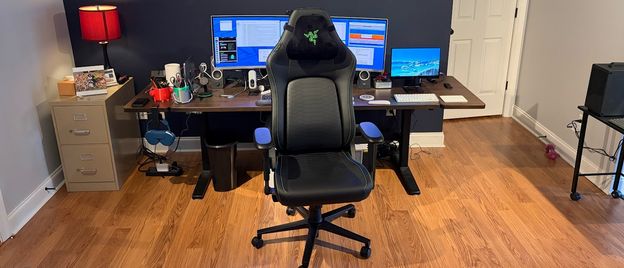
The seat base, backrest, and headrest pillow were wrapped in plastic to protect them during shipping, while the wheelbase was wrapped in thin, flexible foam. The other components (wheels, bolts, tools, plastic covers, gas lift, etc.) were tucked into a smaller box. Something that I’ve come to expect from Razer chairs is a pair of work gloves inside a plastic bag taped to the inner flap. Although I don’t need gloves for chair assembly, I appreciate that Razer takes the effort to include a pair for people who might prefer that luxury.
Given that I’ve previously assembled both the Iskur V2 and the Iskur V2 X, I blazed through the process in about five minutes without even looking at the Iskur V2 NewGen instructions. Razer includes a multitool for assembling the Iskur V2, and the whole process took no more than ten minutes. I first inserted the wheels into the aluminum-allow base, and then used my fist to bang them into place. Next, I inserted the gas lift, attached the bottom cushion to the seat base, and then attached the seatback using Allen screws. The assembly process was aided by an Allen tool that Razer included in the box. The final touches were to add plastic covers to hide the screws used to attach the seat back and attach the headrest pillow.
One thing I noticed after assembling the Iskur V2 NewGen was a strong chemical smell that still lingers. I didn’t experience this odor with the Iskur V2, so perhaps it's due to the new Gen-2 EPU. While the odor is not as strong now — 5 days after I first removed the chair from the box — I can still smell it when I sit in it.
As I mentioned, the Iskur V2 NewGen builds on the firm foundation of the Iskur V2. That means the chair offers plenty of adjustability to conform to your body and posture. My favorite part of the chair is what Razer dubs the HyperFlex Lumbar Support System.
In practice, it features a 360-degree swivel that allows the back lumbar to move with you. If you move your body left, right, back, or forward, the lumbar support stays anchored to your back and moves with you. It feels great on my back, especially as I'm getting up there in age and sometimes have lower back aches.
(Image credit: Tom's Hardware) (Image credit: Tom's Hardware) (Image credit: Tom's Hardware) (Image credit: Tom's Hardware) (Image credit: Tom's Hardware) (Image credit: Tom's Hardware) To that point, you can use the right rotary dial to adjust the lumbar inward (turn the dial downward) or outward (turn the dial upward). You can also adjust the contact point up or down using the left dial. Using a delicate combination of these two controls, you should be able to find the optimal setting to comfort your weary bones.
Adding to the comfort factor is the dual-density cold-cure foam. Now, to be fair, the Iskur V2 was already an extremely comfortable chair with good ergonomics and great long-term comfort. After sitting my butt in both chairs and hopping between them frequently, I couldn’t detect a significant improvement with the Iskur V2 NewGen. Razer has only made minor tweaks here, with the primary impetus being to improve cooling performance.
Like the Iskur V2, the updated model supports a maximum 152-degree recline, which can be beneficial if you just want to lie back and game or enjoy a movie on your widescreen monitor. The extreme recline isn’t for me, but I can appreciate that it's probably beneficial for more daring gamers.
The chair supports height adjustment (floor-to-seat height ranges from 435 to 535 mm), which is controlled using the right stalk that juts out from the seat base. As is common in today's gaming chairs, the Iskur V2 features 4D armrests, which are highly adjustable. I found the perfect height and horizontal position to accommodate my arms while seated at my desk. The armrests can also pivot up to 25 degrees in or out, but I found they were most comfortable pointed straight ahead.
The 4D armrests can adjust up and down, in and out, and can pivot up to 25 degrees inward or outward.
Given that the chair's dimensions haven’t changed, I’m still not completely sold on the seat base, which, at 17.72 inches (45cm) is a tad shorter than I prefer. I'm 5’10” (with long legs), and this means I don’t have the thigh support that other chairs with longer seat bases provide — but my body has learned to adjust.
Despite the “NewGen” in the name, the Razer Iskur V2 NewGen is a relatively minor update to an already good chair. The Iskur V2 NewGen has minor design changes and updates to materials (internal and external) that should help keep your body cooler during gaming sessions. This was one of my nitpicks with the prior model, so it’s good to see that it’s being addressed.
The main problem, however, is that it’s the middle of winter in my neck of the woods, so the ambient temperature is not hot enough to have issues with my legs sticking to the chair or my back sweating from the EPU surface materials on the chair. So, back-to-back testing between the Iskur V2 and Iskur V2 NewGen has not shown any real-world improvements to cooling performance… yet . However, we will revisit the chair when summer comes around to see whether the new materials have improved on this significantly.
That said, if you’re in the market for a new chair at the moment, the Iskur V2 NewGen is replacing the Iskur V2. It retails for the same price — $649 — so if you already have the Iskur V2, it’s probably not wise to spend another $649 for a minor materials upgrade. However, if you don’t already have a gaming chair or you're looking to upgrade from an older, worn-out one, the Iskur V2 NewGen should definitely be on your radar. Just be prepared for at least a week of an odd chemical odor once you take it out of the box.
Brandon Hill is a senior editor at Tom's Hardware. He has written about PC and Mac tech since the late 1990s with bylines at AnandTech, DailyTech, and Hot Hardware. When he is not consuming copious amounts of tech news, he can be found enjoying the NC mountains or the beach with his wife and two sons. ","collapsible":{"enabled":true,"maxHeight":250,"readMoreText":"Read more","readLessText":"Read less"}}), "https://slice.vanilla.futurecdn.net/13-4-17/js/authorBio.js"); } else { console.error('%c FTE ','background: #9306F9; color: #ffffff','no lazy slice hydration function available'); } Brandon Hill Social Links Navigation Brandon Hill is a senior editor at Tom's Hardware. He has written about PC and Mac tech since the late 1990s with bylines at AnandTech, DailyTech, and Hot Hardware. When he is not consuming copious amounts of tech news, he can be found enjoying the NC mountains or the beach with his wife and two sons.
Key considerations
- Investor positioning can change fast
- Volatility remains possible near catalysts
- Macro rates and liquidity can dominate flows
Reference reading
- https://www.tomshardware.com/peripherals/gaming-chairs/SPONSORED_LINK_URL
- https://www.tomshardware.com/peripherals/gaming-chairs/razer-iskur-v2-newgen-gaming-chair-review#main
- https://www.tomshardware.com
- Intel preps CPUs with 'Unified Core' architecture — job listing hints at evolution beyond Intel's hybrid design
- Tinkerer builds VR headset with CRTs repurposed from Sony Watchman — makeshift VR rig isn't the sharpest, but eliminates screen-door effect
- Survey Reveals AI Advances in Telecom: Networks and Automation in Driver’s Seat as Return on Investment Climbs
- Save over $400 on this awesome Newegg combo with an AMD Ryzen 7 9850X3D — just $849.99 for high-spec haul that comes with an MSI X870 Tomahawk and 32GB of fast
- Save $649 by buying 64GB of DDR5-6000 G.Skill RAM with an Nvidia RTX 5070 GPU — Newegg will even throw in a free Cooler Master CPU cooler to sweeten the deal
Informational only. No financial advice. Do your own research.