
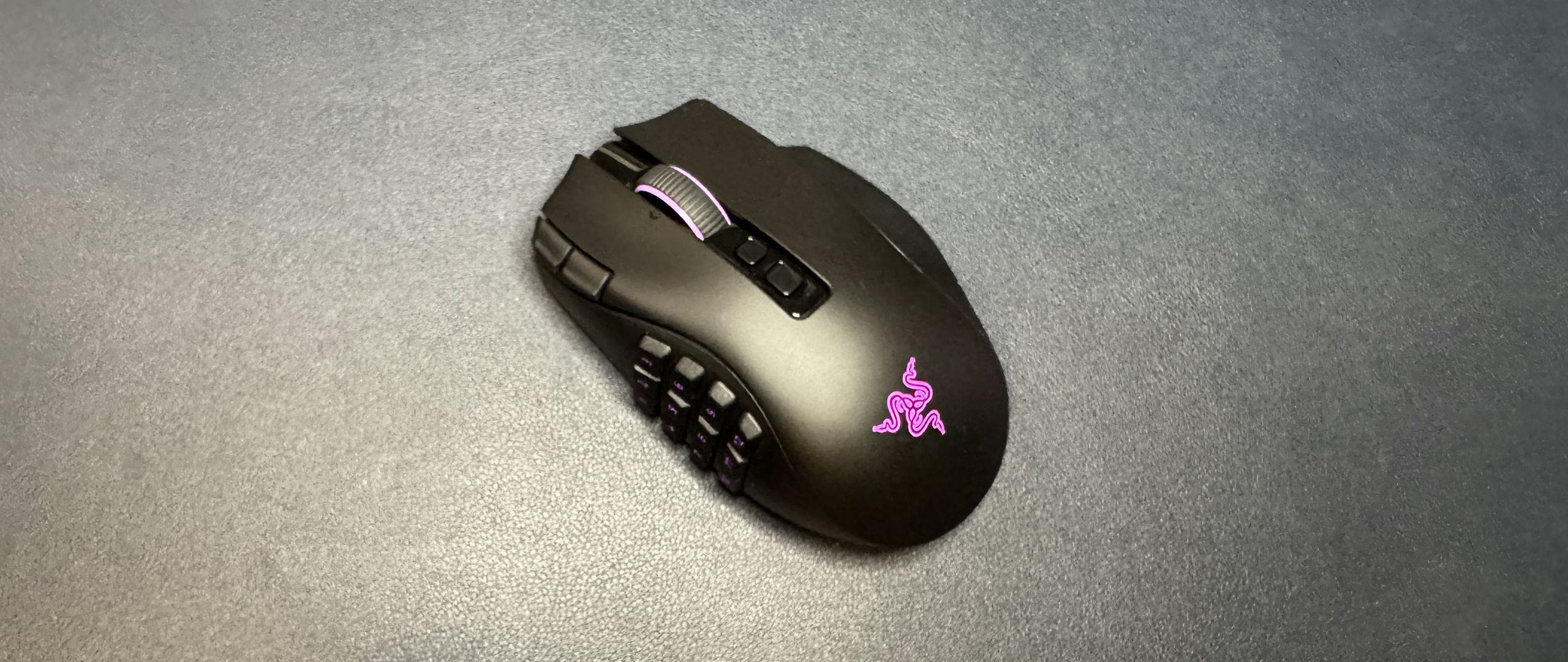
3.9oz / 112g without side plate; side plates weigh 20g (12-button) / 17g (6-button) / 15g (2-button)
The Naga V3 Pro features Razer's latest Focus Pro 50K Gen-4 optical sensor, which has a maximum sensitivity of 50,000 DPI and a maximum speed of 930 IPS, and can handle up to 90 G's of force. These are kind of crazy specs for a mouse considering most people won't use a DPI above 3,200 or so — what you need to know is that it's a great sensor that tracks across a variety of surfaces with excellent accuracy. It's speedy, too, though this is not the kind of mouse most people will be moving around lightning fast and picking up, as it's more than twice the weight of ultra-lightweight mice such as Razer's DeathAdder V4 Pro .
The mouse also features Razer's Gen-4 optical mouse switches, which are rated for up to 100 million clicks and offer crisp, tactile feedback. The feedback does feel slightly crisper and more deliberate than the switches in the Naga V2 Pro, but it's not a very significant difference and you definitely can't tell unless you're using both side-by-side. Still, at 100 million clicks they should last as long as the mouse does.
These switches are only in the primary mouse buttons, not the side panel buttons — though the side panel buttons still felt fairly crisp and gave nice tactile feedback. The only buttons I didn't love on the Naga V3 Pro were the edge buttons on the left side of the left mouse button — they were a little too far to the left to be comfortable, and they had a very soft, mushy, lackluster click.
The Naga V3 Pro ships with a 1,000 Hz polling rate and a 1,000 Hz polling rate is the highest you're going to get unless you make a separate purchase. The mouse is capable of getting up to an 8,000 Hz polling rate, but you'll need to purchase either Razer's Mouse Dock Pro or its HyperPolling Wireless Dongle in order to achieve polling rates higher than 1,000 Hz.
The Naga V3 Pro is programmable via Razer Synapse 4, and you'll almost certainly want to do some customizing since the default settings have the side panel buttons programmed to numbers (except for the two-button side panel, which is MB4 / MB5). Luckily Synapse 4 didn't give me too much trouble with calibration or bringing my Naga V2 Pro settings over to the Naga V3 Pro.
(Image credit: Tom's Hardware) (Image credit: Tom's Hardware) (Image credit: Tom's Hardware) (Image credit: Tom's Hardware) (Image credit: Tom's Hardware) Image 1 of 5 View Original
Synapse 4 lets you remap buttons, customize the tilt wheel, and adjust settings such as DPI steps and polling rate. It features a built-in automatic mouse calibration tool that lets you match your current mouse's DPI (this worked flawlessly for me, but I was matching the Naga V3 Pro to the Naga V2 Pro), as well as some surface calibration settings you can play with. You can also customize the mouse's RGB lighting zones, of which there are three — tilt wheel, side panel, and palm rest logo.
The Naga V3 Pro has 3 forms of connectivity — 2.4GHz wireless, Bluetooth, and wired (via USB-C). Razer rates its battery life at up to 155 hours over its 2.4GHz wireless connection, which is pretty solid for a wireless mouse with so much going on — though this will of course vary depending on your polling rate and lighting settings. It's compatible with Razer's HyperFlux V2 Wireless charging mouse pad, however, which makes its battery life technically endless.
The Naga V3 Pro is a solid update to the Naga V2 Pro, which I've been using for (literally) years. It looks and feels almost identical to the Naga V2 Pro, which I appreciate — the Naga V2 Pro is a very comfortable, if not particularly speed-optimized, gaming mouse — and it's got some nice upgrades in the sensor, switches, and buttons.
These days, the market is mostly dominated by stripped-down, ultra-lightweight eSports-oriented mice, and so it's nice to see that there's still a place for MMO-oriented mice with buttons in the double digits. The Naga V3 Pro isn't the only mouse with a 12-button side panel, but there isn't a ton of competition — we weren't wowed by SteelSeries' Aerox 9 Wireless , and Corsair's Scimitar Elite SE Wireless has an uncomfortably concave side panel (though it does move forward and backward, if that's something you're looking for). If you're looking for a mouse with a ton of buttons — not counting inputs that are duplicated via software — the Naga V3 Pro is now your best bet.
Sarah Jacobsson Purewal is a senior editor at Tom's Hardware covering peripherals, software, and custom builds. You can find more of her work in PCWorld, Macworld, TechHive, CNET, Gizmodo, Tom's Guide, PC Gamer, Men's Health, Men's Fitness, SHAPE, Cosmopolitan, and just about everywhere else. ","collapsible":{"enabled":true,"maxHeight":250,"readMoreText":"Read more","readLessText":"Read less"}}), "https://slice.vanilla.futurecdn.net/13-4-25/js/authorBio.js"); } else { console.error('%c FTE ','background: #9306F9; color: #ffffff','no lazy slice hydration function available'); } Sarah Jacobsson Purewal Social Links Navigation Senior Editor, Peripherals Sarah Jacobsson Purewal is a senior editor at Tom's Hardware covering peripherals, software, and custom builds. You can find more of her work in PCWorld, Macworld, TechHive, CNET, Gizmodo, Tom's Guide, PC Gamer, Men's Health, Men's Fitness, SHAPE, Cosmopolitan, and just about everywhere else.
TechieTwo These might be useful if it had another 50 buttons… /s :astonished: Reply
Key considerations
- Investor positioning can change fast
- Volatility remains possible near catalysts
- Macro rates and liquidity can dominate flows
Reference reading
- https://www.tomshardware.com/peripherals/gaming-mice/SPONSORED_LINK_URL
- https://www.tomshardware.com/peripherals/gaming-mice/razer-naga-v3-pro-review#main
- https://www.tomshardware.com/membership
- FCC proposes import ban on Chinese optical transceivers — blockade targets key AI interconnects as China holds 56% global market share
- UK's Royal Navy sea drones contain component that secretly sent data to China, report claims — government cuts camera connectivity and insists data wasn’t sensi
- AI Leaders Propose SAFE Guidelines for Cybersecurity Transparency
- DIY modder creates 'heat engine computing device' powered by a Stirling engine, can run Tetris, Snake, and Pong — 80 MHz processor operates on just 150 milliwat
- NVIDIA Harnesses Vera CPU to Speed Up Design of Next-Generation CPUs and GPUs
Informational only. No financial advice. Do your own research.