
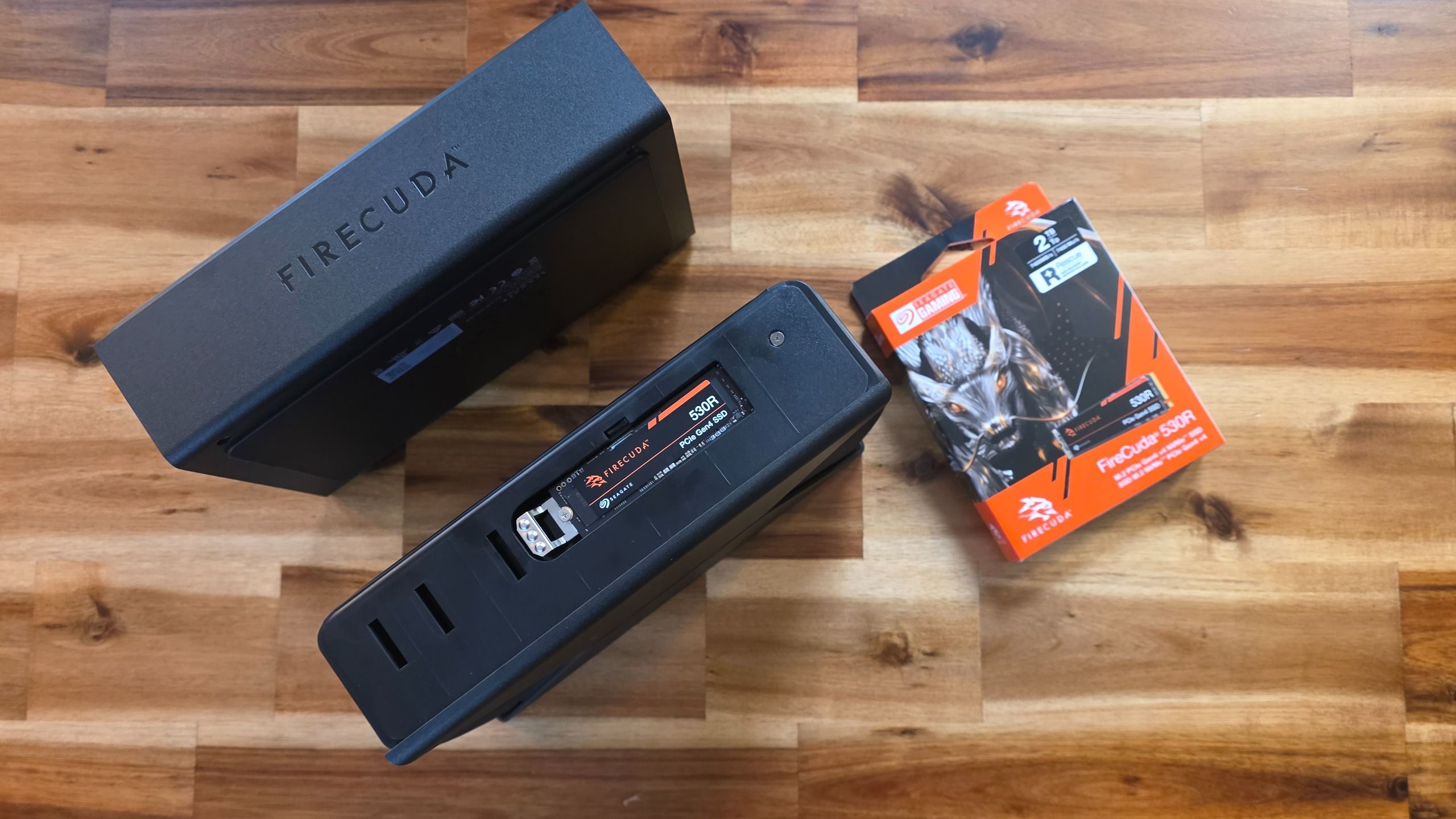
SSD installation is pretty much the same as putting one of these drives in any laptop or motherboard. Though you'll need a tool; the drive requires a a tiny screw and Seagate does not include a suitable Phillips head screwdriver. The drive bay is somewhat recessed, and there are two thick thermal pads included in the box that should ensure the drive makes contact with both the inner edge of the bay and the external shroud.
This should provide some heat dissipation, but these surfaces are all's plastic, with only a foil layer on the outer shroud to draw some of the drive's heat away from the SSD itself. This is probably fine for most bursty game and creative workloads. But this design does not feel ideal for workloads that hit the drive consistently for hours on end. During our testing, the edge of the drive where the SSD is installed got noticeably warmer than the rest of the enclosure, but it didn't get hot.
In terms of design, the FireCuda Forge looks very similar to the FireCuda X Vault HDD we looked at earlier this year, complete with some gamer-friendly RGB lighting. The primary physical difference is that you'll need the supplied USB-C cable and external power adapter to use the Forge, while the X Vault only has a USB-C port. Presumably, powering both a 3.5-inch hard drive and an M.2 SSD draws too much power for most (or at least some) USB-C ports. I still would love for drives like this to be able to run off of one single cable, though, which was my favorite feature of the X Vault hard drive.
Hands On: Sharge's Disk Pro 2 Ultra is a compact, magnetic DIY SSD dock with active cooling, 80W passthrough charging, and HDMI 2.1, supporting up to 8TB drives
$29 per Terabyte makes this 24TB Seagate BarraCuda one of the best-value hard drives in today's market
We only received the FireCuda Forge a couple of working days before its announcement. But we were able to run some benchmarks with the Forge drive and a 530R SSD that Seagate provided, and saw some interesting results. The Forge's USB-C connection is USB4, and Seagate's performance claims are up to 2,500 MB/s read and 2,000 MB/s write. That's obviously much faster than a hard drive, but you're also going to be sacrificing the speed of the SSD you're dropping into this drive — especially if it's a PCIe 4.0 SSD.
PCMark 10 is a trace-based benchmark that uses a wide-ranging set of real-world traces from popular applications and everyday tasks to measure the performance of storage devices.
On this synthetic test, Seagate's Forge beats recent traditional hard drives (and the slowest external SSD we've tested, Samsung's T5). But Kingston's fast flash drive does better, as does Sandisk's Desk Drive, which nearly doubles the score of the Forge, which isn't surprising given it's a full-fledged external SSD.
We use the DiskBench storage benchmarking tool to test file transfer performance with a custom 50GB dataset. We copy 4,617 files (images, videos, and software ISO files) to a folder on the test drive (write). Then, after leaving the system idle for five minutes, we run the same test in reverse, moving the test folder to a different location on our PCIe 4.0 testing drive.
Here , we see the Forge drive easily beating the spinning-platter-only drives and Samsung's T5 Evo on writes, only falling to the SanDisk Desk Drive desktop SSD. But on reads, the Forge leads by the pack.
CrystalDiskMark (CDM) is a free and easy-to-run storage benchmarking tool that SSD companies commonly use to assign performance specifications to their products. It gives us insight into how each device handles different file sizes. We run this test at its default settings.
Last up (for now), CrystalDiskMark proves the Forge does benefit significantly from its USB4 interface, with its performance on sequential reads and writes jumping well ahead of everything else on our chart — because all other drives here top out at 10 Gbps. There are, of course, faster external SSDs ( like Samsung's recent P9 ). But at 8TB, solid-state options are generally more expensive, and faster external SSDs at 8TB are much more expensive. And of course, 20TB external SSDs aren't really an option, at least in the consumer drive space.
The whole reason a product like the Seagate Forge exists is because SSDs are expensive. The problem is, hard drives have faced similar price jumps due to demand. And Seagate says the 8TB Forge will launch at $699 for the 8TB drive, and $899 for the 20TB option. That's a lot of money for a drive you need to also put your own M.2 SSD into for it to function.
We'll also need to do more testing with things like game load times before passing judgment on the FireCuda Forge. But it likely makes much more sense in the 20TB capacity, where no single-drive consumer SSD-based option exists. At 8TB, there are options like SanDisk's Desk drive, which has a slower 10GBps interface, but is a full-fledged SSD, rather than a hard drive with some fast SSD cache. Surprisingly, that Sandisk drive is still on sale for $999 . And unless you happen to have an old M.2 SSD lying around to install into the Forge, its price, including the SSD it needs to function, isn't going to be far off traditional solid-state options.
Matt Safford Managing Editor After a rough start with the Mattel Aquarius as a child, Matt built his first PC in the late 1990s and ventured into mild PC modding in the early 2000s. He’s spent the last 15 years covering emerging technology for Smithsonian, Popular Science, and Consumer Reports, while testing components and PCs for Computer Shopper, PCMag and Digital Trends.
Roland Of Gilead I'm surprised there isn't an 'AI' included in the naming convention 😉 Seagate takes on high SSD storage prices with the Firecuda Force, Some human spell checking please! FORGE Reply
usertests That's horrifically expensive, but it's interesting to see the SSHD coming back in a form that allows you to build it yourself. I think all of the old Seagate 500 GB SSHDs had only 8 GB of NAND. Not even 32 GB! A ratio of 8:1 would be very good by comparison, but anything semi-modern (e.g. 128 GB SSD) will fit lots of frequently used files. This should provide some heat dissipation, but these surfaces are all's plastic, with only a foil layer on the outer shroud to draw some of the drive's heat away from the SSD itself. This is probably fine for most bursty game and creative workloads. But this design does not feel ideal for workloads that hit the drive consistently for hours on end. During our testing, the edge of the drive where the SSD is installed got noticeably warmer than the rest of the enclosure, but it didn't get hot. Being limited to PCIe 3.0 helps here. Reply
Key considerations
- Investor positioning can change fast
- Volatility remains possible near catalysts
- Macro rates and liquidity can dominate flows
Reference reading
- https://www.tomshardware.com/pc-components/external-ssds/SPONSORED_LINK_URL
- https://www.tomshardware.com/pc-components/external-ssds/seagate-resurrects-hybrid-storage-hands-on-with-the-firecuda-forge-8-or-20tb-external-hard-drive-requires-you-to-bring-your-own-nvme-ssd#main
- https://futureplc.com/privacy-policy/
- The Wizard of Open Weights: Chris Alexiuk Makes AI Easy With Open Models
- Linux kernel reviewer steps down from memory management duties due to influx of AI slop patches
- AMD VP and chief Zen architect rebuke claims that Nvidia and Arm made CPUs for agentic AI — ‘We didn’t magically know four years ago that agentic was going to b
- Grab this GameSir Super Nova wireless controller at a record-low Amazon price, now under $40
- Elon Musk’s Terafab targets 1 million wafers a month after 2032
Informational only. No financial advice. Do your own research.