
For storage testing, we used a PNY CS2150 PCIe 5.0 SSD. We first tested the SSD in our test system, which features an Asus Z890 Creator WiFi motherboard with an onboard PCIe 5.0 M.2 slot and two Thunderbolt 4 ports.
Next, we tested the Razer Thunderbolt 5 Dock with the CS2150 installed into the internal M.2 slot. Finally, we tested the CalDigit TS5 and TS5 Plus connected to the CS2150 within the Orico SSD enclosure via a Thunderbolt 5 port.
We ran a quick test with CrystalDiskMark, which is a free benchmarking tool, to see how each dock handled the PNY CS2150 SSD.
For baseline numbers, we saw 10,381.26 MBps reads and 8,645.4 MBps writes using the CS2150 on an Asus Z890 Creator WiFi motherboard. Switching to the Razer Chroma 5 Dock, the sequential reads and writes dropped to 5,627.29 MBps and 5,620.6 MBps, respectively. Not surprisingly, the CalDigit TS5 and TS5 Plus posted nearly identical performance, at just over 5,300 MBps sequential reads and 5,520 MBps sequential writes. It should be noted that all three docks cite a theoretical maximum of 6,200 Mbps transfers (64Gb/s PCIe 4.0 interface).
Given that the FusionDock Ultra is only supported on Apple Silicon Macs, I couldn’t run our CrystalDiskMark benchmarks on the CS2150. However, when using the CS2150 with an Orico SSD enclosure connected to a free Thunderbolt 5 port on the back, I recorded read speeds of just over 3,000 MBps and write speeds of over 2,500 MBps using BlackMagic Disk Speed Test. Keep in mind, however, that the FusionDock Ultra was limited to Thunderbolt 4 speeds on the MacBook Air (M4) that I used for testing.
There were also no issues using the onboard LAN ports, as I was able to reach the theoretical maximum on each port using iPerf3 testing across all three docks (including the 10 GbE port on the TS5 Plus and FusionDock Ultra).
As for thermals, all remained warm to the touch, even when the host computer was idle. At no time did any become too hot to handle. The Razer Thunderbolt 5 and FusionDock Ultra docks were slightly cooler to the touch thanks to their internal fans (which are only audible if you stick your ear to the unit).
Although Thunderbolt docks don’t really make much sense for most desktop systems, they are an incredible lifeline for laptops, which have a more limited port selection. You can take one Thunderbolt 5 port from your MacBook Pro and, in return, get 20 ports with a CalDigit TS5. Not only do they offer a “one cable” solution for data and power, but you also get a wide range of connectivity options across Thunderbolt, USB-C, USB-A, and SD/microSD. And in the case of the TS5, DisplayPort 2.1 and 10 GbE ports are part of the equation.
The Razer Thunderbolt 5 Dock is a sleek solution that provides an internal M.2 slot for storage expansion and Chroma RGB effects that can sync with your Razer laptop. However, I’m not thrilled with the lack of front-mounted ports or the lackluster GbE network port provided, given its $399 price tag .
The CalDigit TS5 Plus is the overachiever of the bunch, offering a total of 20 ports and support for up to four external monitors (when connected to an M5 Max system). You get five legacy USB-A 3.2 Gen 2 ports, four USB-C 3.2 Gen 2 ports, two downstream Thunderbolt 5 ports, a 10 GbE port, and more. However, that abundance of connectivity options results in a hefty price of $499 .
The CalDigit TS5 is not as port-packed as its “Plus” sibling, but it still offers three downstream Thunderbolt 5 ports along with a wealth of USB-A and USB-C 3.2 Gen 2 ports. Like the TS5 Plus, the TS5 also includes multiple front-mounted ports for USB-C, audio , and SD cards. The TS5 also one-ups the Razer Thunderbolt 5 Dock by including an integrated 2.5 GbE port instead of the old hat GbE. At a street price of $399 , the CalDigit TS5 is the best option for most people.
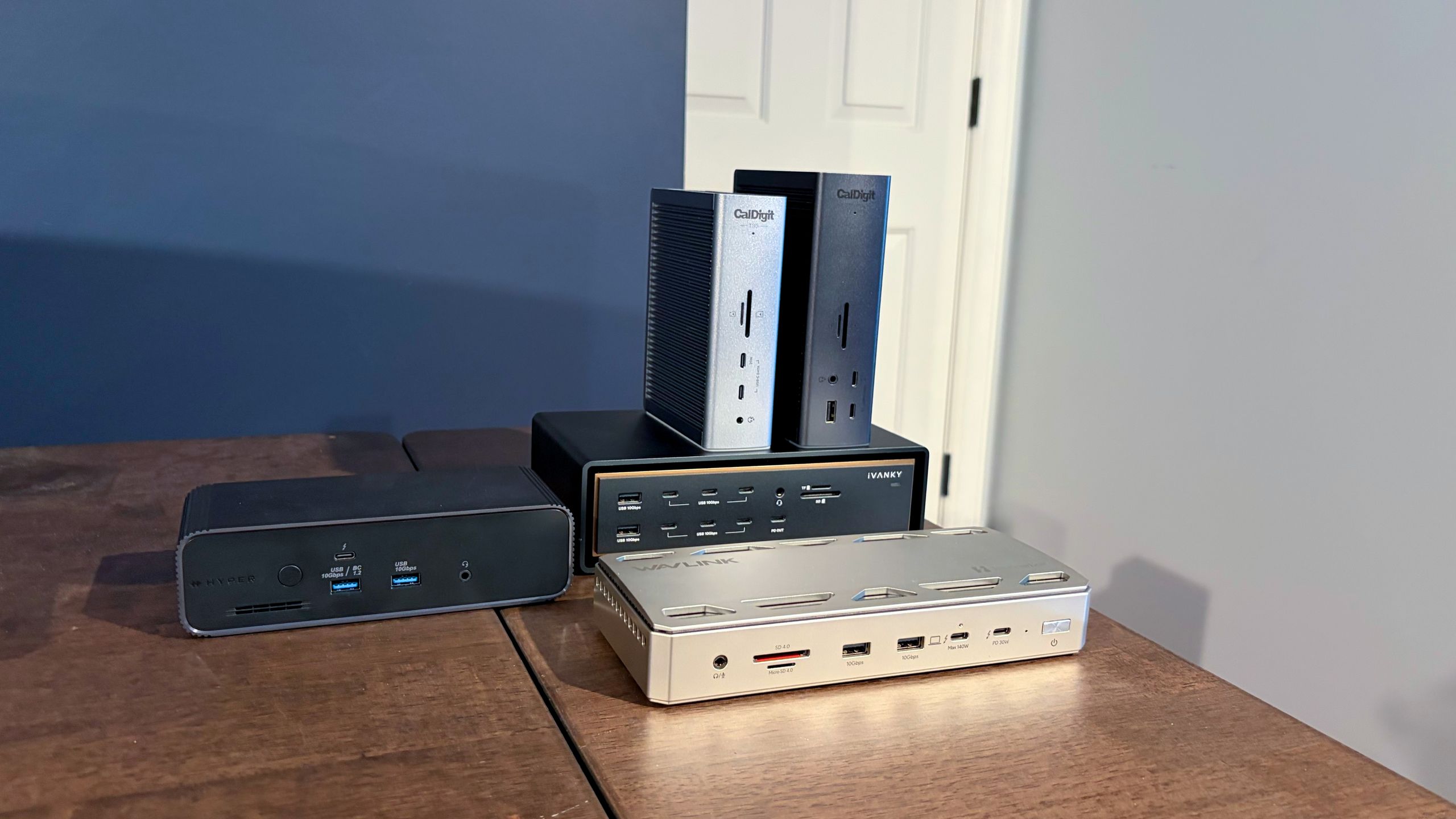
The Hyper HyerDrive Next and WAVLINK WL-UTD58 are both good options if you're looking to spend $400 or less. In addition, they both include an M.2 slot for expanding storage with an SSD. However, the WL-UTD58 is by far the value champion, offering plenty of connectivity with a street price of just $254 .
That leaves us with the Ivanky FusionDrive Ultra. This dock is an exercise in excess, from its elaborate design to its use of two Thunderbolt 5 chips to its requirement of two free Thunderbolt 4 ports. But in return, you get an insane 26 total ports, including seven USB-C ports up front and four Thunderbolt 5 on the back, along with HDMI 2.1, DisplayPort 2.1, and 10 GbE ports. However, compatibility is extremely limited, working only on Apple Silicon Macs. In addition, with a street price of $650 , it’s by far the most expensive dock we tested.
However, if it were money being spent on a Thunderbolt 5 docking station, I’d have to give the crown to the WAVLINK WL-UTD58. With a price tag of just over $250, an integrated M.2 slot, and a well-balanced assortment of ports, it’s hard to ignore its value proposition.
Although we plan to keep this guide updated as we test additional Thunderbolt 5 docks, here are some additional units to consider:
Ivanky FusionDock Pro 3 Thunderbolt 5 Dock – $224.99
Key considerations
- Investor positioning can change fast
- Volatility remains possible near catalysts
- Macro rates and liquidity can dominate flows
Reference reading
- https://www.tomshardware.com/peripherals/docking-stations-hubs/SPONSORED_LINK_URL
- https://www.tomshardware.com/peripherals/docking-stations-hubs/testing-the-top-thunderbolt-5-docks-with-up-to-140w-power-delivery-10-gbe-and-even-internal-m-2-ssd-slots-razer-caldigit-hyper-ivanky-and-wavlink-go-head-to-head#main
- https://www.tomshardware.com/subscription
- Rethinking AI TCO: Why Cost per Token Is the Only Metric That Matters
- Save $1,100 on this powerful gaming rig with Nvidia RTX 5070 Ti, Intel 14900KF, 32GB of RAM, and 2TB of storage — ABS Stratos Aqua on deep discount
- AMD to broaden and specialize EPYC CPUs, already working on Zen 7 architecture — increased customization to better address evolving AI and cloud needs
- Dell XPS 16 (2026) Review: A flagship return to form
- Xbox CEO Asha Sharma kills Copilot for Gaming — overhauls leadership with CoreAI veterans
Informational only. No financial advice. Do your own research.