
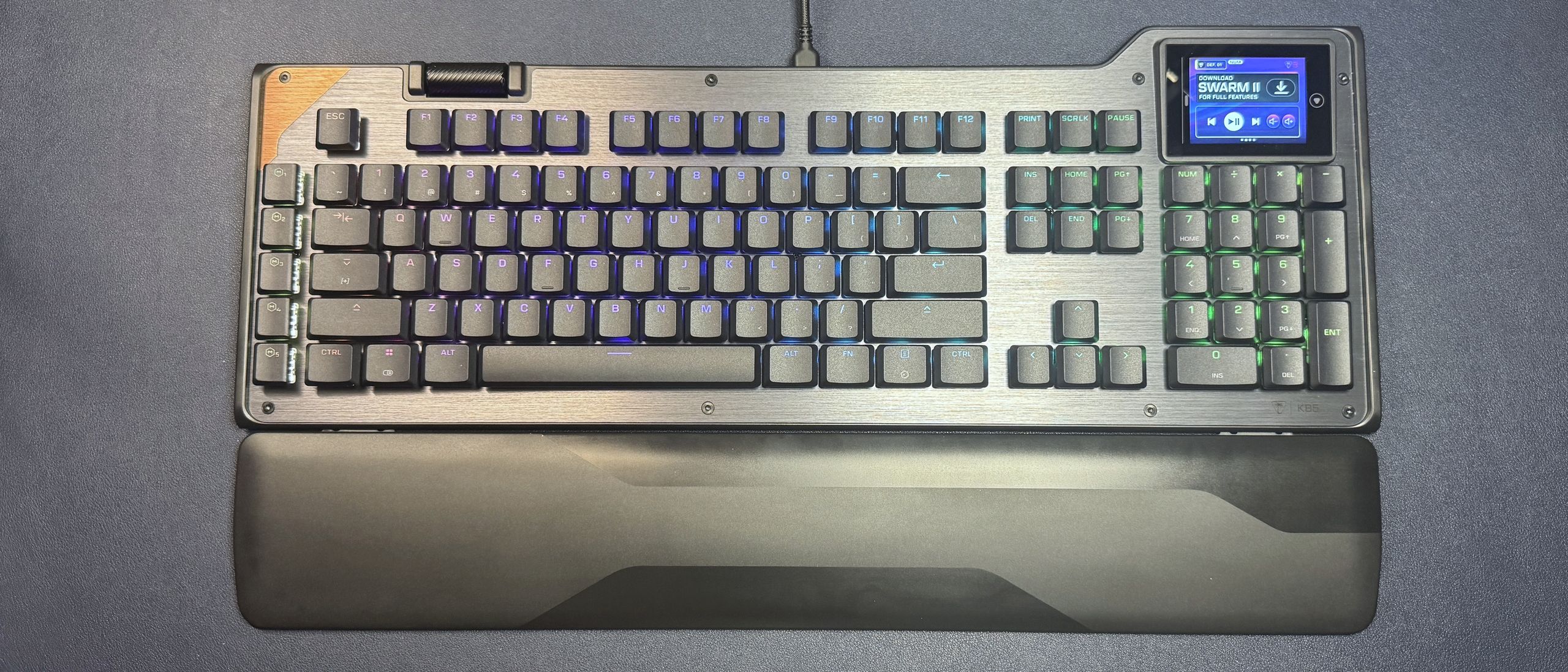
The KB5 comes with Turtle Beach's Titan low-profile linear switches, which are rated for up to 50 million keypresses and have an actuation point of 1.2mm and a force of 42gf. These are traditional low-profile mechanical switches — not magnetic Hall Effect switches like you'll find on the KB7 (and KP7). They're linear, which means a smooth keypress with no audible or tactile bump, and they're pre-lubed so they're pretty smooth.
While I'm not a huge fan of linear switches, the KB5's are quick and stable, and you get a decent little 'thunk' when you bottom out on the keyboard's aluminum top plate. The typing experience is very similar to that of the KB7, which is to say that it's very pleasant for a mainstream gaming keyboard with low-profile linear switches.
The keyboard has flat, shallow keycaps made of double-shot PBT. They have a slightly matte texture and should resist shine better than ABS keycaps, but I'm not fully convinced that'll be the case (maybe they just feel cheaper because they're thinner, overall, than regular keycaps, though). The keycaps are wide, with slightly curved tops, and the keyboard is roomy — I didn't have any problem getting used to the layout for the most part, though the extra row of macro keys on the left did throw me off a few times (this happens whenever there's an extra row of macro keys).
(Image credit: Tom's Hardware) (Image credit: Tom's Hardware) Image 1 of 2 View Original
The touchscreen is located above the numberpad, and is fairly responsive. It responds to both taps and swipes (you can swipe through "pages" of controls / buttons), and I found the 2 x 3 layout a little more intuitive to navigate than the KB7's much larger layout — though still not as intuitive as it would be with tactile buttons, like the Corsair Galleon 100 SD has. In addition to the six customizable "buttons" on the touchscreen, there's also some other info displayed at the top — your current profile (you can switch between profiles by tapping this) and some keyboard info (e.g. numlock, caps lock, scroll lock).
The KB5 is also a solid keyboard for gaming, thanks to its quick, responsive linear switches and 8K polling rate. While it doesn't have magnetic switches like its pricier sibling, it does implement Turtle Beach's ReacTap, which is a software solution similar to simultaneous opposing cardinal directions (SOCD).
Like all Turtle Beach products, the KB5 ships with firmware from 2001 (or at least it feels like it) and requires at least 16 mandatory updates before it can be used with the brand's Swarm II software. I'm exaggerating, of course — but not much.
(Image credit: Tom's Hardware) (Image credit: Tom's Hardware) Image 1 of 2 View Original
Once I managed to get the KB5 up to date on firmware (and Swarm II up to date on software), I was able to customize the touchscreen, keyboard, and lighting. Swarm II is kind of mandatory for this keyboard, as you can't really customize the touchscreen without it — and the touchscreen is a large part of the selling point here. There's not a ton you can do with the touchscreen that you can't do with regular keys, at the moment. There are options for keyboard / Windows / multimedia functions, opening apps and websites, and assigning macros. And there are a couple of "dynamic" options such as a timer setting and performance monitoring, but it's not a robust ecosystem like that of Elgato or Loupedeck. Still, it's probably enough to get you started, and the Swarm II app includes a handful of templates in case you're out of ideas.
(Image credit: Tom's Hardware) (Image credit: Tom's Hardware) (Image credit: Tom's Hardware) (Image credit: Tom's Hardware) Image 1 of 4 View Original
Keymapping is pretty straightforward, and you can map keys to do most of what you can map the touchscreen to do (save for visual things, such as performance monitoring, obviously). You can record and save macros in the app and configure ReacTap. You can also customize the lighting from a handful of presets (or per-key, if you so desire). The keyboard can save up to five onboard profiles, which you can switch between by tapping the profile number in the upper-left corner of the touchscreen.
The KB5 is actually a pretty nice compromise, and I like it better than the pricier (and fancier) Turtle Beach KB7. I love having a built-in numberpad that doesn't cost an extra $100 to snap onto the side of the board, and the smaller touchscreen is actually more manageable to use quickly and without (really) looking. The KB5 may not have magnetic Hall Effect switches, but its low-profile linear switches feel and sound pretty good for a mainstream gaming keyboard. And at $150, it's basically half the price of the combined KB7 keyboard and KP7 numberpad.
Of course, if you're really dedicated to making your keyboard a streaming deck substitute, the Corsair Galleon 100 SD is the only real option. Not only does it have physical buttons, it also has knobs — and it's supported by Elgato's Stream Deck software, which is still the real differentiating factor for macropad and touchscreen devices these days.
Sarah Jacobsson Purewal is a senior editor at Tom's Hardware covering peripherals, software, and custom builds. You can find more of her work in PCWorld, Macworld, TechHive, CNET, Gizmodo, Tom's Guide, PC Gamer, Men's Health, Men's Fitness, SHAPE, Cosmopolitan, and just about everywhere else. ","collapsible":{"enabled":true,"maxHeight":250,"readMoreText":"Read more","readLessText":"Read less"}}), "https://slice.vanilla.futurecdn.net/13-4-25/js/authorBio.js"); } else { console.error('%c FTE ','background: #9306F9; color: #ffffff','no lazy slice hydration function available'); } Sarah Jacobsson Purewal Social Links Navigation Senior Editor, Peripherals Sarah Jacobsson Purewal is a senior editor at Tom's Hardware covering peripherals, software, and custom builds. You can find more of her work in PCWorld, Macworld, TechHive, CNET, Gizmodo, Tom's Guide, PC Gamer, Men's Health, Men's Fitness, SHAPE, Cosmopolitan, and just about everywhere else.
Key considerations
- Investor positioning can change fast
- Volatility remains possible near catalysts
- Macro rates and liquidity can dominate flows
Reference reading
- https://www.tomshardware.com/peripherals/gaming-keyboards/SPONSORED_LINK_URL
- https://www.tomshardware.com/peripherals/gaming-keyboards/turtle-beach-command-series-kb5-review-a-touchscreen-and-a-numberpad-in-one-keyboard#main
- https://www.tomshardware.com/membership
- Wolfbox MF60 Compressed Air Duster is nearly 40% off in a limited-time deal — powerful rechargeable device's propulsion fan runs at up to 110,000 RPM
- This week on Tom's Hardware Premium: August 8, 2026 — Inside China's lithography efforts, co-packaged optics get a spotlight, and Samsung debuts next-gen memory
- Mind-bending self-replicating GIF code prints an exact copy of itself, is both a program and its own visual output — champion coder shows off 'Piet Quine' techn
- Kansas town silences public comment on gigawatt AI data center after receiving death threats, moves to virtual meetings — shift follows physics teacher's arrest
- UK's Royal Navy sea drones contain component that secretly sent data to China, report claims — government cuts camera connectivity and insists data wasn’t sensi
Informational only. No financial advice. Do your own research.