
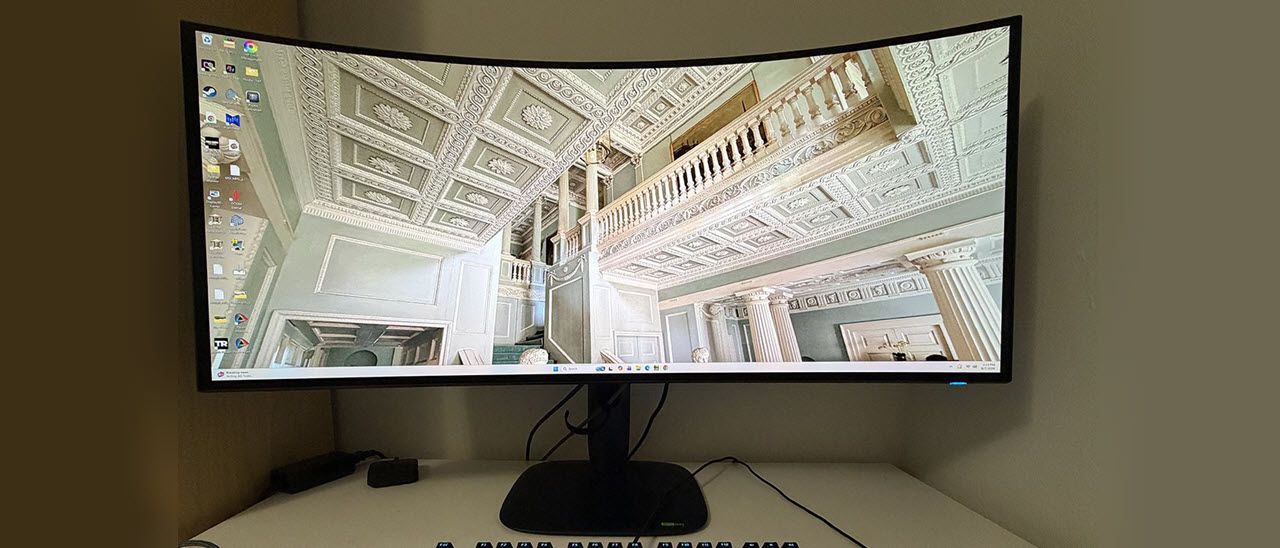
With everything included except for internal speakers, you’d expect the AW3926QW to cost a lot, but it’s opening at $1,100, which makes it competitive with many other premium OLED ultra-wide displays. On paper, Alienware is delivering everything a flagship should have without an extreme price. Let’s see how it performs.
Alienware’s packaging is completely recyclable, even down to the paper tape that seals the clamshell carton. The panel, upright, and base assemble without tools. Included cables are IEC power, two USBs, DisplayPort, and HDMI. The power supply is internal.
(Image credit: Dell) (Image credit: Dell) (Image credit: Dell) (Image credit: Dell) (Image credit: Dell) Image 1 of 5 View Original
The AW3926QW maintains Alienware’s latest styling aesthetic with a thin bezel and the cool floating upright that appears to be detached from the small-footprint base. Everything is solid, with metal cores and heavy plastic coverings finished in a matte texture. On the back is a lozenge-shaped vent ring that provides effective fanless cooling. Inside it is the Alien Head and a polished logo. The stand unsnaps to reveal a 100mm VESA mount with fasteners included if you want to use an arm.
The stand provides a 4.3-inch height range plus 5/21 degrees tilt and 20 degrees swivel. The base remains stationary while the stand pivots upon it. There is no portrait mode, but you can tweak the panel with five degrees of yaw if your desk isn’t level. Movements are firm and sure and befit a flagship product.
The screen curve is 1500R, which in the scheme of things is fairly subtle. There’s just enough wraparound effect to bring the sides of the screen into your vision cone when sitting around three feet away. You can sit closer if you like since pixel density is tight, but then you’d have to turn your head to see the whole image. The screen coating is shiny, but a polarizing layer keeps reflections from affecting the picture.
There are inputs aplenty for video, four in all. You get two HDMI 2.1, a DisplayPort 2.1, and USB-C, which functions as DP Alt and delivers 90 watts of power. There’s a 3.5mm headphone jack plus more USBs: two on the bottom of the panel edge (C and A) and an A and B on the I/O panel. They can be bound to video inputs using the KVM wizard in the OSD.
(Image credit: Tom's Hardware) (Image credit: Tom's Hardware) (Image credit: Tom's Hardware) (Image credit: Tom's Hardware) (Image credit: Tom's Hardware) (Image credit: Tom's Hardware) (Image credit: Tom's Hardware) (Image credit: Tom's Hardware) (Image credit: Tom's Hardware) (Image credit: Tom's Hardware) (Image credit: Tom's Hardware) (Image credit: Tom's Hardware) Image 1 of 12 View Original
Game Enhance Mode has a timer, frame counter, and alignment marks. For the aiming points, go to AlienVision where you’ll see a cool reticle editor that includes settings for sniper aids. You can create up to three configurations for later recall.
AlienFX Lighting refers to the power LED and Alien Head’s color and effect options. You can customize them to a variety of colors and movements.
For HDR signals, there’s a Dolby Vision option along with eight modes for HDR10 content. Custom Color HDR includes grayscale calibration. Of the listed modes, the brightest one is True Black, and the one with the best luminance tracking is Peak 1300 Bright.
For panel maintenance, the AW3926QW has pixel refresh, which runs automatically when the panel health indicator goes red. That’s determined automatically by internal software. Alienware backs the AW3926QW with a three-year warranty that includes burn-in.
The AW3926QW doesn’t need calibration in its Standard picture mode. I noted slightly light gamma, but the color gamut and temperature are visually perfect out of the box. To adjust the grayscale, I used Custom Color mode, which has both gain and offset sliders. If you want to change the color space, Creator mode has that option along with gamma presets. The three Game modes also have grayscale adjustments. My recommended SDR settings are below. For HDR, there are eight modes available plus Dolby Vision. I suggest trying Peak 1300 Bright and True Black to see which you prefer. They look similar, but the latter is a tad brighter while the former has more accurate luminance tracking.
A few days with the AW3926QW proved its flagship status beyond a doubt. It excelled as a gaming monitor and workday display in equal measure.
For gameplay, my test PC with its GeForce RTX 4090 was more than enough to drive it at 165 Hz at full 5120×2160 resolution. That’s 11 megapixels in case you’re counting, about 23% more than Ultra HD. The video processing here is good enough that I didn’t wish for 240 Hz. And I had little need for the 330 Hz modes. I can see their use in competition or with lesser video cards to keep the action smooth. But I saw nothing but perfect motion resolution and hyper precision. Aiming and moving became an extension of my brain as control inputs were instantly translated.
Image quality was also superb, with lush bright color and deep contrast. Playing in SDR mode with the full color gamut was excellent, but HDR games were even better. The AW3926QW is a superb HDR display. And don’t forget to try Dolby Vision with its dynamic tone mapping. I didn’t have any DV games, but I watched content from a Blu-ray player that looked stunning. Going back and forth between HDR True Black and Peak Bright 1300, I found I preferred True Black because it had a tad more impact. On page five, I’ll explain the technical differences.
I’ve reviewed many 34-inch ultra-wide displays, and while I find them excellent for gaming, they lack the height I prefer for writing content. The 39-inch AW3926QW is perfect for getting work done. It is only half-an-inch shorter than the 32-inch 16:9 screen I use every day. So, it’s ideal for lining up two or three windows side by side when comparing copy or graphics. I loved it for Photoshop, where I could open and see multiple photos and still have room for toolbars. If you’re already a user of dual screens, the AW3926QW is the perfect replacement if you’re sick of that pesky dividing line.
The monitor proved to be flagship-worthy in every respect. The stand is solid; styling is premium and everything about the AW3926QW exudes quality. The inclusion of USB ports and KVM further extends its usability. And the selection of esports modes makes it flexible for a wide variety of gaming systems.
Takeaway: The AW3926QW is super useful in every way and excels as a gaming display. It delivers speedy and responsive performance at 165 Hz and impressive frame rates up to 330 Hz in the esports modes. The picture is gorgeous with vivid and accurate color and plenty of brightness. HDR has high impact and multiple picture modes to choose from, plus Dolby Vision support. The AW3926QW is a great all-around monitor that delivers a lot of bang for the buck.
Current page: Features and Specifications
Key considerations
- Investor positioning can change fast
- Volatility remains possible near catalysts
- Macro rates and liquidity can dominate flows
Reference reading
- https://www.tomshardware.com/monitors/gaming-monitors/SPONSORED_LINK_URL
- https://www.tomshardware.com/monitors/gaming-monitors/alienware-aw3926qw-39-inch-wuhd-oled-gaming-monitor-review#main
- https://www.tomshardware.com/membership
- Crucial SSD owner offered $200 refund for 4TB drive now selling for over $500 — company finally caves to warranty demands after protracted back-and-forth
- Glass substrate roadmaps examined — Absolics in final qualification and a first product that keeps slipping
- Save $260 on this high-end AM5 gaming combo from Newegg — just $1,345.99 buys a Ryzen 9 9950X3D, 32GB Corsair DDR5 RAM, MSI X870E Carbon Wifi motherboard, along
- OpenAI bans Russian ChatGPT accounts posing as a fake Israeli think tank — used VPNs to push pro-Kremlin narratives and steal academic papers for its website
- Universitas Gadjah Mada, Indosat and NVIDIA Open Indonesia’s First University AI Center to Develop Local AI Talent
Informational only. No financial advice. Do your own research.