
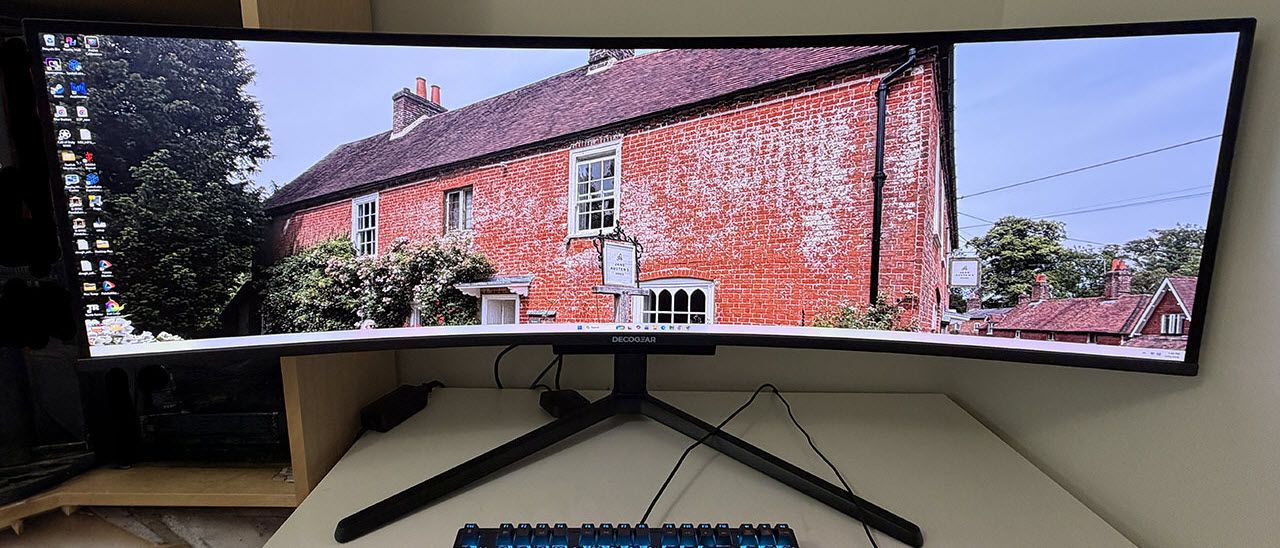
Gaming is enhanced by a pair of internal five-watt speakers accompanied by a 10-watt woofer plus a 3.5mm headphone jack. And you can hang those cans on a stout metal hook that flips out from the stand. Video inputs include two DisplayPort 1.4, one HDMI 2.1, and a USB-C that includes 90 watts of charging power. Additional USB ports support things like input devices and webcams. You also get LED lighting in the back with control in the OSD.
If you’re wondering about the Deco Gear brand, it is a subsidiary of Beach Camera, a very experienced vendor of electronics and technology. You can buy the DG49OLED240 directly for $1,229.99, or in one of Beach Camera’s brick-and-mortar locations.
The DG49OLED240 showed up in a large white carton with just the words “49” OLED Ultrawide Monitor” printed on it. A visit to Deco Gear’s website revealed that several variants of this display differ mainly by refresh rate. The DG49OLED240 is the flagship model at 240 Hz. The contents are packed in crumbly foam and assembled tool-free. The accessory bundle includes an IEC cord for the internal power supply plus DisplayPort, HDMI and USB cables.
(Image credit: Deco Gear) (Image credit: Deco Gear) (Image credit: Deco Gear) (Image credit: Deco Gear) Image 1 of 4 View Original
The DG49OLED240 is styled simply with just a Deco Gear logo on the front, screened on above a small protrusion. This is where you’ll find the only control, a tiny joystick. It covers all monitor functions. A word of warning: pressing it only toggles power. It doesn’t select functions like every other joystick on every other monitor. So, unless you plan to turn the DG49OLED240 on or off, do not press it.
The screen’s bezel is flush so you can’t see it when the power’s off. But it is a tad wider than average at 12mm around the top and sides and 15mm at the bottom. In practice though, you’ll be so glad to get rid of the line down the center after chucking your two 27-inch screens that you won’t care.
The stand is super solid with a wide and deep base made from cast aluminum and finished in a matte black powdercoat. It’s almost monolithic, but there is a bit of wobble where the panel snaps on. This is typical of super wide monitors. Ergonomics include a 4.6-inch height range plus 5/20 degrees tilt and 20 degrees swivel.
In the back are LED lights in two vertical arrays that frame the rear-facing I/O panel. There are two DisplayPort 1.4s and an HDMI 2.1. A USB-C handles video signals and provides 90 watts of power. There are USB ports too, one upstream and two downstream. A 3.5mm headphone jack delivers audio , and there’s an RJ-45 network port.
(Image credit: Tom's Hardware) (Image credit: Tom's Hardware) (Image credit: Tom's Hardware) (Image credit: Tom's Hardware) (Image credit: Tom's Hardware) Image 1 of 5 View Original
Picture Settings has the usual basic controls and an unusual one called Contextual Model. I don’t know where this terminology comes from, but here, it means more picture modes. Specifically, this is where you’ll find sRGB along with other activity-specific options. An important one here is Brightness Mode. Deco Gear calls the two settings Normal and Highlight, and what they actually are is fixed or variable brightness. I’ll talk more about that later. The second screen, not shown above, has six gamma presets.
In Color Settings, you get three fixed color temps plus three more user memories with RGB sliders. These are difficult to adjust thanks to the joystick’s unusual operation. But they are effective and allowed me to dial in grayscale tracking to a very accurate level.
Additional settings include PIP/PBP for viewing two video sources at once. You can adjust the position of the OSD, and there are port version options. The one thing I didn’t find was OLED care options. But Deco Gear assures me that the DG49OLED240 has automated logo dimming and panel refresh, which runs every few hours to guard against burn-in.
HDR signals get two modes that vary only in their EOTF tracking. The best choice there is HDR Standard.
Gaming on the DG49OLED240 was instantly addictive. It delivered very balanced performance with perfect motion resolution, lighting-fast reflexes, and a gorgeous image. The extra width provided by the 32:9 aspect ratio really drew me into the gaming environment with a VR-like feel that enveloped my peripheral vision.
You’ll see on the next page that the DG49OLED240 has a tad less input lag than the other 49-inch OLEDs I’ve reviewed. Though the numerical difference is small, I experienced a quickness and precision that I don’t get with every OLED. Clearly, 240 Hz is more than enough speed to ensure blur-free operation and instant control response. A seasoned competitor will want to give this monitor serious consideration. And I had no problem maintaining 240 fps on a GeForce RTX 4090 in Doom Eternal with detail set at maximum in HDR mode.
The DG49OLED240 also has exceptional color balance. Even though it covers more than 112% of DCI-P3, it never looked overblown in SDR mode. There is an available and accurate sRGB mode, but I only needed it when working on photos and graphics for web publication. For all other activities, including watching SDR video, I enjoyed the extra color. And HDR looked stunning thanks to linear saturation tracking and no visible hue errors.
With the same 109 ppi as a 27-inch QHD screen, clarity is excellent but not quite at the level of a 4K screen. It is more than sharp enough for gaming though. Documents also render with clean fonts, no apparent fringing, and that signature OLED contrast. I found smooth scrolling in Windows by running at 120 Hz. You can certainly run at 240 Hz all the time if you wish, but it will increase power consumption.
Putting a monitor as wide as the DG49OLED240 on your desk will require some adaptation if you aren’t already used to multiple screens. I habitually put the work I’m focusing on at the center of the screen, but with a mega-wide, I had to spend more time with pages to my left and right. Photoshop was my favorite use since I could put the photo in the center and leave the sides for toolbars and supporting dialog boxes. It’s also great for very wide spreadsheets, like my monitor test database which has 25 horizontal fields. For my work, it is less suited to writing since I prefer more height when using Word or Notepad.
A standout feature I noticed immediately was the DG49OLED240’s excellent audio quality. It has a pair of internal speakers which alone are not extraordinary, but they are accompanied by a 10-watt woofer which rounds out the bass frequencies. This makes the sound presentation much fuller and more realistic. It adds to the screen’s immersive quality and is a completely viable alternative to headphones or external desktop speakers.
Takeaway: The DG49OLED240 delivers gaming performance on par with the best OLED screens I’ve reviewed. It has perfect motion resolution and responds instantly to control inputs with less lag than other 49-inch monitors. It’s super useful for workday tasks like Photoshop and Excel and not quite as well suited to word processing or web browsing. Sound quality is equivalent to a good pair of headphones or external desktop speakers. If you’re looking to get rid of the line between your two 27-inch QHD monitors, the DG49OLED240 is a no-brainer.
Current page: Features and Specifications
Key considerations
- Investor positioning can change fast
- Volatility remains possible near catalysts
- Macro rates and liquidity can dominate flows
Reference reading
- https://www.tomshardware.com/monitors/gaming-monitors/SPONSORED_LINK_URL
- https://www.tomshardware.com/monitors/gaming-monitors/deco-gear-dg49oled240-49-inch-32-9-oled-gaming-monitor-review#main
- https://www.tomshardware.com/membership
- $215 discount turns Corsair's DDR5-6000 Vengeance memory kit into the cheapest 32GB of RAM at those speeds — 35% saving as stock dwindles and prices continue to
- Save a ridiculous 76% on this 7-in-1 Hyper Dual Monitor Thunderbolt 4 Dock — just $24 buys a dual 4K60Hz HyperDrive docking station for pennies on the dollar
- Get a 32-inch Samsung Odyssey G55C curved gaming monitor for $199 — 1440p 165 Hz screen is 39% off at Amazon for a limited time
- Get a 32-inch Samsung Odyssey G55C curved gaming monitor for $199 — 1440p 165 Hz screen is 39% off at Amazon for a limited time
- EPA faces lawsuit over claims it fast-tracked approval of toxic 'data center chemicals' — exposure to photoacid generators used for semiconductor manufacturing
Informational only. No financial advice. Do your own research.