
Make sure the room you use your resin printer in is well-ventilated to avoid inhaling fumes. Spilled resin should be immediately cleaned up with 99% isopropyl alcohol. After printing, make sure to wipe down your printer and bottles to remove smudges of uncured resin. Always keep your resin tightly sealed and safely stored out of reach of pets and children. Formlabs states that a respirator is not required, but it’s always good to have one to be extra safe.
The Formlabs Form Studio 1 comes almost fully assembled out of the box. You'll need to remove packing material from the inside of the hood and remove the plastic covering the vat. You'll then need to unbox the build plate and insert it onto the printer's mast.
The Form Studio 1 came pre-leveled and ready to go out of the box. But if needed, you can adjust the plate by using the included alignment shims and a 4mm hex key that is neatly tucked away on the left front side of the printer.
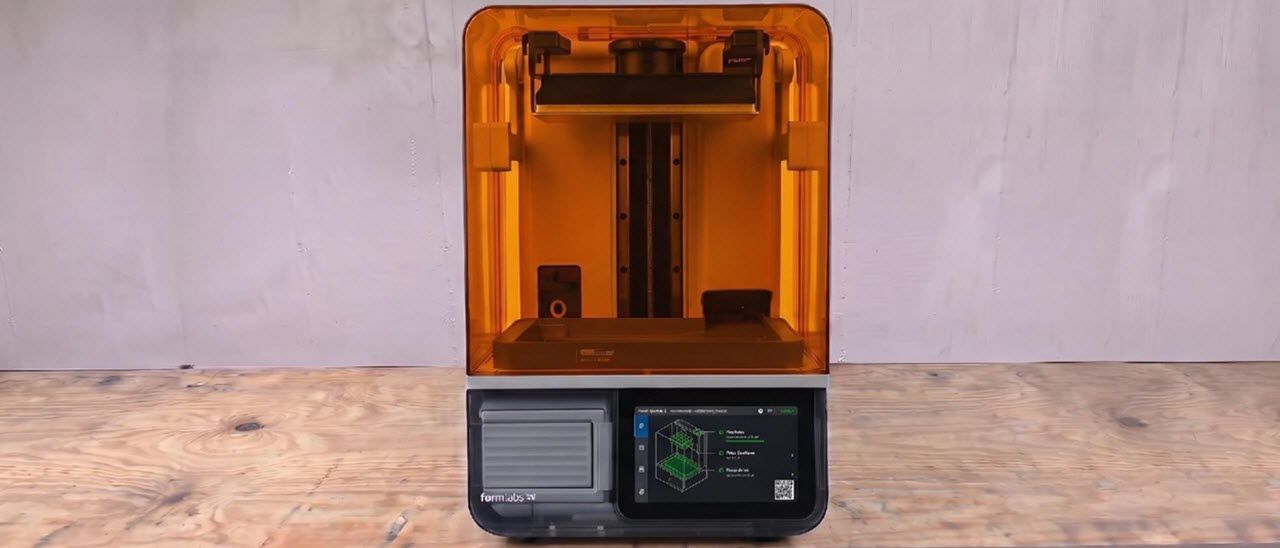
The Formlabs Form Studio 1 shares similar styling features to its larger, much-pricier professional-grade resin printers, with its distinct Orange and Grey coloring. But the company has slimmed down the design and given it more of a modern, skeleton-style panel. The build plate has a nice tab-locking system to help users lock and remove the build plate with ease. The same can be said for the vat system, with two clamp locks on the side to help keep the vat in place, while making it easy to quickly change vats if needed.
The seven-inch display on the Form Studio 1 is large and responsive. It’s the largest screen I have seen on a printer of this size, and a great addition to the setup so you can see what is happening without having to walk right up to the printer. The printer also makes useful sounds to let you know when something is removed, put back into place, or even when there is an issue with a check while printing.
The hood does feel a little flimsy, particularly where it mounts to the arms for the hood, but it’s not terrible. This is about the only thing I found on the printer that seemed like the company cut some hardware corners. But again, it works, and the arms are solid. Formlabs did state that they are working on the design of this to make it a little better.
There is also a camera on the bottom left for live access to your current print job, or to show off an awesome time-lapse of the previous prints you did. One feature I was not expecting was the little pocket on the front left of the printer, shown in an image above, holds hex keys and leveling items. Most printers just have the tools there in a box and expect you to either print a case or toss them in a drawer and forget about them. This little case is 3D printed (files are available to download and make your own too), which is a nice touch showcasing what 3D printers are for.
When you set up the Formlabs Form Studio 1, it walks you through a series of setup screens, like most resin printers now, but I did not expect the printer to ask me to level the physical printer. This is something normally overlooked by many when resin printing. Leveling the entire printer makes sure that the Automatic resin feed system is properly balanced, keeping the system from making a big mess when the auto refill is triggered, and not overfilling the vat. This step can be skipped, but it is a good idea to make sure the printer is level.
Let's talk about resins, and specifically Formlabs resins. When it comes to resin printers, most users will end up using their prefered resin, or whatever is cheapest. This can still be done with the Form Studio 1 with its Open Material Mode. But you will still need to calibrate your resins through the slicer as normal, to get successful prints.
Formlabs Alpha Resins are the first and 3D printing resins that are UL GREENGUARD Gold certified when using Form Studio 1 and Formlabs’ VOC Extractor. This means they pass an independent test for chemical emissions during printing that are low enough to be considered healthy for sensitive groups. The company’s resins are low odor, and parts printed with Alpha Resins have passed tests for long-term skin safety.
Formlabs achieved this by changing up the ingredients in its resin. There are no known chemicals with acute toxicity or known long-term effects on organ and reproductive health. This is good news for those who are scared of the chemical side of resin printing. Now, this doesn't mean that you can just carelessly toss out your PPE, but it does mean that resins are getting better and safer for users. Maybe one day we’ll get to a point where we don’t need PPE.
The Formlabs Form Studio 1 comes with the PreForm Form Studio 1 slicer. This is Formlabs’ slicer for all its printers. It takes a little bit to get used to if you're coming from Lychee or Chitubox, like most resin printers, but after your third print, you should be getting the hang of it. If you're a new user, it’ll be a little troublesome understanding how to properly angle the print and size it, but that's about it.
Using Formlabs Alpha V1 Resin in Grey, I printed a model of Johanna from Diablo 3 . I found this model while searching on Makerworld. I used Formlabs’ auto orientation tool for this print. I used stock settings for the Alpha Grey V1 in the slicer and added the stock supports. The file was sliced and sent via Wi-Fi to the printer. I printed this as a solid piece using 264ml of resin, which printed in 10 hours and 56 minutes, at 0.05 mm layer height.
The next print I wanted to tackle was a Halloween-themed print, since it is Spooky season after all.
This print was scaled up to fit the build plate area, and printed with Formlabs Alpha V1 Resin in Grey. I added some supports and sent it to the printer. This print used 224ml of resin and printed in 7 hours and 58 minutes at 0.05 mm layer height.
Lastly, I decided I wanted to try a different resin, one that most people either don’t know about or haven't really used before: flexible resin.
I did have to tweak the supports and go the manual support route. Because of the way the slicer sees all the holes, it wanted to add tons of supports that aren't really needed. Once that was completed, I sent it to the printer. These models printed together in 7 hours and 53 minutes, and only took 153 ml of resin at a 0.050mm layer height.
Before you can admire your prints, you’ll need to wash them with isopropyl alcohol and cure them with a UV light . I like to give prints a 30-second hand rinse in a container of 95% Isopropyl alcohol, then a 5-minute rinse in the Form Studio 1 Wash + Cure Station which is sold separately and retails for $199.
Completely dry the print with a hair dryer on cool – IPA left on the print can make it tacky. You can also let the print air dry in a place away from sunlight. Supports are easier to remove before curing because they are softer. Clip the supports off with side cutters and use tweezers to remove stubborn supports. Remember to always wear gloves while handling uncured prints. Then place the print in a UV curing station for its recommended curing time.
Your IPA should never be flushed down the drain, especially after being contaminated with uncured resin. Instead, keep using the resin until it’s too dirty, then leave the container open to evaporate. The remaining sludge can be cured with UV light or the sun before being thrown away. Supports should also be cured before being thrown away.
Starting at $699 , the Formlabs Form Studio 1 may seem a bit pricey for those looking at comparable resin printers on the market, like the HeyGears Reflex RS ($499) and Elegoo Saturn 4 Ultra for $426.99 . And while our testing showed slow printing times, you can get Formlabs Fast Resin to print quicker. The build quality of the printer and the Formlabs name instantly appeal to those looking for a premium package. Overall, the price feels right for what you're getting.
Using Formlabs resin pretty much guarantees a completed print over other resin printers I’ve tested. For me, the selling point beyond the name and price is the fact that it just prints. I didn’t have a single issue on that front while testing the Studio 1. That right there will sell me over any new tech or faster print times. Plus, with all the added helpful features in the slicer and the printer, the Form Studio 1 welcomes new users with open arms.
MORE: Best Budget 3D Printers for Beginners
Key considerations
- Investor positioning can change fast
- Volatility remains possible near catalysts
- Macro rates and liquidity can dominate flows
Reference reading
- https://www.tomshardware.com/3d-printing/SPONSORED_LINK_URL
- https://www.tomshardware.com/3d-printing/formlabs-form-studio-1-review#main
- https://futureplc.com/privacy-policy/
- From Scan to Treatment Plan, AI Helps Close Breast Cancer’s Deadliest Gaps
- Nvidia GPU prices spike in Japan; prices up to 41% higher than Amazon US
- Nvidia GPU prices spike in Japan; prices up to 41% higher than Amazon US
- Unsupervised AI agent deletes TV show’s entire edit weeks before release; program can't air
- Save $1440 when you go for this 4K gaming rig with a massive 64GB of DDR5 RAM and a 4TB SSD
Informational only. No financial advice. Do your own research.