
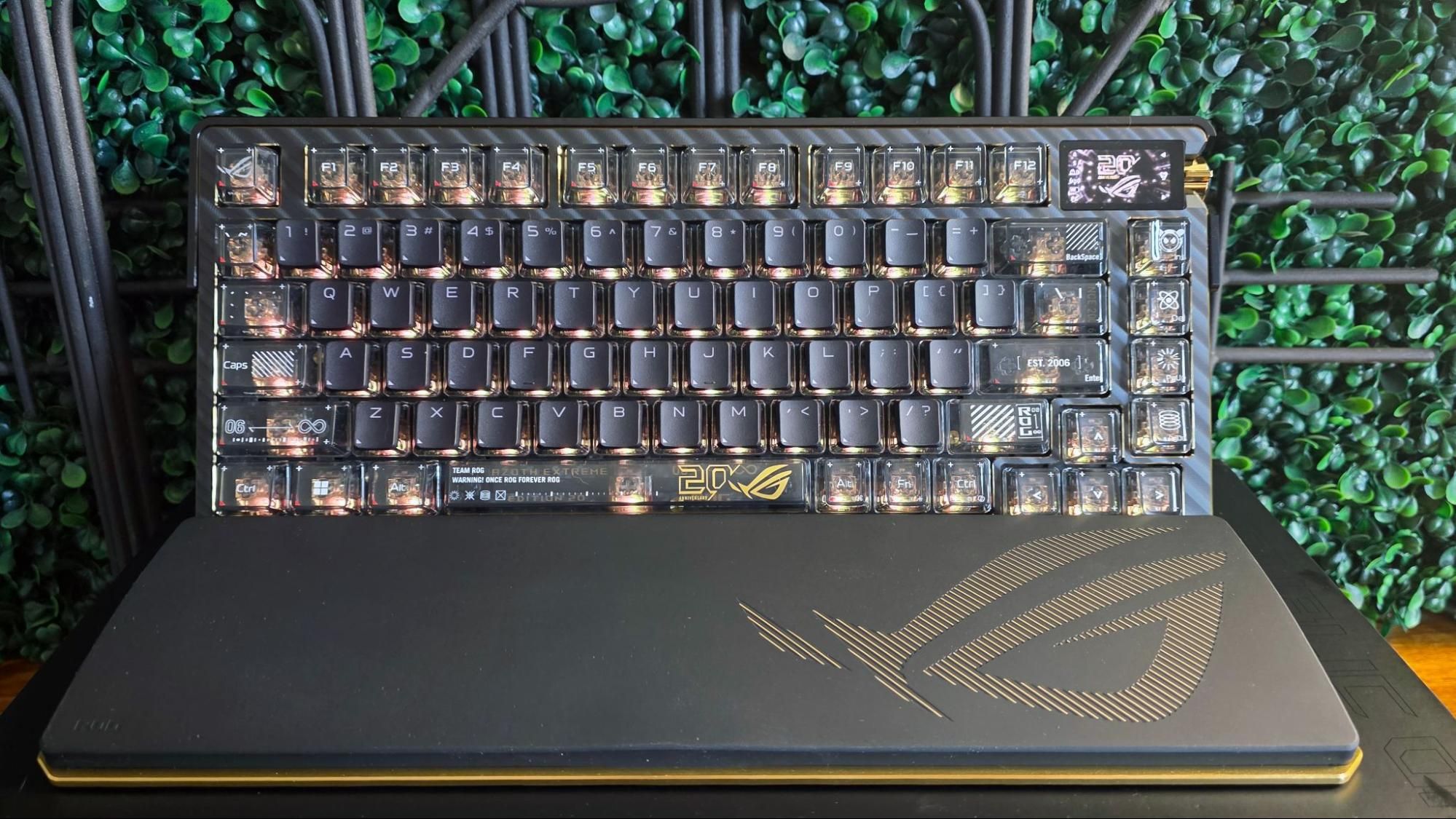
I’m not the biggest fan of Armory Crate (or any gaming peripheral software suite, to be honest), so I like that Asus makes heavy use of its Gear Link ( https://gearlink.asus.com/ ) web app for keyboard control here. With the mouse plugged into your system, you can dig pretty deep into the settings via the site.
The settings here feel a little limited compared to theoptions with the 20th Anniversary Harpe II mouse. But you can assign keys and key combinations. Macro recording is supported on the fly by pressing the Fn and Left Alt key to start and stop macros, then pressing the key you want it assigned to.
There are also lots of options for adjusting the screen and the RGB lighting. I particularly like the Music Mode preset, which lets you display an animation and artist / track listing of whatever song you’re listening to. There’s also an option for displaying CPU and GPU stats, including frequency, temperature, fan speed, voltage, and use. There are enough options for the screen (and they’re easy to navigate, thanks to touch and the jog button) that I feel like the screen here is something I would use and fiddle with quite a bit if this were my main keyboard.
While I didn’t have as much time with the keyboard as I would have liked before jumping on a plane to Taipei for Computex , I did use it for work and gaming for about a week. While I generally prefer clicky switches for writing, lubed linear switches have either gotten good enough, or I have gotten used to them enough that I don’t mind using them for productivity tasks. And the linear NX Snow switches here, combined with the general overall quality of the rest of the keyboard, meant I was happy to work on this keyboard for hours – the somewhat muted and very solid sound (and feel) of the keyboard certainly helped.
And whether I was slicing through demons in Doom: The Dark Ages, racking up headshots in Borderlands 4 , or checking out the new expansion pack in Dome Keeper , the Asus ROG Azoth Extreme Edition 20 kept my gaming fingers happy. I can’t say that the keyboard made me a better gamer, but it certainly didn’t make me worse, or require much in the way of adjustment. Some gamers may miss the extra programmable keys that would come with a larger key layout, but I’ve personally always found 75% the sweet spot for both work and play.
(Image credit: Tom's Hardware) (Image credit: Tom's Hardware) (Image credit: Tom's Hardware) Asus also sent along a case of blind box 20th Edition keycaps that it will also sell to commemorate two decades of ROG, which are priced at $24.99. They are tiny replicas of other ROG products, like mice, keyboards, and headsets. There’s a mystery cap that I didn’t get in my box, but of the six standard blind box keycaps, my favorite by far is the ROG Chariot gaming chair, because the chair spins, and I spent at least five minutes with it affixed to the Escape switch, snapping it and watching it spin. Either it’s a great momentary escape all on its own, or I really need a break after I get back from Computex. There must be a grass-themed keycap, right?
Follow Tom's Hardware on Google News , or add us as a preferred source , to get our latest news, analysis, & reviews in your feeds.
After a rough start with the Mattel Aquarius as a child, Matt built his first PC in the late 1990s and ventured into mild PC modding in the early 2000s. He\u2019s spent the last 15 years covering emerging technology for Smithsonian, Popular Science, and Consumer Reports, while testing components and PCs for Computer Shopper, PCMag and Digital Trends. ","collapsible":{"enabled":true,"maxHeight":250,"readMoreText":"Read more","readLessText":"Read less"}}), "https://slice.vanilla.futurecdn.net/13-4-24/js/authorBio.js"); } else { console.error('%c FTE ','background: #9306F9; color: #ffffff','no lazy slice hydration function available'); } Matt Safford Managing Editor After a rough start with the Mattel Aquarius as a child, Matt built his first PC in the late 1990s and ventured into mild PC modding in the early 2000s. He’s spent the last 15 years covering emerging technology for Smithsonian, Popular Science, and Consumer Reports, while testing components and PCs for Computer Shopper, PCMag and Digital Trends.
Key considerations
- Investor positioning can change fast
- Volatility remains possible near catalysts
- Macro rates and liquidity can dominate flows
Reference reading
- https://www.tomshardware.com/peripherals/gaming-keyboards/SPONSORED_LINK_URL
- https://www.tomshardware.com/peripherals/gaming-keyboards/hands-on-with-asus-rog-azoth-extreme-edition-20-mechanical-keyboard#main
- https://www.tomshardware.com/subscription
- Save 78% on Nord's latest Complete VPN package — 27 months of online protection for $107
- License to Stream: ‘007 First Light’ Coming to GeForce NOW With an Ultimate Bundle
- NVIDIA Vera CPU Is ‘Packing a Heavy-Hitting Punch’ Against Competition
- AMD is considering a potential Ryzen 5 9600X3D — company says six-core Zen 5 X3D chip 'maybe something we look at doing… later this year'
- Intel Arc G3 interview transcript — Intel's Senior Product Director talks new handheld chips, Arrow Lake Refresh, and RTX Spark
Informational only. No financial advice. Do your own research.