
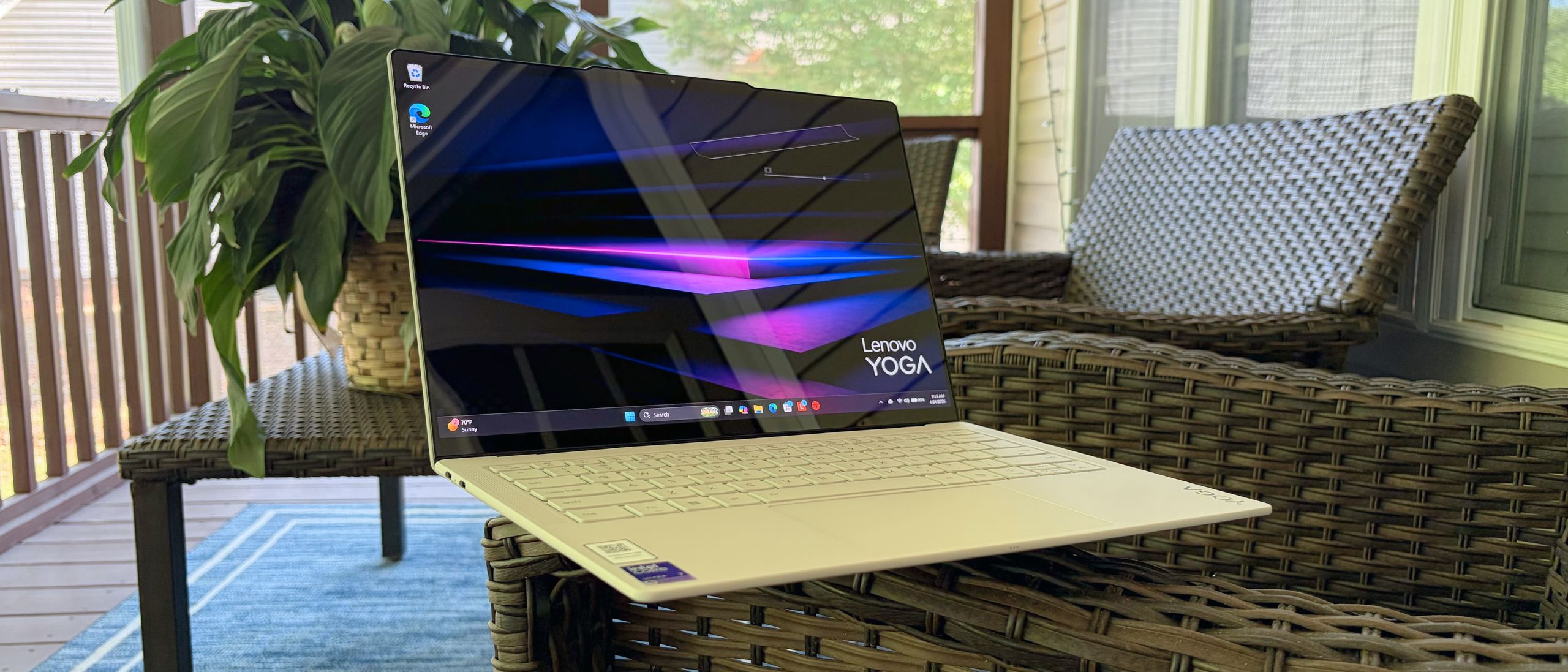
The Lenovo Yoga Slim 7i Aura Edition (2026) is powered by Intel's Core Ultra 7 355 processor. The chip features 8 cores (4 performance, 4 efficiency), a base frequency of 2.3 GHz (performance cores), and a Max Turbo Boost frequency of 4.7 GHz (performance cores). Lenovo pairs the processor with 32GB of dual-channel LPDDR5x-7467 memory and a 1TB M.2 2242 PCIe 4.0 SSD.
In the Geekbench 6 CPU benchmark, the Yoga Slim 7i with its Core Ultra 7 355 processor achieved a single-core score of 2,729 and a multi-core score of 11,555. This result compares quite favorably to Dell XPS 14, which uses the same CPU: it mustered 2,685 on the single-core benchmark and just 7,964 on the multi-core benchmark. Among the Intel-based competition, the Omnibook X Flip 14 (AMD Ryzen AI 7 350) upped the ante with single- and multi-core scores of 2,889 and 13,106, respectively. However, Apple’s 13-inch MacBook Air (M5) ran away from the competition, delivering a blistering 4,168 in single-core and 17,067 in multi-core.
(Image credit: Tom's Hardware) (Image credit: Tom's Hardware) (Image credit: Tom's Hardware) (Image credit: Tom's Hardware) The Windows machines were evenly matched on our 25GB file transfer test, with both the Yoga Slim 7i and the OmniBook X Flip 14 getting pretty close to the 1,700 MBps mark. The XPS 14 crossed that line, achieving 1,730.36 MBps. The MacBook Air was faster still, recording 1,924.84 MBps with its 1TB SSD.
Our Handbrake test transcodes a 4K video to 1080p, and here the Yoga Slim 7i completed the task in 5 minutes and 56 seconds, the slowest in the group. Interestingly, the XPS 14, which uses the same processor, was the fastest of all four systems, finishing in just 4 minutes and 30 seconds.
We ran Cinebench 2026 for 10 loops to stress-test the Yoga Slim 7i. The system started in the 2,465 to 2,485 range, before settling in the upper 2,500’s for the remainder of the runs. The internal fans were audible during the stress test to keep the system cool.
The four P-cores on the Core Ultra 355 ran at an average of 3.87 GHz, while the four E-cores clocked in at 3.49 GHz during the Cinebench 2026 stress test.
The Yoga Slim 7i features integrated Intel Graphics, with 4 Xe cores operating at a maximum dynamic frequency of 2.5 GHz. During the 3DMark Steel Nomad benchmark, the Yoga Slim 7i scored just 513, putting it slightly behind the XPS 14.
The MacBook Air was the overachiever in this group, nearly doubling the Yoga Slim 7i’s score at 1,005.
Lenovo ships the Yoga Slim 7i with a vibrant 14-inch POLED display panel, covered in Gorilla Glass 3 with a glossy finish (like most OLED panels). The display has a WQXGA+ (2880 x 1800) resolution and a maximum refresh rate of 120 Hz.
Since we’re looking at an OLED panel here, it should come as no surprise that the colors were lush, while blacks were as deep as you could imagine for a laptop. OLEDs aren’t often known for going over the top with panel brightness, but the Yoga Slim 7i more than held its own, delivering 476 nits, the highest among the assembled laptops (the MacBook Air was in second at 458.8 nits).
That strong showing filtered over to the color gamut coverage, where the Yoga Slim 7i reached 120.6 percent of DCI-P3 and 170.3 percent of sRGB . But figures were second only to the OmniBook X Flip 14.
I used the Yoga Slim 7i’s display to watch the first trailer for Coyote vs. ACME , which deftly combines computer-generated cartoon graphics with real-world settings and human characters. From the light and dark blues of the Roadrunner’s feathers to the red and orange explosions through (this trailer does, after all, feature the silly antics of Wile E. Coyote), the POLED panel handled the presentation with aplomb.
I found the keyboard on the Yoga Slim 7i comfortable to type on, though the key surface felt a bit smoother and slipperier than what I’m used to. I wouldn’t say that it distracted from my typing experience; it just felt different . The one thing that I would be concerned about, however, is the white finish on the keys. I can only imagine how grimy the keys will look after a few months of constant use once the oils from your fingers permeate through the surface.
My only other comment about the keyboard would be that I’m not a fan of the half-height up/down arrows, which are flanked by full-size left and right arrows. I’d prefer all of the directional keys to be full-size, even if it came at the expense of a narrower right Shift key.
Using my go-to keyhero.com typing benchmark, I hit 89 words per minute with 96 percent accuracy, which is about average for me (I’m no fast-typing dynamo).
The keyboard deck and the touchpad, which I found highly responsive, are also covered in the same off-white color. The touchpad measures 4.72 x 2.95 inches and is buttonless; it uses a haptic mechanism for registering clicks (similar to MacBooks). I found that my fingers glided easily over the surface, and responsiveness was “just right” without requiring additional tweaks in Windows 11 .
The Yoga Slim 7i features a four-speaker sound system comprising two 2-watt woofers and two 2-watt tweeters. The speaker grills flank the keyboard, and are precision-machined into the deck.
Sound quality was surprisingly good and vibrant for such a thin machine. Even more shocking was the amount of bass that the speakers were able to produce without seeming overpowering. I was bopping to the classic, “What a Fool Believes” by the Doobie Brothers, and could feel every bass line and drum hit with clarity. Michael McDonald’s soulful voice shined through, proving this classic is just as impactful nearly 50 years later.
To my delight, as “What a Fool Believes” finished playing, my YouTube Music playlist kicked over to “Fantasy” by Earth, Wind, and Fire, and I was again blown away by this ultraportable system. The rhythm guitars, bass, and staccato horns — it all came together beautifully. You can use the Dolby Settings app to select Dynamic, Game, Movie, and Music profiles to suit your audio tastes.
The bottom panel of the Yoga Slim 7i is affixed with two eight screws and friction clips. With a well-placed finger between the panel and the gap in the display hinge, it popped off.
Unfortunately, the LPDDR5x memory is soldered on, so there’s no way to upgrade it. And while the 2242 M.2 SSD is technically replaceable, it is hidden behind the heatpipe system that also covers the CPU and memory. If you want to replace the SSD, do so with caution.
The Yoga Slim 7i proved to be a winner in our battery life test. The system lasted a healthy 16 hours and 38 minutes during the test, which encompasses web browsing, video streaming, and WebGL tests with the display set at 150 nits of brightness.
Interestingly, the Yoga Slim 7i’s result was over an hour longer than the perennial endurance champ: the MacBook Air.
We measured the surface and internal temperatures of the Yoga Slim 7i while running the Cinebench 2026 stress test. Surface temperatures were measured with a laser thermometer, while the process temperature was measured using internal sensors.
(Image credit: Tom's Hardware) (Image credit: Tom's Hardware) The Core Ultra 7 355 processor measured 83.4 degrees Celsius. The keyboard registered 91 C, and the touchpad came in at 76.9 C. The bottom measured 94.2 C at its hottest point, while the hottest overall temperature (106 C) was at the top of the keyboard deck near the display hinge, where hot air exhausts.
Lenovo includes a 5-megapixel webcam on the Yoga Slim 7i, which is mounted above the display. A tiny hump is integrated into the display lid to accommodate the camera hardware (which includes an IR sensor for Windows Hello facial recognition).
The Yoga Slim 7i includes an E-shutter switch mounted on the right side of the chassis. This can be used to electronically enable or disable the camera.
Our Yoga Slim 7i is an “Aura Edition,” meaning it has several smart features designed to make your life easier. The laptop includes Smart Modes (Working, Gaming, Creating, Entertainment, Meeting, Learning) that can be accessed within the Lenovo Vantage application. Based on the mode you select, the system can automatically configure settings (e.g., attention times, noise cancellation, or VPN access).
The laptop includes Smart Modes (Working, Gaming, Creating, Entertainment, Meeting, Learning) that can be accessed within the Lenovo Vantage application. Based on the mode you select, the system can automatically configure settings (e.g., attention times, noise cancellation, or VPN access).
Aura Smart Care provides real-time access to Lenovo technicians for troubleshooting, while Aura Smart Share lets you easily share media between a PC and a smartphone (including iPhones).
You’ll also find the usual assortment of Lenovo-branded apps, including Vantage, which gives you control over power settings, Smart Modes, and other customization options. Vantage is also where you’ll find controls for presence detection, which I had to disable because it would put the system to sleep if I walked away for more than 30 seconds.
But there's also some bloat: McAfee Security is installed by default, along with Adobe subscription apps, and a 90-day trial to the Dropbox 100GB plan.
The Yoga Slim 7i comes with a one-year warranty.
Key considerations
- Investor positioning can change fast
- Volatility remains possible near catalysts
- Macro rates and liquidity can dominate flows
Reference reading
- https://www.tomshardware.com/laptops/ultrabooks-ultraportables/SPONSORED_LINK_URL
- https://www.tomshardware.com/laptops/ultrabooks-ultraportables/lenovo-yoga-slim-7i-aura-edition-2026-review#main
- https://www.tomshardware.com
- NVIDIA and ServiceNow Partner on New Autonomous AI Agents for Enterprises
- New Adobe Premiere Color Grading Mode Accelerated on NVIDIA GPUs
- Intel's P-core Core 9 273PQE 'Bartlett Lake' CPU beats 14900K by up to 9% in gaming tests — embedded-only chip is unofficially Intel's fastest gaming CPU (at 72
- Lenovo Yoga Slim 7i Aura Edition (2026) Review: Vibrant display, lightweight design, and an endurance champ
- No Need for Space Gear — Capcom’s ‘PRAGMATA’ Joins GeForce NOW on Launch Day
Informational only. No financial advice. Do your own research.