
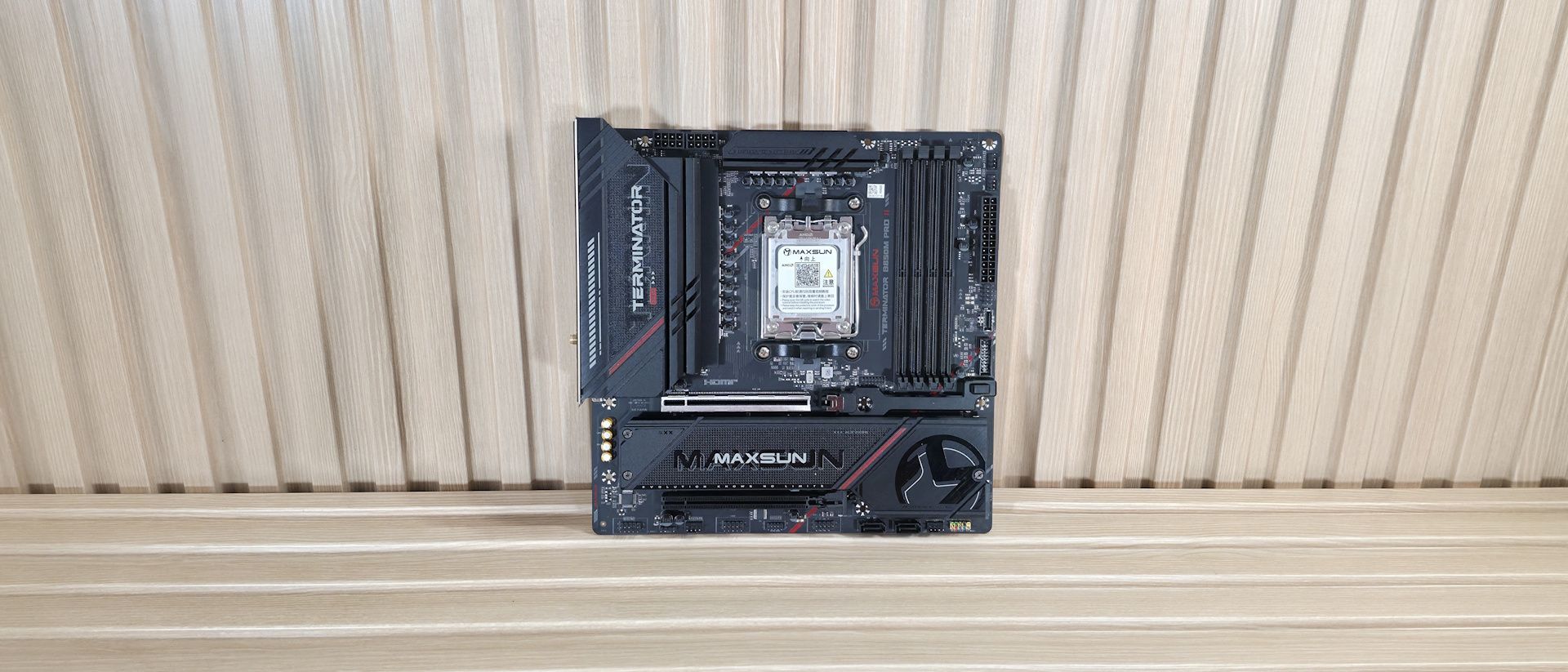
Continuing along the edge, we run into the 24-pin ATX connector for the board power, and the front-panel USB ports. The first is a USB 2.0 (480 Mbps) header, a USB 3.2 Gen 2 (10 Gbps) Type-C connector, and a 19-pin USB 3.2 Gen 1 (5 Gbps) header. What’s worth noting here is the lack of a 20 Gbps header. And the rear IO’s fastest port is also 10 Gbps. While 20 Gbps ports aren’t common on B850 boards, it would be nice to see at least one.
Power delivery on the B850M Pro II is on the light side, sporting a total of 15 phases, with 12 dedicated to Vcore. Power heads from the 8-pin EPS connector(s) and onto the Realtek RT3678BE PWM controller. From there, it moves to the paltry Vishay Sic654 50A DrMOS MOSFETs. The 600 Amps available is relatively low, but Maxsun lists support for up to 300W TDP, which means, in theory, you can toss in a Ryzen 9 9950X or the Ryzen 9 9950X3D2 , and still be OK. If that’s your plan for this board, make sure you have adequate case cooling, especially if you’re pushing the CPU hard for extended periods, as these VRMs will get toasty with a high-wattage processor. If you’d like to know more about VRMs and what you actually need from a motherboard, check out the Motherboard VRM thermal testing article we recently published.
On the bottom half of the board, starting on the left, is the exposed audio section, consisting of the Realtek ALC897 codec and four dedicated audio capacitors above it. The ALC897 is the most basic audio codec on consumer-class motherboards. In fairness, it is commonly used, especially in the Micro ATX form factor. That said, its direct competitors (by price point) use the improved ALC1220 or the latest-gen ALC4080 codecs. And while you’ll be hard-pressed to notice a difference without plugging in some of the best PC speakers , it’s still a difference among the comparables. In the middle are two full-length PCIe slots, and under the plate-style heatsink are all three M.2 sockets. Starting with the two PCIe slots, the top slot with the reinforcement is your PCIe 5.0 x16 slot and is primary for graphics. It also uses a quick-release GPU latch for easy removal. Press the button to unlock and remove. Easy. The bottom slot connects via the chipset, supports PCIe 4.0 x4, and is good for expansion cards. You could use it to add faster USB Type-C ports, if needed.
In between the PCIe slots are the three M.2 sockets. The B850M Pro II gives you two PCIe 5.0 x4 (128 Gbps) M.2 sockets (up to 80mm) that source their bandwidth through the CPU, and a single PCIe 4.0 x4 (64 Gbps) socket that also supports up to 80mm devices. Note that when using both PCIe 5.0 M.2 sockets, the primary graphics slot drops to PCIe 5.0 x8. Having all three M.2 sockets under the graphics card with a plate heatsink isn’t ideal, especially if you have one of those PCIe 5.0 drives. We've also included a few images of the active ICs for the board. This Maxsun uses a mix of Realtek (PWM controller, audio) and Vishay (MOSFETs) branded ICs.
(Image credit: Future) (Image credit: Future) (Image credit: Future) (Image credit: Future) Image 1 of 4 View Original
At the bottom are several headers, including front-panel audio and USB ports. A complete list of connectivity is listed below (from L to R):
The rear IO on the B850M Pro II generally has what most users need, just perhaps not the fastest or the largest number of ports. Starting on the left, we see the DisplayPort and HDMI (v1.4) video outputs. Next to that are the first two (of four, in blue) USB 3.2 Gen 2 10 Gbps ports, your 10 Gbps Type-C port, and a convenient clear CMOS button. The tall stack of black USB ports is USB 2.0. Above the second set of Gen 2 ports is the Realtek 2.5 GbE port. Next to that is the Mediatek Wi-Fi 7, but note it only uses the 160 Hz frequency and can be slower than the fastest Wi-Fi 7 devices. Last but not least, on the right is a full 5-plug plus SPDIF audio stack.
There’s nothing out of the ordinary here, but I would like to see at least one 20 Gbps port, even on a B850-class Micro ATX motherboard.
MORE: Best Motherboards MORE: How To Choose A Motherboard MORE: Best Motherboard Deals MORE: Best Motherboard Combo Deals MORE: All Motherboard Content
Current page: Maxsun Terminator B850M Pro II Features and Specifications
Key considerations
- Investor positioning can change fast
- Volatility remains possible near catalysts
- Macro rates and liquidity can dominate flows
Reference reading
- https://www.tomshardware.com/pc-components/motherboards/SPONSORED_LINK_URL
- https://www.tomshardware.com/pc-components/motherboards/maxsun-terminator-b850m-pro-ii-motherboard-review#main
- https://www.tomshardware.com/membership
- Why Scaling AI Compute Performance Requires a New Power Architecture
- AMD highlights Ryzen 5 5500 briefly topping Amazon CPU best sellers, beating 9800X3D — $80 DDR4 CPU remains a top seller during memory crunch
- Best in Class: Stream PC Games and Study on the Same Laptop With GeForce NOW
- Razer Naga V3 Pro Review: My new 23-button mouse
- Nova Lake CPUs with cut-down E-core clusters may still retain full cache pool, says new leak — 8P+12E config predictions revised from 33MB to 36MB, 4P+4E config
Informational only. No financial advice. Do your own research.