
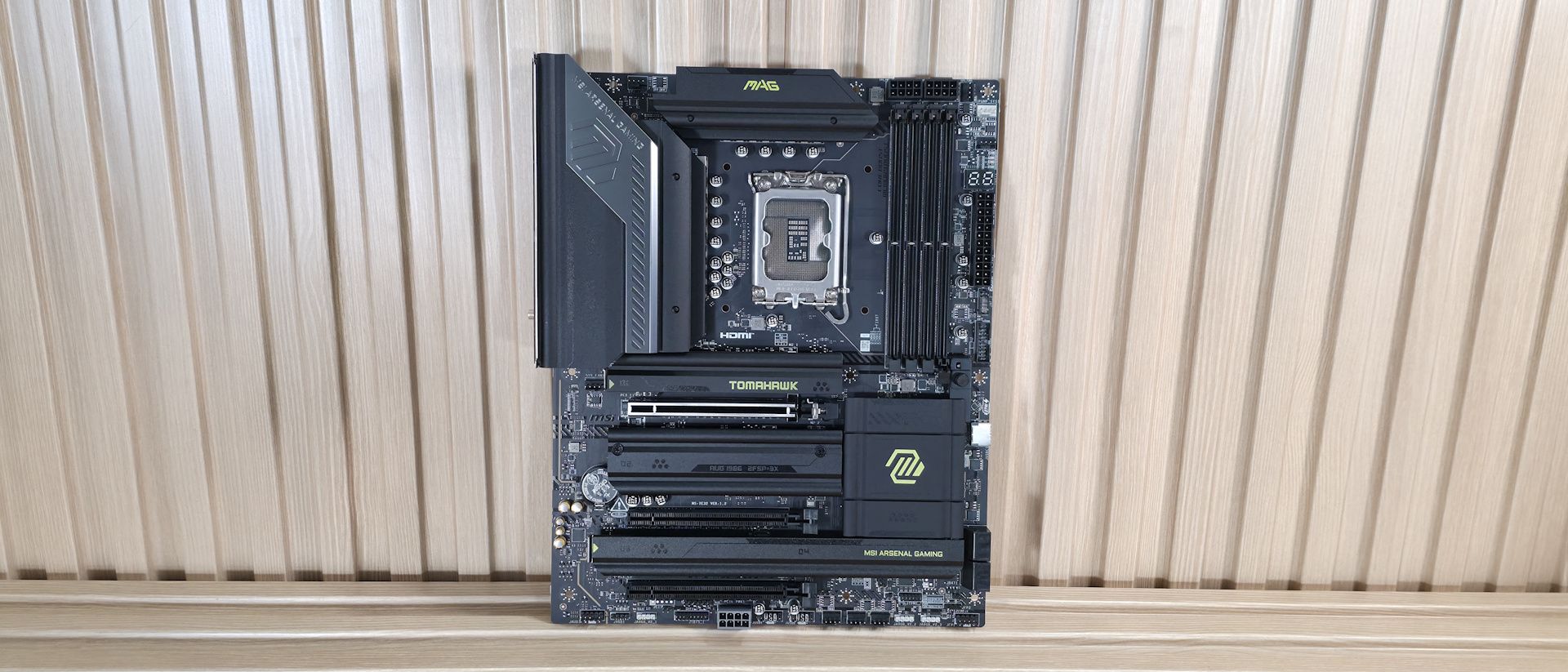
Power delivery on the Tomahawk II is capable and appropriate for this class of motherboard. It has 19 phases, 16 of which are dedicated to Vcore. Power is supplied to the Monolithic Power Systems (MPS) MPS2477 controller. From there, it heads to 16 MPS 90A SPS MOSFETs. The 1,440A available can handle the Core Ultra 7 270K Plus , the Core Ultra 5 250K Plus , and even the Core Ultra 9 285K, even with overclocking. Just be sure to keep air flowing in your chassis, as the components here will get warm with sustained heavy use.
On the bottom half of the board, we’ll start on the left with the audio section. There, we see a couple of dedicated audio capacitors and the last-gen flagship codec, the Realtek ALC1220P. While this isn’t the latest/best audio codec available, it’s a good one and makes sense for most budget-class motherboards. You should still be happy with it, as it’s difficult to tell them apart without seeing the actual specifications anyway.
In the middle of the board are three full-length PCIe slots and four M.2 sockets. Starting with PCIe, the topmost slot has reinforcement, which MSI calls Steel Armor II. It is your sole PCIe 5.0 x16 slot and connects through the CPU. The bottom two slots connect via the chipset and support PCIe 4.0 x4. The top slot does not bifurcate, if you’re wondering.
Among and around the PCIe slots are four M.2 sockets. The top socket, M.2_1 (above the top PCIe slot and under the heatsink that, again, I wish were larger), is your CPU-connected PCIe 5.0 x4 (128 Gbps) socket. The other three M.2s all connect through the chipset and run at PCIe 4.0 x4 (64 Gbps), with M.2_4, the bottom-right socket, also supporting SATA-based M.2 devices. All sockets support up to 80mm modules and can run RAID 0/1/5 modes for redundancy and/or increased speed (RAID is not a backup). Between the PCIe slots, M.2, USB, and SATA ports, there is no lane sharing. You can fill all the slots and sockets and still receive the full bandwidth from each. Finally, moving past the chipset heatsink to the right edge, are two of the four SATA ports (supporting RAID 0/1/5/10). The other two are mounted vertically along the bottom edge. We've also captured several images of the IC's used to make this motherboard work consisting of a mix of Genesys Logic for a USB hub, Killer/Intel Ethernet, Realtek audio, and Monolithic Power Systems MOSFETs.
(Image credit: Future) (Image credit: Future) (Image credit: Future) (Image credit: Future) (Image credit: Future) (Image credit: Future) At the bottom of the board is a slew of headers. It offers your typical set of connectivity in this area, with nothing missing or worth a specific mention. Below we’ve listed all the connections across the bottom of the board.
Flipping the board around to the rear IO, the Tomahawk II provides basic connectivity for the platform. You get everything, but compared to the original Tomahawk, you get one less Thunderbolt (40 Gbps) Type-C port. On the left, there's the HDMI (v2.1) output and the TB4/DisplayPort Type-C port, both of which work with integrated video. Next to that is a 10 Gbps Type-C port, while above that are the seven Type-A ports (3x 10 Gbps, 4x 5 Gbps). Below the USB ports are two buttons (BIOS Flashback and Clear CMOS). Next is the Killer 5GbE, the EZ antenna quick-connect for the slower (2.9 Gbps) Wi-Fi 7 connections, and the 3-plug (2x 3.5mm and SPDIF) audio stack. The next stack holds the 40 Gbps Thunderbolt Type-C port and the only USB 3.2 Gen 2 (10 Gbps) port. Next to that are four USB 2.0 ports, and the Realtek-based 2.5 GbE port stacked on top. Rounding out the USB ports back here are two USB 3.2 Gen 1 (5 Gbps) ports. There’s nothing particularly notable here, just a difference in TB4/40 Gbps port count (now one).
MORE: Best Motherboards MORE: How To Choose A Motherboard MORE: Best Motherboard Deals MORE: Best Motherboard Combo Deals MORE: All Motherboard Content
Current page: MSI MAG Z890 Tomahawk Wifi II Features and Specifications
Key considerations
- Investor positioning can change fast
- Volatility remains possible near catalysts
- Macro rates and liquidity can dominate flows
Reference reading
- https://www.tomshardware.com/pc-components/motherboards/SPONSORED_LINK_URL
- https://www.tomshardware.com/pc-components/motherboards/msi-mag-z890-tomahawk-wifi-ii-motherboard-review#main
- https://futureplc.com/privacy-policy/
- Nvidia's Huang vows to deliver 'giant amounts' of Vera Rubin — company says that 'our roadmap is intact'
- AGI AI828 SSD Review: A near-last resort for those on a budget
- Grab AMD’s Ryzen 7 5800X3D 10th Anniversary CPU with motherboard and 16GB RAM for just $529 — save over $100 on this epic AMD gaming bundle
- Intel becomes the first company to ship high-volume logic chips made with ASML's High NA EUV — select Panther Lake layers on 18A are now dual-qualified for 0.55
- CXMT's DDR5 RAM isn't as performant or as consistent as SK hynix dies, early testing shows — reveals resistance to voltage scaling and inferior manual overclock
Informational only. No financial advice. Do your own research.